We rank vendors based on rigorous testing and research, but also take into account your feedback and our commercial agreements with providers. This page contains affiliate links. Advertising Disclosure
At this point in time, Jimdo’s alright. If you’re just starting out, you’ll appreciate its fairly reasonable prices and a simple, user-friendly editor. That said, it’s still missing a few important features (like blogging), and it may not be the best choice if you have more complex site building needs.
Jimdo is a cheap, beginner-friendly option for small businesses just starting out. It’s simple, it’s fast, and the tutorial wizard that pops up when you first create a website can do a lot of the work for you. Not all of it, but a lot.
So, what’s not to love?
Jimdo’s biggest problem is that it’s competing against a number of strong alternatives: Wix with its design flexibility, Squarespace with its sleek experience, Hostinger’s Website Builder with its myriad AI tools. How does Jimdo hold up against these industry giants?
Well, it mostly doesn’t. After creating my own Jimdo website and testing every tool I could get my hands on, I can tell you that in certain areas, Jimdo struggles to keep up with the competition.
But don’t write it off just yet; on the other hand, it has a solid free plan, and built-in GDPR and VAT tools. These are particularly useful if your business is in Europe and you want to ensure your site visitors’ private data is protected. If you don’t need any of the features it doesn’t have, it might just be right for your business. Read on to find out.
4.5
Templates
Jimdo Sites Look Good, but They’re Not Too Customizable
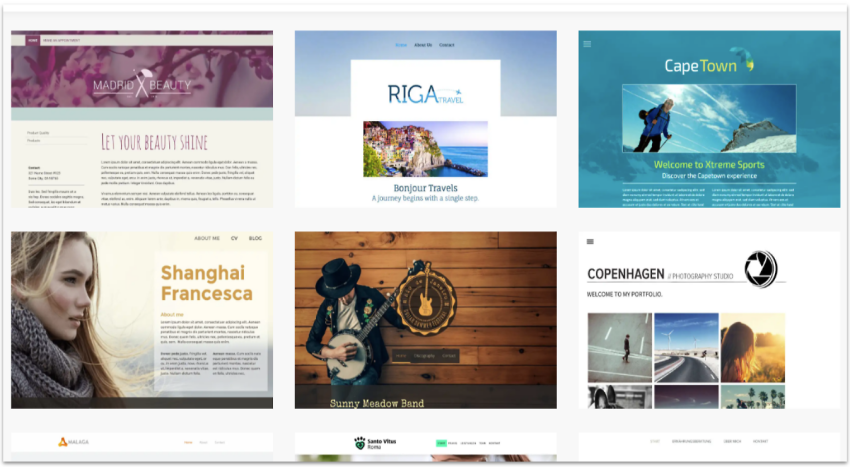
Jimdo offers 20+ ready-made, mobile-responsive designs. Some of the templates stick to the classic minimalism that’s usually associated with site builders, but others pop off the page with a heavier use of bright colors and vibrant imagery.
Jimdo’s templates are vibrant and varied
I did find, however, that you can’t really just pick and choose a template. The site startup wizard (which I will talk about more below) will choose a couple for you to start from, and then you can change the basic style later.
Design and Customization
Jimdo very much belongs to the “we do it so you don’t have to” school of thought, and this is a double-edged sword.
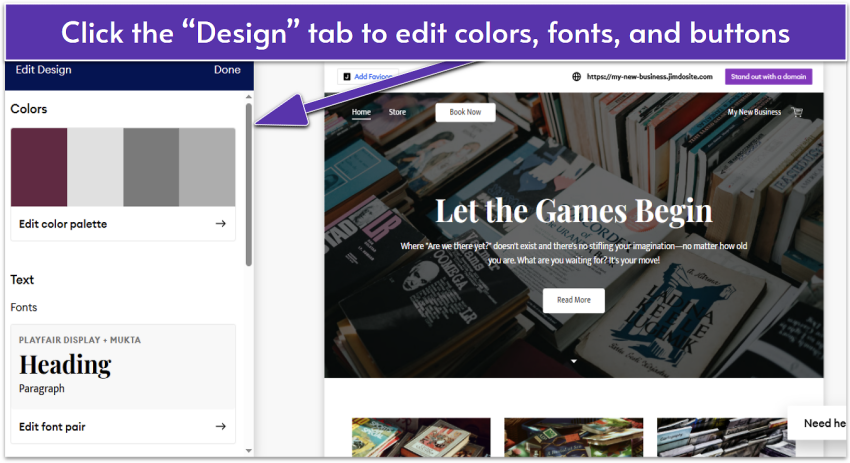
Jimdo’s editor is sleek and simple, but not very flexible
On the one hand, Jimdo makes it easier to build a website. But at the same time, the page editor is not particularly flexible in terms of layout or customization. You can change your site’s color scheme, and pick from a few different color combinations, but that’s about it.
All sections of content must be chosen from pre-created, mini-layouts, and the content is confined to the pre-set mini-layouts you choose. Thankfully, there are several on offer.
Don’t get me wrong: the site editor is fine. That comparative lack of control works for people who just want to build a site and go. You can still put in your text and images, upload a video, and even throw in a slideshow. The theme customization gives you just enough to generally meet your branding guidelines…
But I wouldn’t try to meet any super-specific branding guidelines.
4.0
Features
Jimdo Does Some Things Right, and Doesn’t Do Others At All
I once remarked that Jimdo sounds like someone’s nickname, and honestly, I still wonder where that name came from. Well, odd name aside, Jimdo makes me think of the kind of guy who’s friendly, and has his life together, but has apparently never heard of blogging.
No, that’s not a silly analogy. Jimdo is — in its current iteration — flat-out missing a blog feature. Where most site builders treat blogging as something of an afterthought, Jimdo doesn’t think about it at all.
On the other hand, Jimdo does come with some nice extras here and there. For example, while buying domains through Jimdo is nothing special, it’s not often that a site builder will handle your emails for you. Jimdo can do that.
In addition, the things that Jimdo actually does, it mostly does well. Here are a few examples:
There Are E-commerce Features Galore
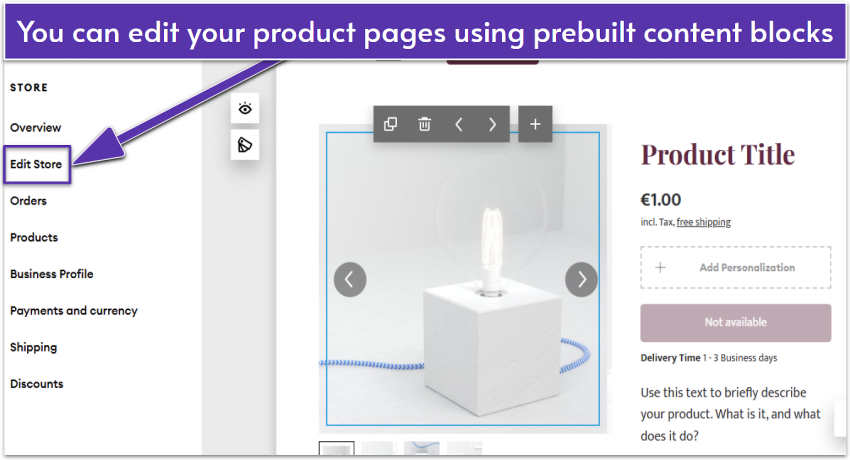
You have to pay extra for the store plans, but they give you just that: a big old store to sell things on. There are a ton of features to this, but this is my favorite bit: you can edit product pages like just about any other page, with much of the same functionality.
With the Personalization option, you can let customers leave notes or requests
Feature-wise, you can do the standard stuff like add product variants, adjust shipping settings (e.g. offer free shipping on large orders), and offer discounts. You can also sell on Facebook and Instagram to reach more customers.
Once you’ve got some products up, you can accept payments from PayPal, Stripe, and (through those services) all major credit cards. Jimdo doesn’t charge transaction fees, which makes it particularly suitable for online stores on a budget. You only have to pay PayPal’s (or Stripe’s) cut.
There’s A Strong Focus On SEO
Jimdo wants your website to grow in popularity. You know, so you’ll stay on Jimdo. To that end, the company has implemented a bunch of SEO and stat-tracking features, so you can decide how best to expand your online operations.
For instance, you can modify page titles, meta descriptions, and URLs. The built-in analytics let you track visitor engagement. Also, Jimdo allows you to connect your website to Google Search Console, so you can monitor indexing and search performance via the built-in menu.
I should mention, however, that you’ll have to upgrade to a paid plan to get access to most SEO features. If you’re serious about growing your business though, I’d say it’s worthwhile.
Business Tools
There isn’t a huge marketplace full of addons, but there are a couple of extra useful tools. For example, the Business Listings (which costs a bit extra on most plans) will automatically submit your site to listings sites all over the web, to help you drum up more business elsewhere.
The Legal Text Generator can partially assist you in safeguarding your interests by creating a fundamental Terms of Service document and Privacy Policy. However, it’s important to note that no algorithm can replace the expertise of a local lawyer who is familiar with your jurisdiction’s laws. It’s advisable to consider upgrading to professional legal counsel sooner for optimal protection.
Add More Functionality With Smart Apps
Another easy way to add extra functionality to your site is through Smart Apps – widgets you can integrate directly from the editor.
For example, you can embed a scheduling system from Calendly so visitors can book directly on your site. Or, you can embed video streams from platforms like YouTube and Twitch, or audio playlists and podcasts from services like SoundCloud and Anchor.
With Google Docs and Google Sheets widgets, you get easy access to your content, so you can keep all information in one place. You can also gather all your socials and display your Twitter, Pinterest, or Dribbble profiles directly on your site.
Right now, the collection of apps isn’t big, but according to Jimdo, there will be additions in the future, so fingers crossed.
4.6
Ease of use
My Experience With Jimdo
The basic site editor is easy stuff, once you learn how to access all of the relevant menus and settings. It doesn’t have the most traditional interface, but it works. It’s that initial learning curve that might trip up new users, especially those who’ve never used a site builder before.
And when you don’t know what to do, there is a pretty good knowledge base designed to teach you all about Jimdo.
Getting Started With Jimdo
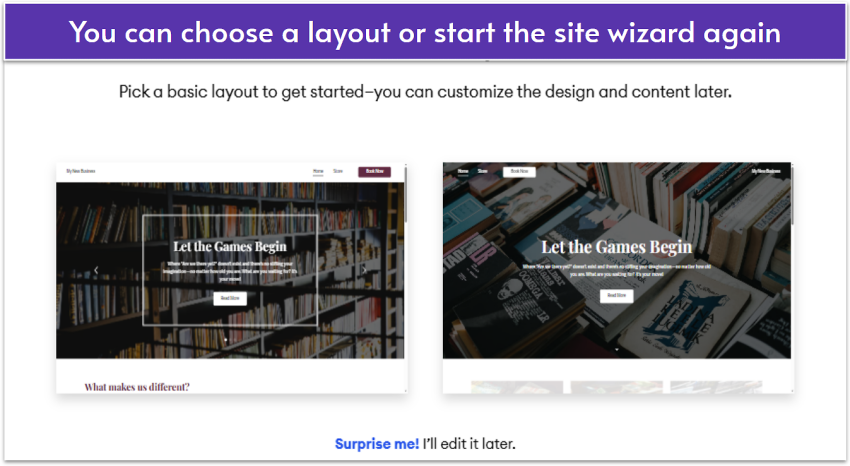
Like I said before, Jimdo doesn’t really let you choose templates. Instead, as soon as you sign up, the site creation wizard takes over. It will guide you through all the necessary steps to define your website’s goals and purpose. Only after that, will it present you with options for colors, fonts, and templates.
The wizard does a fair bit of work for you – it goes beyond picking a business category and a template. It will actually change the sample text in the website, depending on whether you’re making a website for a business or an individual.
Jimdo’s site wizard makes things easy, but your choices are limited
My only issue is that this creation wizard only offers around two template choices at a time. And if you want to see more, you have to go through the wizard again. It’s an oddly unintuitive choice for what is otherwise a very intuitive tool.
Customizing My Jimdo Website
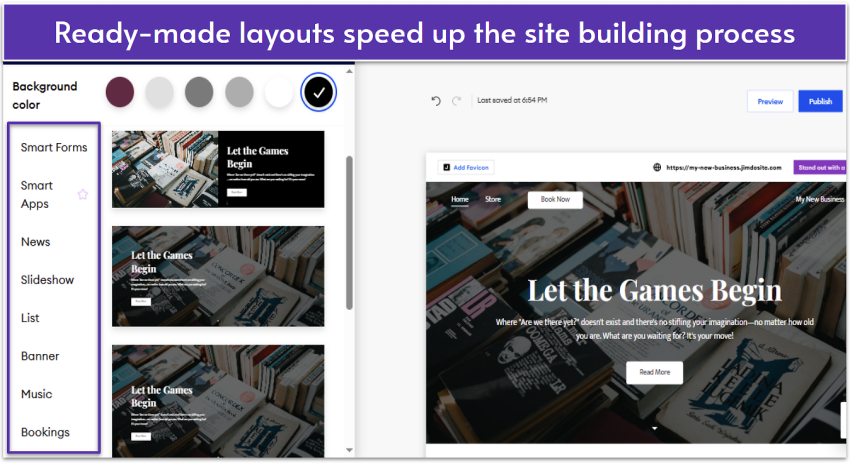
With Jimdo, all sections of content must be chosen from pre-created mini-layouts, and the content is confined to the pre-set mini-layouts you choose. Thankfully, there are several on offer. In addition to Smart Apps, you can add elements like images, slideshows, lists, banners, forms, and menus.
Aside from choosing blocks, you can change background colors
If you want to add other pages to your site, such as for services, portfolios, news, or events, you can do so with a click. I like how the pages are grouped according to purpose, so you can quickly find contractual pages like Terms and Conditions and store pages like a shopping cart.
Jimdo is by no means hard to use, but I still would have liked to see popups or some sort of guidance when you first open the editor. Some settings (such as for products) can be tricky to find, especially if you’re a newbie. It might take some time to learn where things are, but once you do, customizing your site should be fairly easy.
Additional Ease of Use Features
Easy Social Media Integration
There are a number of tools designed to make it easier for you to share parts of your site directly on social media, sell your products on Facebook and Instagram (as mentioned above), and generally reach an audience beyond your immediate website.
Good stuff all around.
Professional Design Analysis
Yep, you can hire a designer directly from Jimdo to look through your site, and show you how to make it better. Now that’s a feature I haven’t seen before. It’s always good to have an extra set of eyes on any project, and experts in the tools you’re using don’t hurt either.
Smart Forms
Jimdo’s built-in form builder makes it easy to collect information from your customers. You can create custom GDPR-compliant forms for inquiries, quote requests, or for gathering feedback.
Though the customization options aren’t as extensive as the ones SITE123’s form builder offers, you can still edit questions and mark fields as required. You can also set up a confirmation/thank you email that your visitor receives after submitting the form.
You can access the forms on all plans, but some features, such as file uploads are only available on paid plans.
3.5
Support
The Support (at Least for Free SItes) Is Helpful, but Slow
Where Jimdo’s site editor is like a good fast-food restaurant – decent and quick – the support team seems to have opted for the gourmet experience. You get good answers to your question, but they take a long while to show up. Specifically, the response I got took until the next day.
That’s how it is on the free plan anyway. Paying for the Grow plan or higher will get you guaranteed support within 4 hours. But I’ll be honest: that should be the offer for every paying customer, so this policy is going to cost Jimdo a few points.
And even then, 4 hours is not great in an emergency, and many of Jimdo’s competitors do better. Like, a lot better. I’m talking minutes.
Also, the only way to get support that I have found is to click that little question mark at the bottom right of the site editor itself. That opens up a form which lets you leave a ticket/email for the support team.
Technically, support is available 24/7… though that doesn’t mean much on anything lower than the Grow plan.
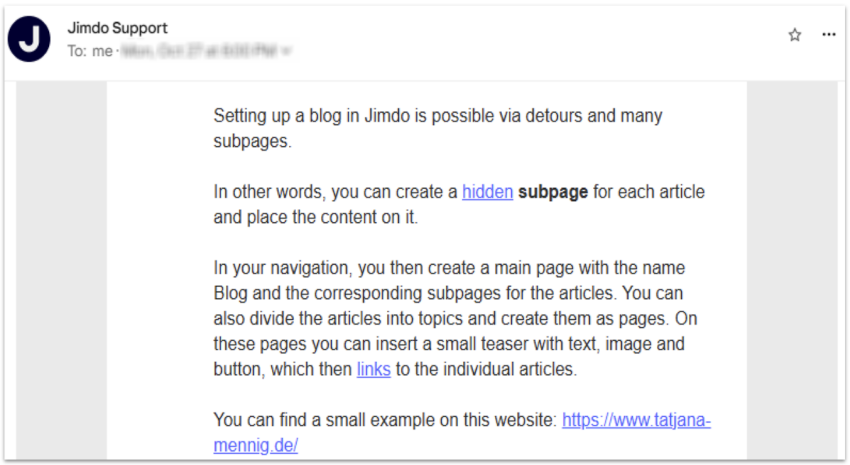
The response was detailed and helpful
I inquired if I could add a blog to my site. Though there’s no built-in blogging functionality, the customer support agent outlined some possible workarounds. It’s not quite what I want, but I appreciate that sort of thing.
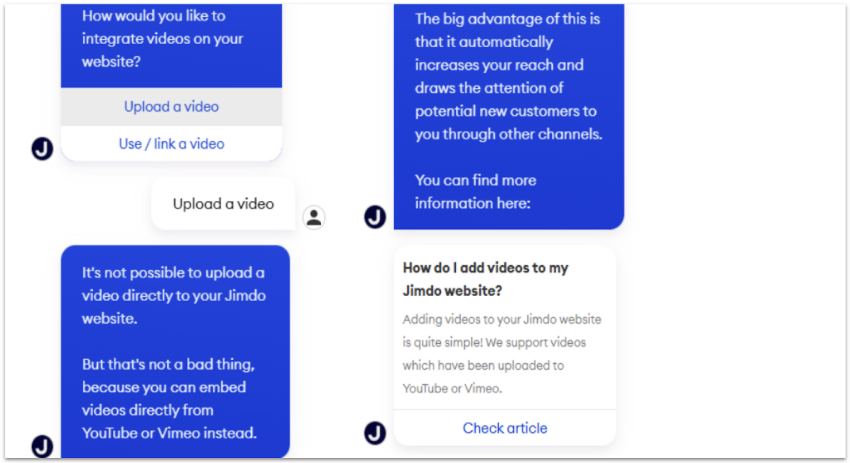
Jimdo’s chat bot helps with simple requests
For simpler inquiries (and faster responses), you can consult Jimdo’s chat bot. It will pull out relevant articles from the knowledge based on your questions, saving you some time.
If you like to really do things for yourself, you can search the aforementioned knowledge base for solutions to problems, or check out Jimdo’s blog. Yeah, they have a blog, despite not having one in the site builder. GO figure.
3.8
Pricing
Jimdo’s Prices Are… Okay
Honestly, they’d be pretty good, if not for some arbitrary page count limits put on your site.
There’s a pretty solid free plan. You get 5 pages, and 5GB of storage, which you can use indefinitely. However, your site is limited to a Jimdo subdomain, and there’s a Jimdo ad on every page.
If you want to get started building your own first website, and want an experience that doesn’t feel overly limited in terms of features, Jimdo’s free plan might just do that for you. If nothing else, it’s a decent place to put your business’ contact information until you’re ready to invest in a bigger site.
You can even demo the e-commerce features on the free plan, though you have to upgrade your plan to actually accept payments.
The cheapest paid plan starts at $11.00 per month, which isn’t bad at all. It gives you access to all the basic site builder features. However, you’re limited to an incredibly arbitrary 10 pages. That’s just… silly. I’m sorry, but it is.
More expensive plans will get you access to more SEO features, the e-commerce features, social media integrations, and more. But even then, there are page limits. You’ll have to upgrade to the most expensive plan to be able to add unlimited pages to your site – something most other top website builders offer for free.
Jimdo is missing a few features for now (like blogging), but the framework for something greater is certainly there. However, I can’t tell you to open your wallet for the mere promise of greatness.
There’s no denying that Jimdo is a simple and affordable option for small businesses that are just starting out. Still, I’d like to see itJimdo make some real strides towards being feature-complete before too long.
FAQ
How do I create a Jimdo website?
Just sign up for the plan you want and go. The site creator will ask you a couple of questions about what kind of website you want to make (a hobby site, a business site, a portfolio, online store, etc.), let you choose a starter template, and then launch you into the site editor itself.All in all, it’s a simple enough process.
How much does Jimdo cost?
The basic site builder, without an online store, starts at $11.00 per month. It’s a decent price for a decent product, and it gives you a fair number of features. More expensive plans will get you extra SEO and marketing features, and then access to all of the online store-related things you could want.
Is Jimdo better than Wix?
As a full product, Jimdo is certainly nothing to sneeze at. Its site editor is easy to use, and its set of features will get the job done in most small-to-medium business use cases. That said, you get much more with Wix, in terms of templates, apps, and creative freedom.
Is Jimdo secure?
Yes, Jimdo is generally secure. All sites use HTTPS encryption, and the platform manages updates and security patches automatically. It also includes GDPR-friendly tools such as a Legal Text Generator (for Privacy Policies, Imprints, and Terms), GDPR-compliant contact forms, and a cookie consent banner to help protect user data.
Is Jimdo a free website builder?
Well, Jimdo has one of the better free plans I’ve seen. You get 5GB of storage, can build up to 5 pages, and access to most of the features.If you are looking to build your very first small website and want to familiarize yourself with site builders, Jimdo could be an excellent starting point.Or, if you’d like to see how Jimdo’s free plan stacks up against the competition, see our list of the top free website builders in 2026.
Ana specializes in writing about web building platforms, project management software, and other digital tools. She has been a freelance writer for 7 years, and has published countless product reviews and comparisons in that time. Ana has a passion for language and all things tech, and she combines the two to provide accessible and insightful resources for anyone interested in building websites or managing projects.
As a freelance writer, editor and grammar nerd, Emily loves a comma almost as much as she loves an en dash. Having earned her degree in English Language and Linguistics, Emily started her career in print journalism before quickly realising the only way forward is digital. Since starting at Website Planet in 2019, she’s developed an extensive understanding of everything digital from website builders and email marketing to logo design services and freelance websites. When she’s not debating the use of commas, Emily can be found renovating her house, while (desperately) trying to make her cats Insta-famous.
onclick="trackClickout('event', 'clickout', 'Visit User Reviews', 'jimdo', this, true, ReturnPopup );"
View 1 reply
View %d replies
Don’t waste your time and money – Jimdo is a scam!
I signed up for a paid year subscription. According to their website, you are guaranteed to a refund within 14 days of subscription. Guess what, their web app does not have a cancellation menu. It's pretty much a waste of time and effort. Don't use them. You are better off using reputable web hosting provider and paying extra to save you aggravation and inconvenience.
Jimdo is a scam. They use Pair Finance to come after you and ask you to pay for subscriptions you’ve never used. I canceled mine in 2021 after the new subscription almost doubled. I decided to don’t renew it and now they ask me for cancellation proofs otherwise a 214€ fine. The page was deleted nearly 2 years ago, of course, I can’t prove I canceled it when the page doesn’t even exist anymore. I tried to talk to them and ask how I got into this situation and why there are so many people in the same situation as I am. None of my questions was answered, they keep insisting I have to address these questions to Pair Finance. Guess what? Pair Finance didn’t clarify anything, only sent me an invoice and urged me to pay. Stay away from Jimdo, you might end up paying money for a service you’ve never used like many others !!!
Can’t cancel the subscription and it costs more than 200€
Jimdo is definitely not the ideal option. Created an account in 2020(a paid subscription) and one year later the subscription doubled so I canceled it. I registered 2 emails with Jimdo, the main one which was the email I created specifically for my website and a second one- my personal one. After cancellation I stopped using the main one. I canceled the subscription in June 2021 and in December 2022(1,5 years later) I received a letter from Pair Finance asking me to pay for my last year subscription which I canceled it more than 200€. Note that I didn’t use the website all this time, is not even there, was blocked after I canceled my subscription. Went on Jimdo website to check if I made a mistake and really haven’t canceled it, but there’s no cancellation button, no way of contacting any support and no help regarding this problem. I went to my old email to check if I got any emails from them. I got my first payment reminder on 8 June 2021 and a second one on 28 June 2021. No additional email on my personal email(the second one listed ). I still don’t know how to “cancel my subscription “ so I guess I’ll have to pay for this year as well. Don’t recall signing up for a life-time subscription. Be careful with Jimdo!
I really like Jimdo, but I didn't know, that once you cancel a website it is free for all. I used my website, which had my full name. com to display my artwork. Now I find that this website has pornographic content with my full name plus my email address. I still have Jimdo free websites to display my art, but I am so very upset that my name has been blackened. I would give 5 stars, but after what happened to me I can not do that.
Simply put, Jimdo is disappointing. The website-builder feels outdated and is quite difficult to use. As a small business owner, being able to put together a simple website should be one of the easier parts of running my business. Jimdo is clearly not for individuals or businesses who are not able to design their own websites using HTML or CSS. For the sake of the person who took the time to read this review, STAY AWAY FROM JIMDO!
There's always room for improvement but Jimdo simply works. It's the most robust website builder I've found and I've explored about thirty alternatives including some of the big names. You can actually build a very sophisticated site with the cheaper of the pro packages they offer, upgrade anytime if you require even more bells and whistles and the learning curve isn't too steep. They have servers on three continents and sites load extremely fast. Their online store options, included in each package, are powerful and include linkable product view sliders and numerous appearance/layout options. Jimdo templates are extremely flexible and a joy to work with. You can build anything from a few pages and a blog at pro level, to a massive site streaming thousands of videos with their business offering, as bandwidth and storage are both unlimited. SEO tools are included and of course you can add as many external widgets as you like with full the built-in html editor. They even have a mobile app. If you like to edit on the move and all their templates are responsive and resize beautifully on all devices - except toasters :) What's not to like!
We have loved the ease of use and beauty of customer service from Jimdo for years. But with their recent unwillingness to work with google for us, we view them with suspicion. Google has website providers who routinely work with website hosters for getting the clients good email addresses. Jimdo instead of working with google attacked us, and that is unacceptable. We are hugely disappointed in Jimdo and will be working on moving our website to another host provider asap. The ease of use of an email is critical to a business; Jimdo seems to have something to hide from google given all the work they went into trying to attack us for doing so. Wow, we are hugely sad at jimdo. If they think google is a competitor, they are not. If they want to battle google, they may as well battle the universe. We as a business who uses google's tools can't have a provider who battles google. Can anyone truthfully?
BTW, google gave us two phone numbers for jimdo to call them so google could help them with the process and coding. Instead jimdo turned on us as a client, ignored us/pretended to escalate during a chat but hung up on us, and had a senior manager email us his disapproval when we became mad. All we wanted was help to get a good google email. Instead our web host provider jimdo ignored us, hung up on us, attacked us. Not the best choice if you are a start up. We'll ask google who to go to now, someone who at least can work with them.
Family sharingMulti User SharingExpert SupportBackupSmart syncPersonal SolutionBusiness SolutionTeams optionsOffline foldersFile history and recoveryRead more reviews
 Website Planet