We rank vendors based on rigorous testing and research, but also take into account your feedback and our commercial agreements with providers. This page contains affiliate links. Advertising Disclosure
Shopify is simply fantastic for any retail-oriented business and loaded with features. The cheapest plan is more than enough to get your online business started.
That said, some other e-commerce platforms make it easier to customize your site, at the same price points. It’ll come down to individual features, and which of those you think are better for your business.
For years, Shopify has been almost synonymous with building an online store. If you want to sell something, pretty much everyone would say: “Well, check out Shopify.” But I wondered if Shopify was still the best builder for selling online.
To help figure that out, I created my own Shopify account, built a proper store, and tested every feature I could. Despite the heavy competition, I found that Shopify is still that good and affordable, considering the wealth of features you get.
Because Shopify is mainly focused on sales, there aren’t a whole lot of design features when you’re building your site. However, Shopify makes up for this by offering basically any sales feature you can dream of. From shipping logistics to tax calculation to detailed sales insights, Shopify has a solution for you. So the real question is not whether it’s good, but whether it’s right for your business.
Read on to learn more about Shopify’s features, how much it costs, whether it’s worth the price, and if it will work for you.
4.3
Templates
Shopify Templates Let You Build Gorgeous-Looking Stores Fast
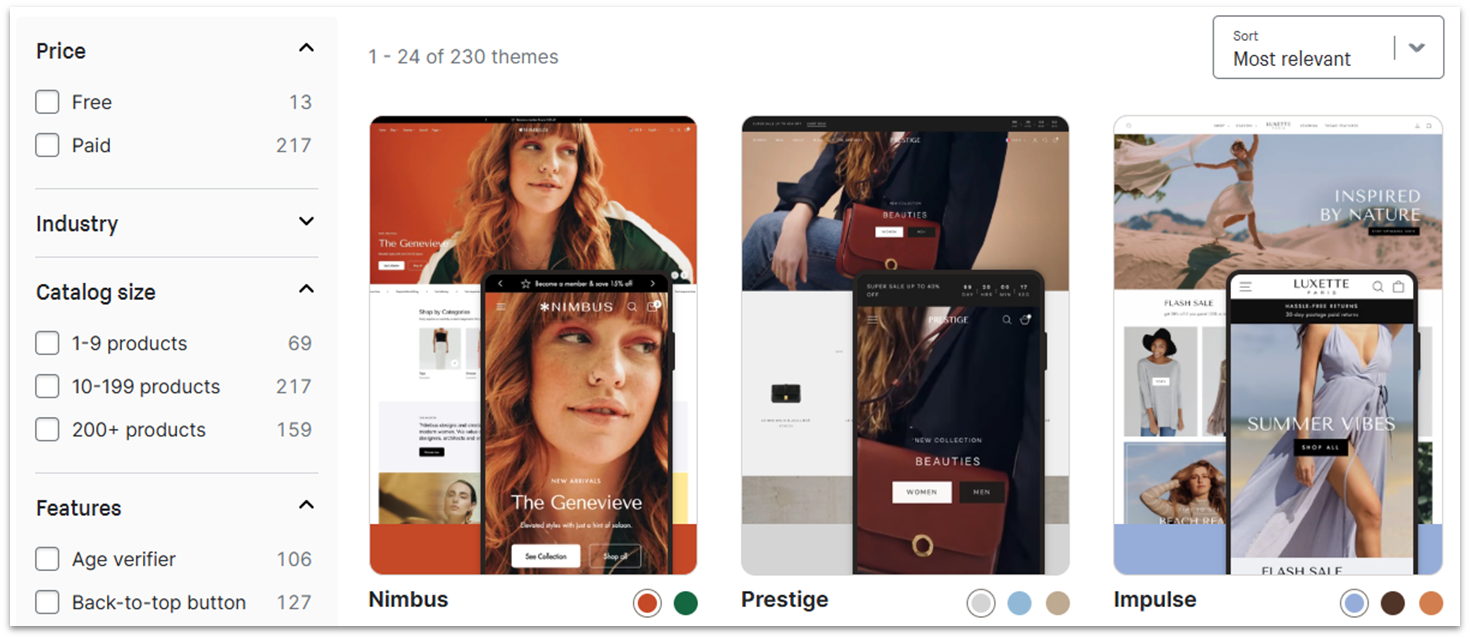
Shopify’s templates are good-looking, top-notch even, though generally pretty simple. It currently has 900+ themes. However, you can import third-party themes, and there are thousands of options out there.
Templates on Shopify are sorted by catalog size and features (e.g., sticky header, stock counter, store locator, EU translations, mega menu), and they can also be sorted by industries such as arts and crafts, clothing, electronics, and even pet supplies. All themes come with a mobile version, too.
The only downside is that the paid themes are not cheap. If you want a fancy theme, but don’t want to fork out well over $200, consider going to ThemeForest or a similar third-party theme site as mentioned above.
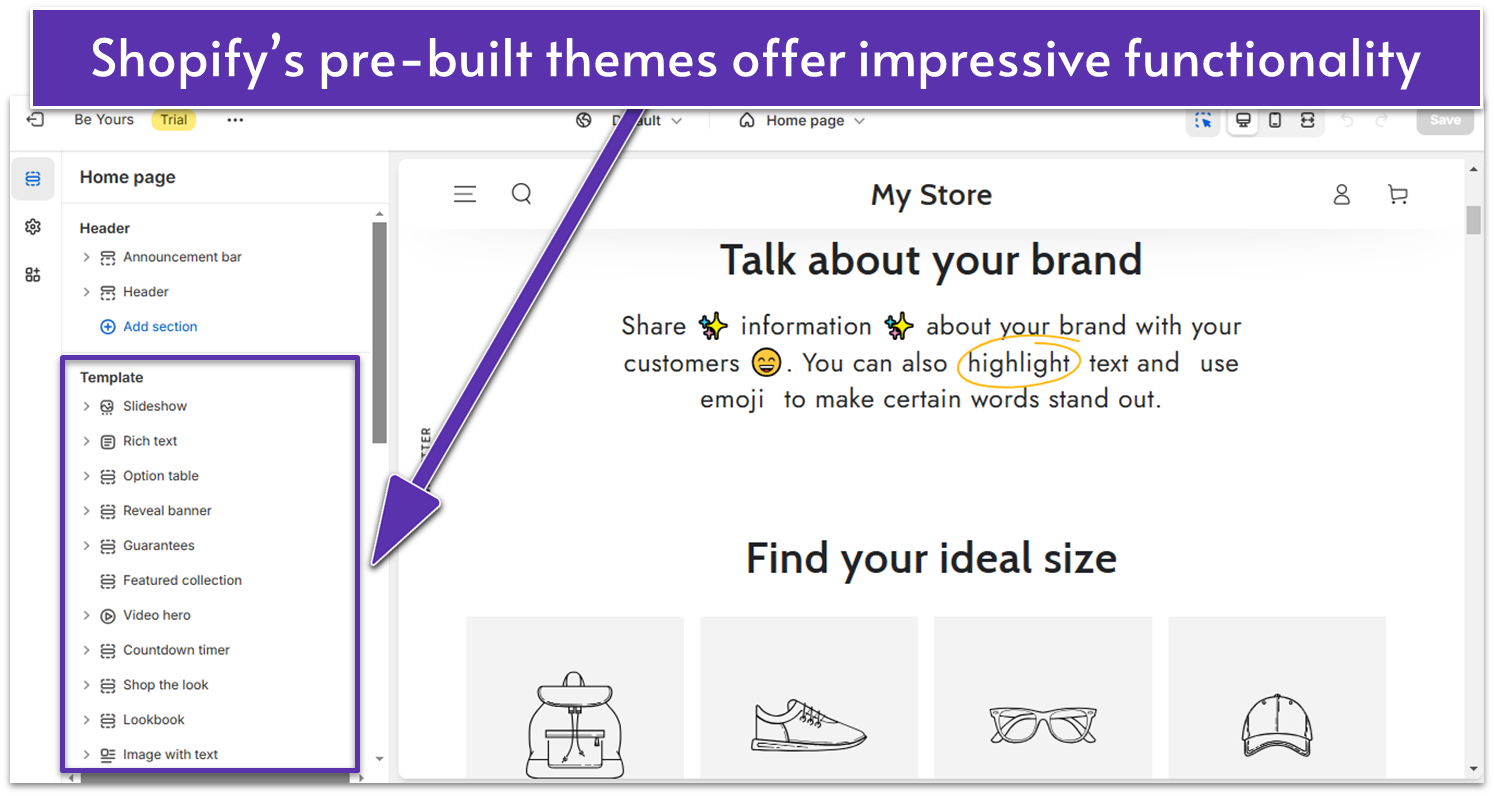
The great thing about Shopify’s themes is that they come with useful features already built-in. The more expensive options (like the Be Yours theme I tried) have more sections to customize, such as a video hero, a countdown timer, and a newsletter popup.
Shopify’s pricier themes come with more built-in features
However, even the free themes include sections like image slideshows, featured collections, and a contact form.
Sites are visually customized via a sidebar in the editor, but only the layout and content of the homepage are editable. The rest of your pages are more or less fixed in place by your templates. You can, at least, customize things like your typography, colors, and more.
5.0
Features
Shopify Has More Features Than I Have Room to Show
No, seriously. As our team compares all of the best site builders out there, services like Shopify present a problem for me as a reviewer. While it may not have as much in the way of layout and design features, it does have a ton of retail features.
Because there are too many features to list in this review, I’ve showcased the features that stand out below – but this is by no means a complete list. First up, here’s all the regular stuff you would and should expect.
On the site-building side of things, you get:
Unlimited products, bandwidth, and online storage
A blogging platform (simple, yet decent enough)
SEO and marketing tools
Custom domains (You can edit the DNS records to, for example, host your mail servers elsewhere, but use the same domain.)
On the actual store-management side, you’ve got the essentials (and more):
Multiple sales channels (including social media, online marketplaces like Amazon and Etsy, and even Walmart)
Discounts and discount codes
Inventory management
Gift cards
Multi-language stores
Automatic tax calculation (Just to keep everyone out of trouble!)
Customer accounts
Video displays
3D asset displays (As someone who used to tinker with 3D graphics, I have to say this is such a cool idea.)
Subscriptions
Google Analytics
Over 100 alternate payment gateways – including PayPal, Google Pay, Stripe, and more
Shopify also has its own proprietary payment solution. Shopify Payments lets you accept payments in multiple currencies and it gets rid of your transaction fees. It isn’t available everywhere, but it’s worth considering if you run your store in one of the supported countries.
Shopify Point of Sale
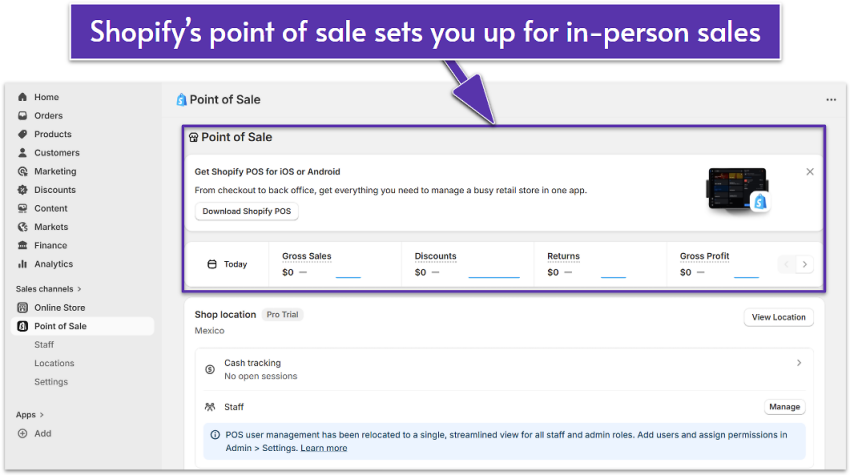
Shopify POS is a system where you can use your Shopify store to manage sales and inventory at physical locations. This way, you can use the same system for people who want to order online, and for people who whip out their cash right in front of you.
You can easily set up Shopify POS from your dashboard
You can handle physical sales through proprietary kiosks or with an app on your smartphone or tablet. Thanks to a recent update, you can even personalize the POS experience with custom branding. The entire POS experience has been overhauled to also offer in-store credit options, single checkout for orders that mix shipping and carryout, and an overhauled management system to make operation more user-friendly.
If you’re focused on in-person selling, Shopify offers an exclusive plan for retail stores, which includes unlimited POS logins, staff and customer management tools, inventory settings, and more.
Multiple Online Sales Channels
It’s better to have multiple ways to put your products in front of people’s eyeballs, and Shopify has you covered. You can sell your stuff all over the net, but control it all from one place.
You can sync your Shopify inventory with Amazon to sell on your site and Amazon at the same time. You can also do this with eBay, and a few other marketplaces, as well as sell your stuff via social media platforms like Facebook, TikTok, and Instagram.
Shopify is now also the only e-commerce platform to integrate with Roblox, which is… Honestly I’m not sure how I feel about it. But it’s worth a mention since it opens your store to nearly 80 million potential new customers.
Huge App Store
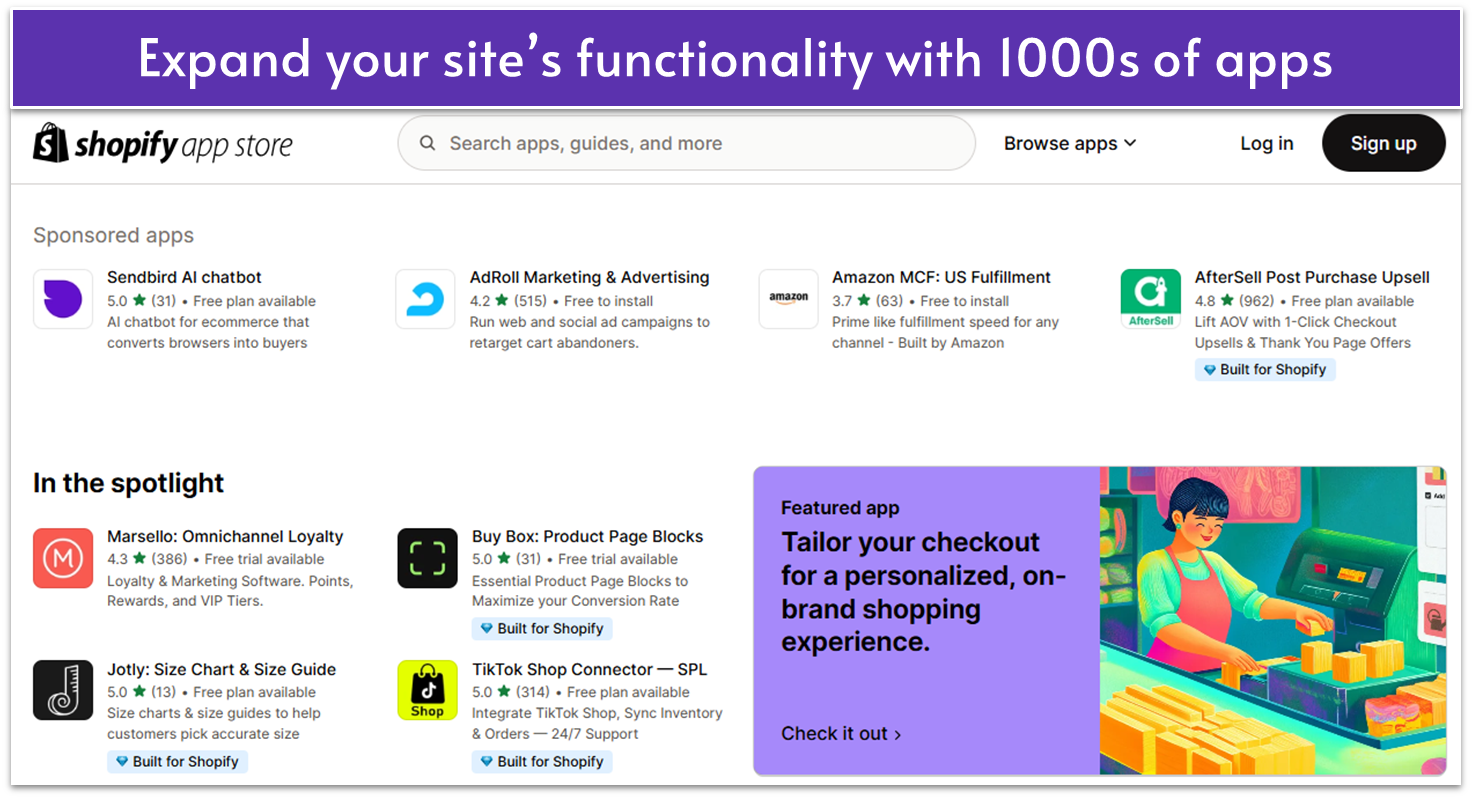
Shopify App Store contains a whole bunch of apps and add-ons to help you integrate Shopify with just about every other major web, shipping, or marketing service. At last count, there were over 8,000 apps in the store.
You can search for apps by categories or try out the ones recommended by Shopify
Despite such a large number of integrations, the Shopify App Store is easy to navigate. The apps are divided across categories and you also get Shopify’s recommendations, so you can quickly find what you need.
Compliance & Security
Seeing how Shopify is one of the largest platforms currently handling the financial information of millions of customers, it’s only fair to expect a robust set of security tools. I’m glad to say that, for the most part, Shopify doesn’t disappoint.
Shopify is level 1 certified with the PCI DSS (Payment Card Industry Data Security Standard) the international standard for handling credit card transactions. Shopify also fulfills the requirements for compliance with the General Data Protection Regulation (GDPR) and California Consumer Privacy Act (CCPA). In short, you can be sure that your financial data will be secure from third-parties with Shopify.
Shopify also offers additional tools to help merchants sell securely, like the fraud analysis tool. Thanks to its proprietary system, Shopify can help you identify potential red flags of fraudulent behavior.
Shopify users on more advanced plans will also receive recommendations for what to do about potentially fraudulent orders, and all Shopify plans include support for third-party anti-fraud apps.
5.0
Ease of use
My Experience with Shopify
Getting Started with Shopify
Once I opened my Shopify account (I only needed an email address), Shopify asked me a series of questions about my business, such as where and what I plan to sell.
This is supposed to help Shopify create a store based on your business needs, but in the end, I didn’t see how my answers contributed to the personalization of my store. When you access your dashboard, Shopify seems to give you the same options regardless of what you checked during the onboarding process. You can also skip this process and go straight to the online store creation.
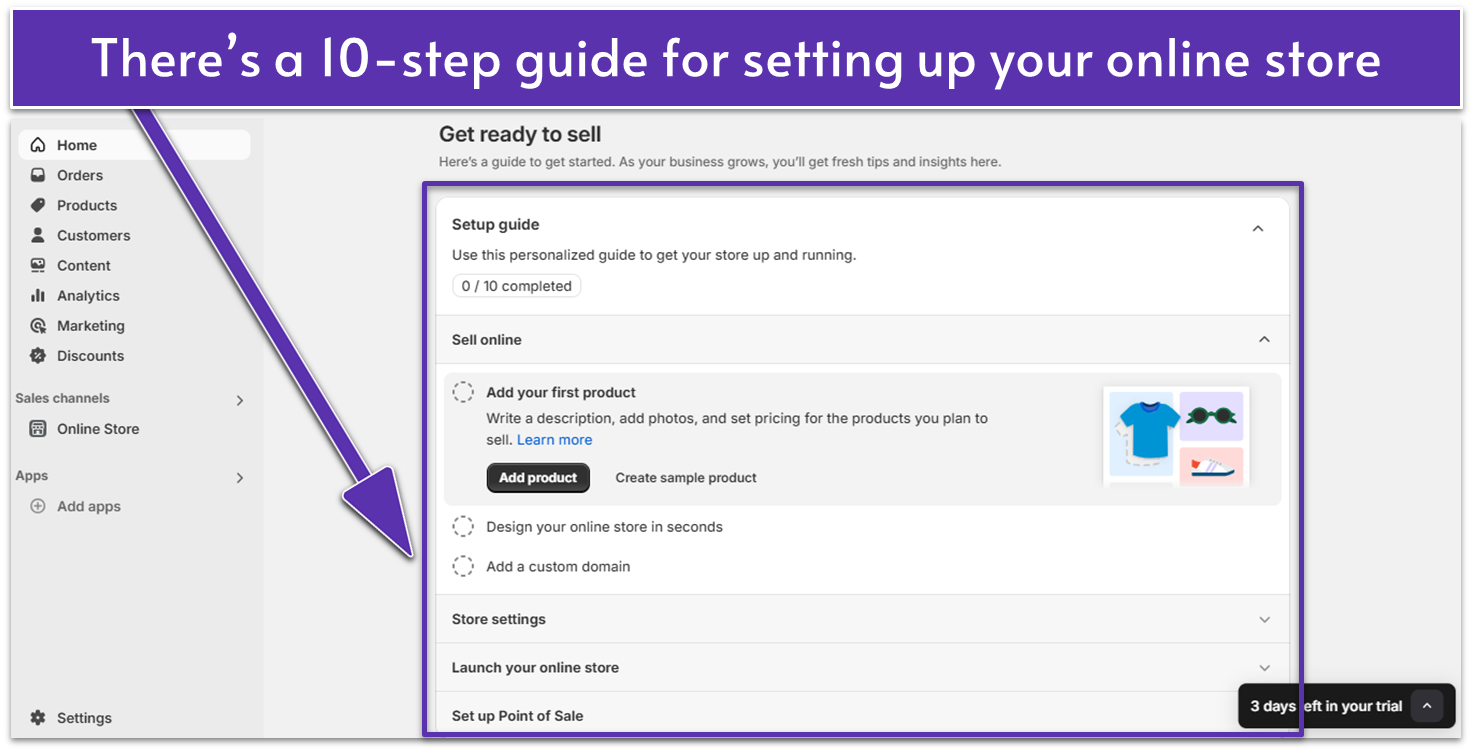
Shopify offers a step-by-step guide to help you create your online store
Once the onboarding process was done, I landed on the homepage of my dashboard. I liked that there was a store setup guide with steps to help you get started – this can be quite useful if you’ve never built an online shop before.
Customizing My Shopify Website
My default theme was Dawn (which I found rather simple), but I could also choose another from the Theme Marketplace (you can access it by clicking on the “Online Store” tab in your dashboard sidebar). As I’ve already mentioned, I tried out the pricier Be Yours theme, but I also checked out other free options. If you have a limited budget, the free Sense theme looks good and it puts your products in the spotlight.
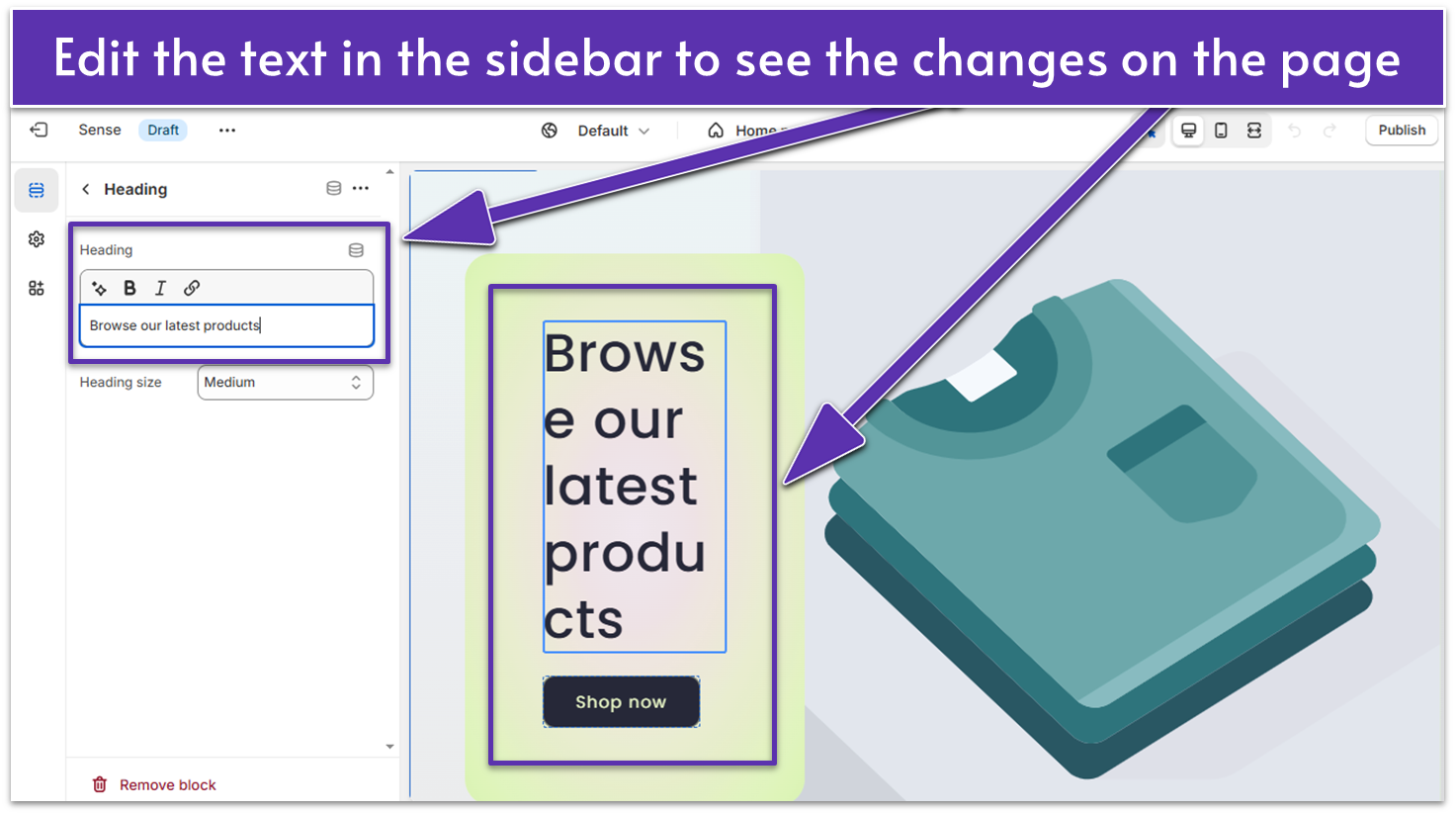
Shopify’s editor could be more intuitive, but it’s still easy to use
Shopify’s editor is section-based, which limits your creative choices to a degree – you can’t just drag and drop elements anywhere you want on the page. Also, Shopify doesn’t let you edit the text directly on the page – you have to do it in the editor’s sidebar, which makes customizing your site less intuitive.
Shopify lets you schedule the publishing of your store
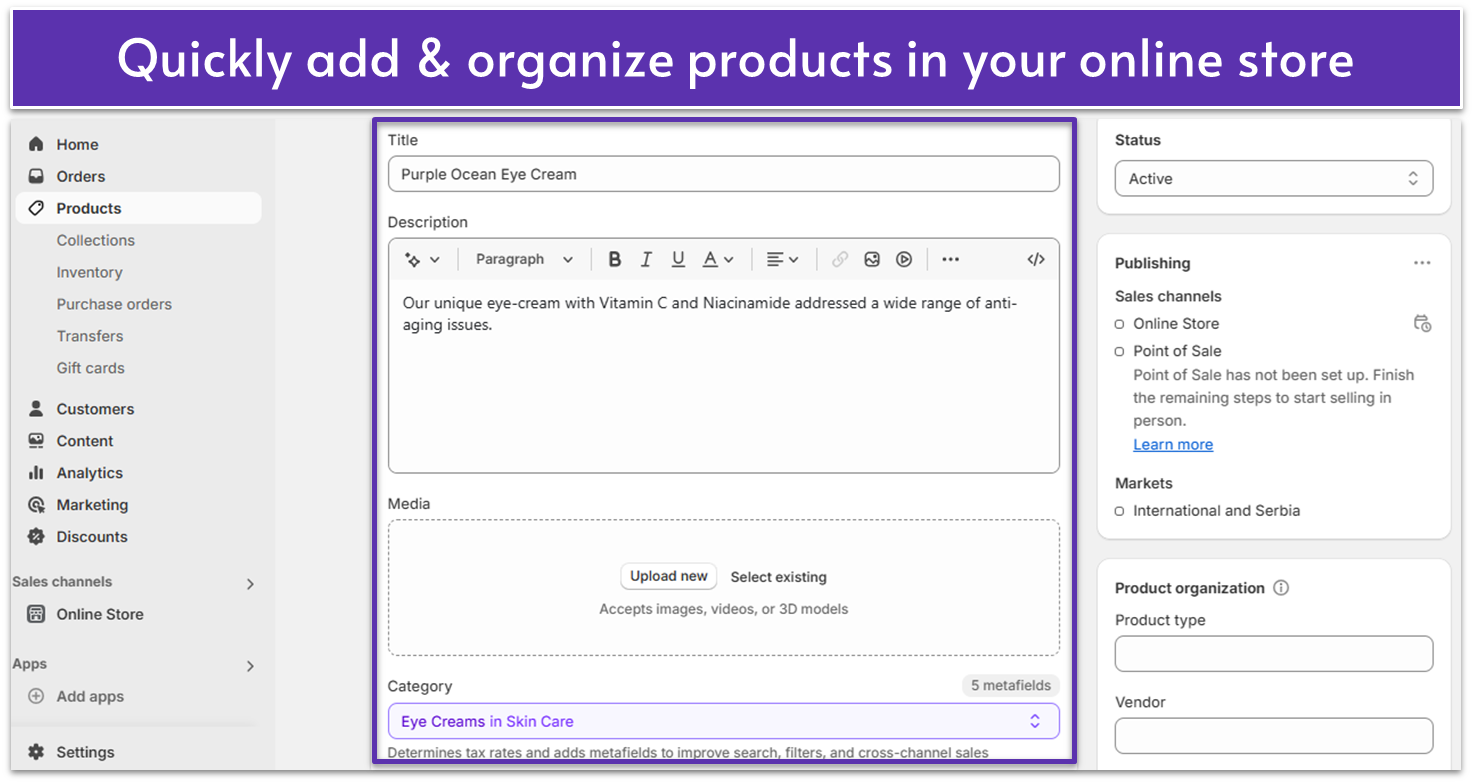
Still, I found the process of adding products to my store much smoother. Shopify doesn’t overwhelm you with too many options right from the start. The interface for adding products is clean and easy to navigate, allowing you to set up the essentials like product descriptions, images, and categories quickly.
Shopify Magic & Sidekick
Listen, I know that, these days, every software and smart toaster has to have some sort of AI integration or another. I would completely understand if the statement “Shopify includes a suite of AI features” doesn’t create the same response it might have before. But allow me to clarify: Shopify includes a suite of actually useful AI features.
Its first AI integration is Shopify Magic, which does everything you’d expect an AI integration to do. With Shopify Magic, you can generate product descriptions, write content, edit and even generate images. I should also mention that Shopify Magic does an exceptionally good job at generating SEO-optimized product descriptions.
Shopify Sidekick can help you edit your site simply by chatting with it
Shopify Sidekick stands out from the myriad AI integrations of other web builders as a full AI assistant for website building. By talking with its chat interface, you can make site-wide edits, create custom discounts, and even generate advanced sales reports.
Shopify is such a feature-heavy platform that new users can often lose track of everything they can do with it. Sidekick allows you to simply ask for the features you need.
Additional Ease of Use Features
Here are some of the other features that can make your life easier:
Shopify Shipping
Shopify’s robust built-in shipping system lets you choose from the top carriers and gives you access to the lowest shipping rates. You can save up to 88% on shipping, which is nothing to sneeze at.
Also, you get package and shipping service suggestions for each order, and you can print up to 100 shipping labels and packing slips in bulk to speed things up.
Shopify Fulfilment Network
Shopify Fulfillment Network is a free app that distributes your inventory across fulfillment centers. Your orders are routed to the nearest warehouse center, which allows you to offer quick delivery in many regions.
You get tools for inventory management and real-time tracking, so you can oversee the entire process from start to finish. And Shopify handles the logistics for you, including returns management, so you can focus on the important stuff.
Shopify Email
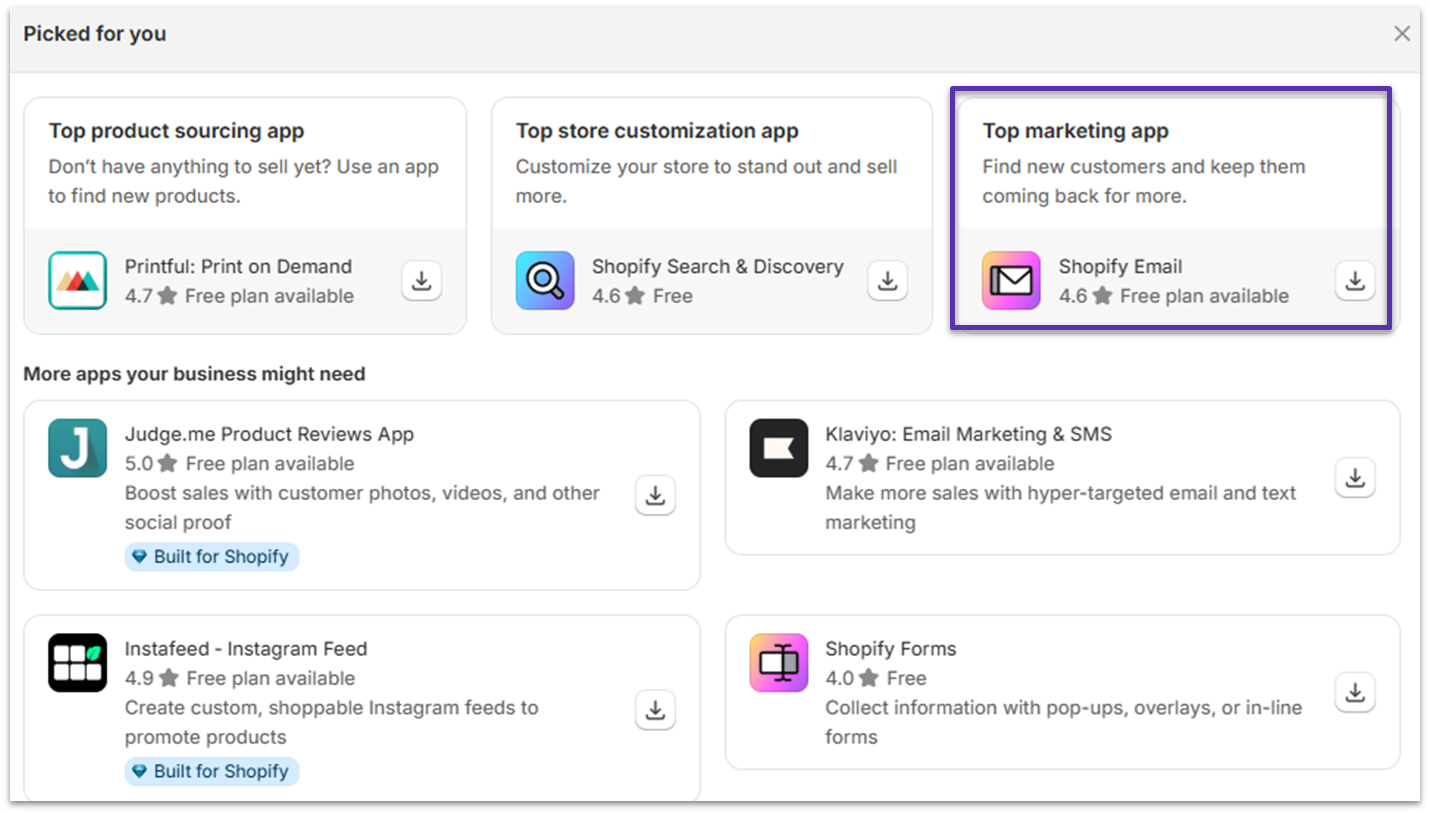
Shopify Email will likely be a top recommendation for you when you click on the Add Apps tab in your dashboard’s sidebar. It’s a built-in email marketing tool that allows you to create, customize, and send promotional emails directly from your Shopify dashboard. You get pre-designed templates that automatically use your logo and store colors, so you can maintain your brand image across platforms.
You can easily add Shopify Email to your store from your dashboard
Also, Shopify Email syncs customer and order data, so you can send targeted messages to the right customers. And you can use Shopify Magic to generate email subject messages and copy. This feature is available on all Shopify plans, and you can send up to 10,000 monthly emails for free.
5.0
Support
My Support Experience Was Fast and Smooth
Shopify’s whole support experience was pretty smooth, as far as I was concerned. For starters, there’s a handy knowledge base/help center/tutorial platform to teach you all the basics.
And if you don’t mind diving into social spaces, there’s a community forum where you can ask questions. When it comes to direct support, there’s a 24/7 live chat, and I’m happy to report that it worked rather well for me.
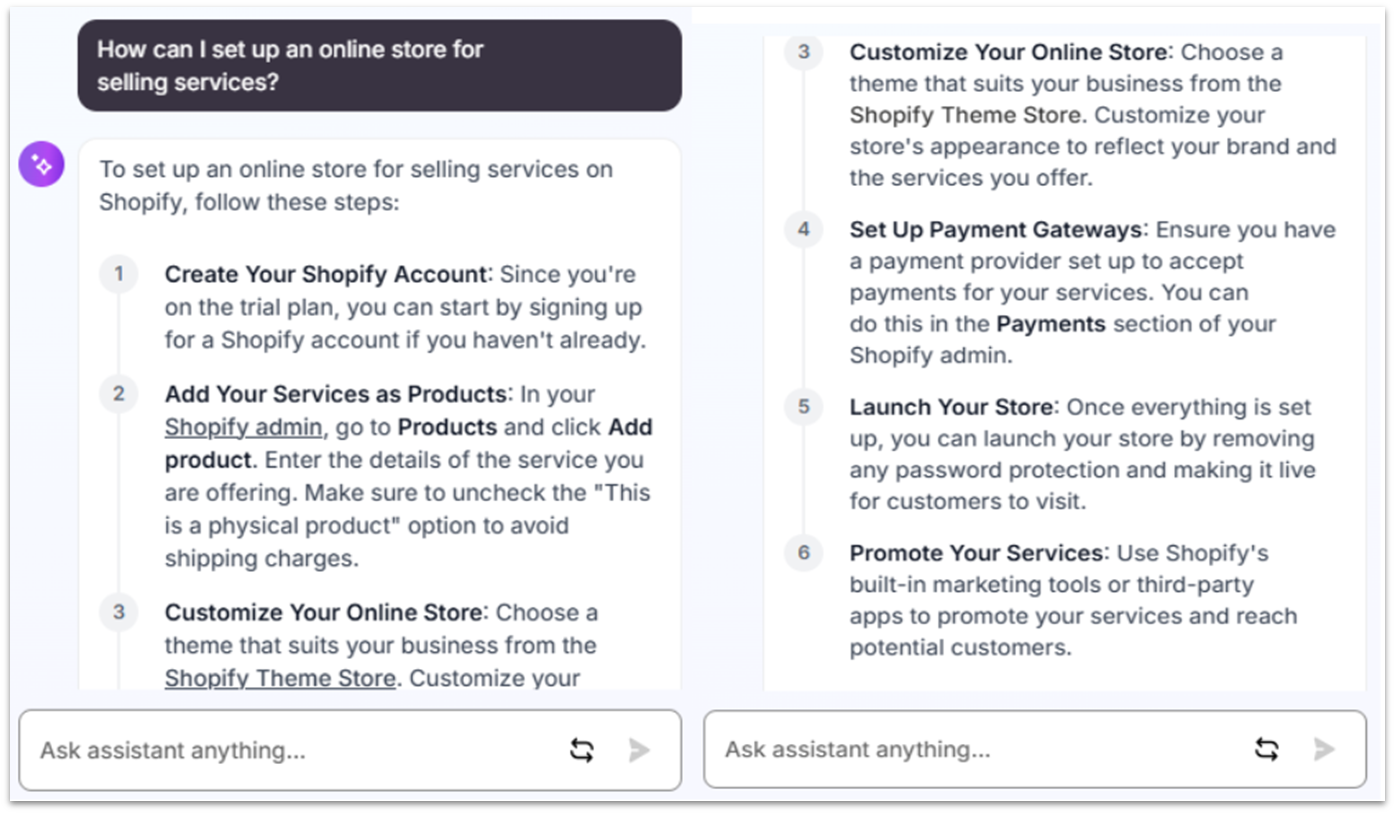
Before you can speak to an actual human, you’ll have to discuss your issue with Shopify’s AI chatbot, which can be pretty helpful with common questions.
Shopify’s AI Chatbot provided a detailed and helpful response to my question
I asked about setting up an online store for selling services, and the chatbot outlined the necessary steps for me. It even pointed out things to pay attention to, such as unchecking the “physical product” box to avoid shipping charges.
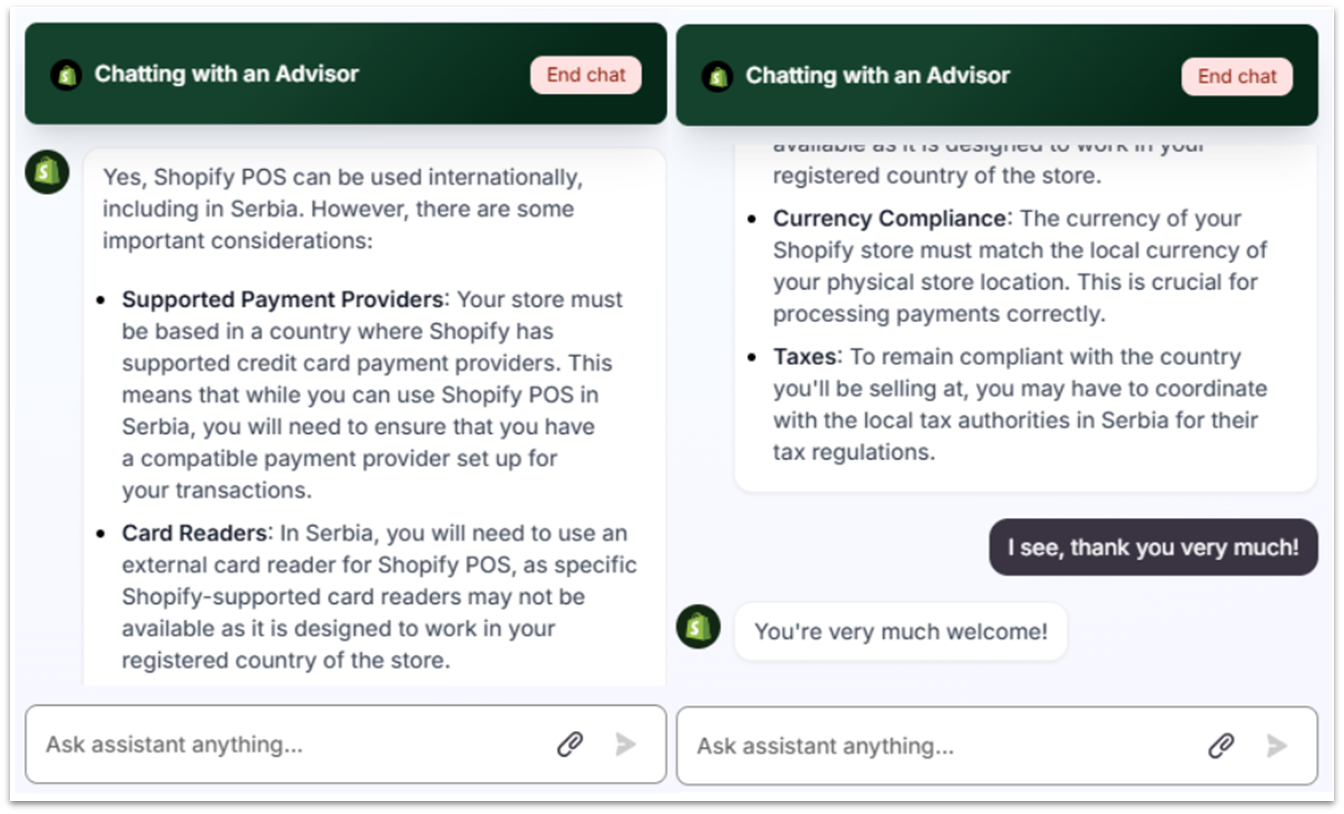
To chat with a customer support agent, you’ll need to ask the AI bot to connect you with a support advisor. The agents respond in approximately 5 minutes with helpful information.
Shopify’s customer support agent was friendly and gave a thorough reply
This time, I asked about whether Shopify POS works internationally (and in Serbia, specifically). I got a detailed reply with bullet points on things to pay attention to when setting up a Shopify POS in Serbia.
Worth A Mention
My experience with Shopify’s customer support was nothing but pleasant and efficient. However, I should note that when I looked at the experience of other customers, not everyone had the same positive things to say.
Some customers have reported friction with customer support, specifically with the AI chatbot. While Shopify has reportedly fixed a lot of the issues it had in the past, users still encounter problems. This mis-matched with my recent experience, but it’s worth mentioning to allow you to make an informed decision.
4.8
Pricing
It Could Be Cheaper, but It’s Fair
Shopify plans are not what you would call cheap when compared to other site builders, but they are reasonable for their purpose. You could get a perfectly functional online store from any other major site builder, such as Wix or SITE123 for cheaper. But if e-commerce is your main income source, then Shopify’s prices are worth it. More conventional site builders just can’t keep up with the sheer number of useful e-commerce features.
Shopify doesn’t offer a free plan or any proper refund options. That said, there is a 3-day free trial, which, honestly, feels a bit too short to properly test the platform. After your trial is over, you can enjoy a great discount on your chosen plan for the first few months.
Although you can’t sell anything during your free trial, you can unlock Shopify’s standard features by selecting a plan and trying it out for just $1 per month for three months.
Like most e-commerce platforms, Shopify charges a transaction fee on all payments made through its platform. Though this is the standard with e-commerce transactions, you should keep it in mind so you can price your products accordingly.
The transaction fee changes depending on the plan. So, keep in mind that Shopify will charge you 2.9% + 30¢ on all transactions with the Basic plan, 2.7% + 30¢ with the Grow plan, and 2.5% + 30¢ with the Advanced plan.
That’s if you use Shopify’s built-in payment processing service. Third-party services will charge their own transaction fees, with Shopify charging about 1% on top of that.
Shopify is simply fantastic for any retail-oriented business and loaded with options and features. The cheapest plan is more than enough to get your online business started, and overall I have no complaints.
It should be mentioned, however, that some other e-commerce platforms (like BigCommerce) and a few general-purpose site builders (like Wix and SITE123) make it easier to customize your site however you want. Plus, they match Shopify’s pricing plans or are even cheaper.
In the end, it’ll come down to individual features, and which of those you think are better for your business.
FAQ
Is Shopify worth it for a small business?
If you’re in the business of selling things online, then yes. There are cheaper (and even somewhat easier) ways to sell both physical and digital products, but platforms like Wix and SITE123 don’t have the absolute wealth of features and options that you’d get from a dedicated e-commerce platform like Shopify.
How trustworthy is Shopify?
Very. Shopify is committed to keeping your online store secure – all plans include features such as free SSL certificates, payment data encryption, and support for third-party anti-fraud apps. Also, Shopify has built-in fraud analysis tools to protect you from fraudulent orders.
Does Shopify charge transaction fees?
It depends. If you use Shopify Payments as your payment processor, there are no extra fees. If you use an external payment gateway such as PayPal or Stripe, then there are varying transaction fees based on the plan you are paying for. The Basic Shopify plan has a 2% fee, the Grow plan will set you back by 1%, and the Advanced Shopify plan will only charge you 0.5%.
Is Shopify easy to use?
Shopify is one of the easier e-commerce platforms out there, once you’ve gotten used to it. After you have the actual storefront and products set up, and your tax and shipping options in place, it should be pretty smooth sailing.
Andrés writes about a variety of topics aimed at helping business owners and merchants grow and manage their ventures. These topics include (but are not limited to) website building, web hosting, project management software, and credit card processing. Andrés has 3+ years of experience as a writer and content creator. He’s also worked as a project manager, website designer, and social media manager for a variety of science communication groups.
As a freelance writer, editor and grammar nerd, Emily loves a comma almost as much as she loves an en dash. Having earned her degree in English Language and Linguistics, Emily started her career in print journalism before quickly realising the only way forward is digital. Since starting at Website Planet in 2019, she’s developed an extensive understanding of everything digital from website builders and email marketing to logo design services and freelance websites. When she’s not debating the use of commas, Emily can be found renovating her house, while (desperately) trying to make her cats Insta-famous.
2.5
User reviews
Based on 8 reviews in 8 languages
Be the first user to leave a review about Shopify in English!
onclick="trackClickout('event', 'clickout', 'Visit User Reviews', 'shopify', this, true, ReturnPopup );"
View 1 reply
View %d replies
Shopify est ce sérieux
Hébergeur du site amour2chien et gros problème de sérieux qui met en doute celui de Shopify. L'honnêteté et le manque de suivi des commandes est suspect et doit être l'objet d'alertes via tous les réseaux sociaux. Quelles précautions prenez vous pour accepter d'héberger des sites qui ne respectent pas leurs engagements.
Family sharingMulti User SharingExpert SupportBackupSmart syncPersonal SolutionBusiness SolutionTeams optionsOffline foldersFile history and recoveryRead more reviews
 Website Planet