We rank vendors based on rigorous testing and research, but also take into account your feedback and our commercial agreements with providers. This page contains affiliate links. Advertising Disclosure
SiteGround plans renew at a higher price, but you get what you pay for. After testing its services, I’m genuinely impressed. Powered by Google Cloud with a built-in CDN and automated backups, SiteGround is fast, reliable, and easy to manage. It’s ideal for small businesses, agencies, and e-commerce owners who want beginner-friendly hosting backed by real expert support.
SiteGround Pros, Cons, & Things That Could Be Better
Free daily backups
Free 1-click security plugin for WordPress
Servers on Google Cloud infrastructure
Beginner-friendly dashboard
Free domain and SSL for all plans
Access to live support could be faster
Limited hosting options
High renewal fees
SiteGround has built a reputation as one of the most reliable names in hosting, but it’s not the cheapest option. Does its performance and ease of use justify the higher renewal costs? After weeks of testing, the short answer is yes.
Built on Google Cloud infrastructure, SiteGround delivers fast loading times and near-perfect uptime. Beyond the modern infrastructure, every plan includes automated daily backups, WordPress features, and a built-in content delivery network (CDN), making it feel more like premium managed hosting than a standard shared package.
SiteGround’s web hosting, WordPress hosting, and WooCommerce hosting plans are practically the same. Each shared plan is optimized for WordPress by default, but you can also host non-WordPress sites if you prefer. In short, you get managed performance without being tied to one platform.
In addition to shared (WordPress) hosting, SiteGround also offers cloud and reseller hosting, all fully managed to minimize maintenance and maximize reliability. Its multilingual Site Tools control panel is available in English, Spanish, Italian, German, and French, making setup simple for international teams.
That said, you’ll need to weigh the high renewal costs and resource limits. SiteGround is best suited for small to medium-sized businesses, freelancers, agencies, and online store owners who want a reliable platform that takes most of the technical work off their hands. If you’re running a high-traffic or resource-heavy site, you may eventually need to move up to SiteGround’s cloud plans.
If you want performance and peace of mind, keep reading – SiteGround might just be your match.
4.7
Features
Everything You Need for Security and Performance
Small business owners, e-commerce site owners, and personal bloggers will find that SiteGround offers plenty for their website hosting needs, even in the entry-level plan. My StartUp shared WordPress plan included unmetered traffic, unlimited email accounts, and unlimited databases.
Beyond the basics like daily backups, a free domain name, a free Let’s Encrypt SSL certificate, and one-click WordPress setup, SiteGround’s value comes from its built-in tools for site management, performance, and security. You can also add team members with collaborator access, even on the basic plan, which makes managing shared projects easier.
Those on GrowBig and GoGeek plans gain extra flexibility with on-demand backups and developer-friendly options like a WordPress staging environment. These are practical upgrades for teams and freelancers managing multiple sites.
Let’s look into some of its standout features in more detail.
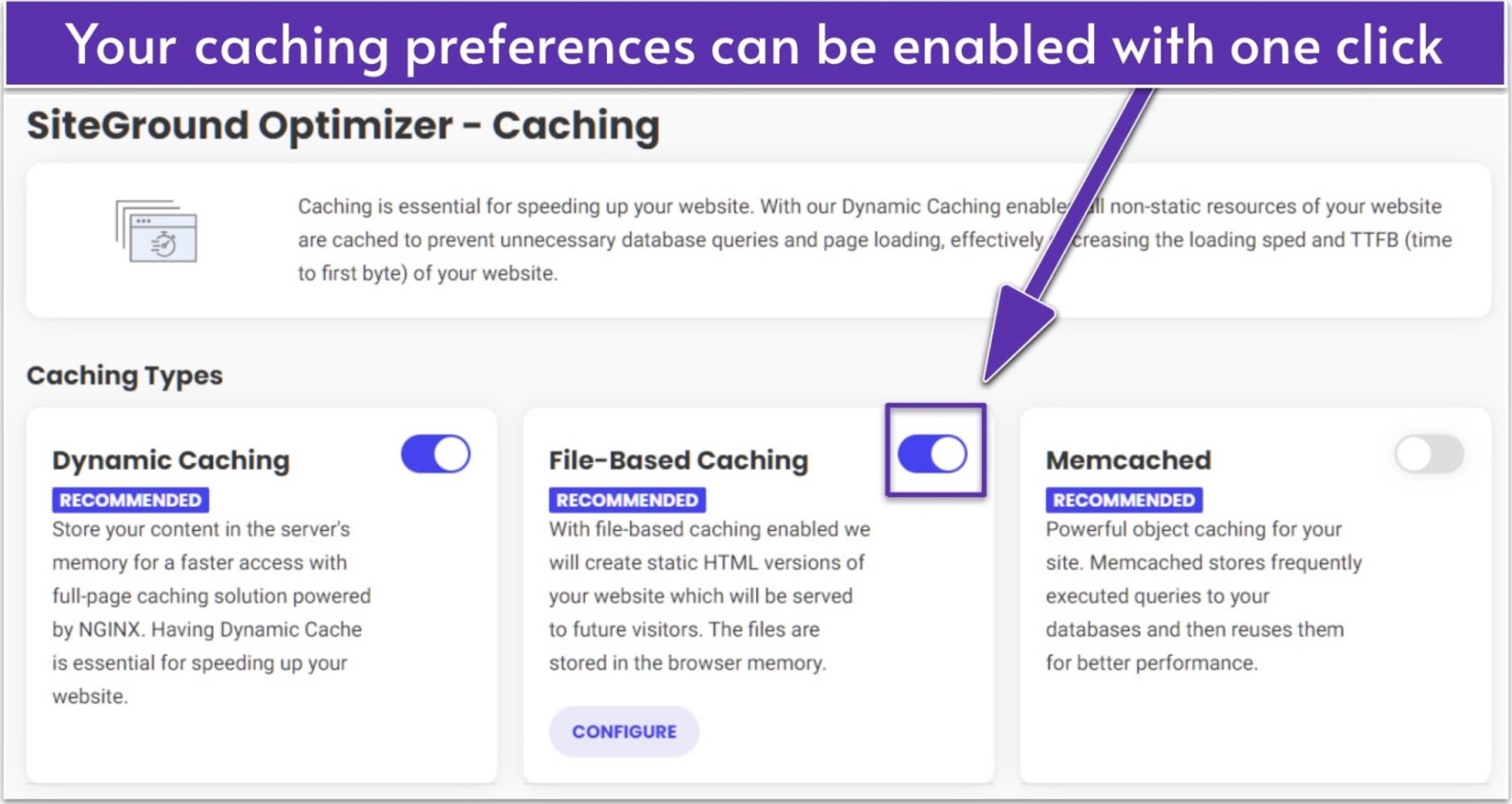
SiteGround’s Speed Optimizer is an all-in-one WordPress performance plugin that keeps your website fast and lightweight without you needing to tweak any code. It handles caching, environmental elements like scheduled database maintenance, frontend issues such as minifying your CSS files, and media optimizations such as activating lazy load and compressing images.
What I particularly like is how beginner-friendly it is. Every recommended option is clearly marked, so you always know which settings will work best for your site. Even if you’ve never optimized a website before, the plugin practically walks you through it. The plugin is free for all WordPress users, but SiteGround customers get full access to its exclusive full-page and object caching tools.
SiteGround’s performance edge also comes from its proprietary SiteGround CDN, which is included for free in every plan. It’s built on Google’s global network and automatically routes your visitors to the nearest server, so pages load faster wherever they are. The latest version adds smarter routing and built-in redundancy, helping your site stay consistently fast and available, even if one location experiences downtime.
SiteGround’s staging tool (included with GrowBig and GoGeek plans) lets you safely test updates before they go live. You can clone your site with a single click, try out new plugins or design tweaks, and then push everything to production once you’re happy with the results. It also creates an automatic backup before deployment, making it easy to reverse any changes instantly if something doesn’t go as planned.
For anyone managing a WooCommerce store, client projects, or busy content sites, it can save hours of troubleshooting. I found it especially useful for testing plugin updates, which can sometimes cause conflicts if you update directly on a live site. It’s one of those quiet, practical tools that pays off over time and makes upgrading to the GrowBig or GoGeek plan worth it.
Free Security Solutions
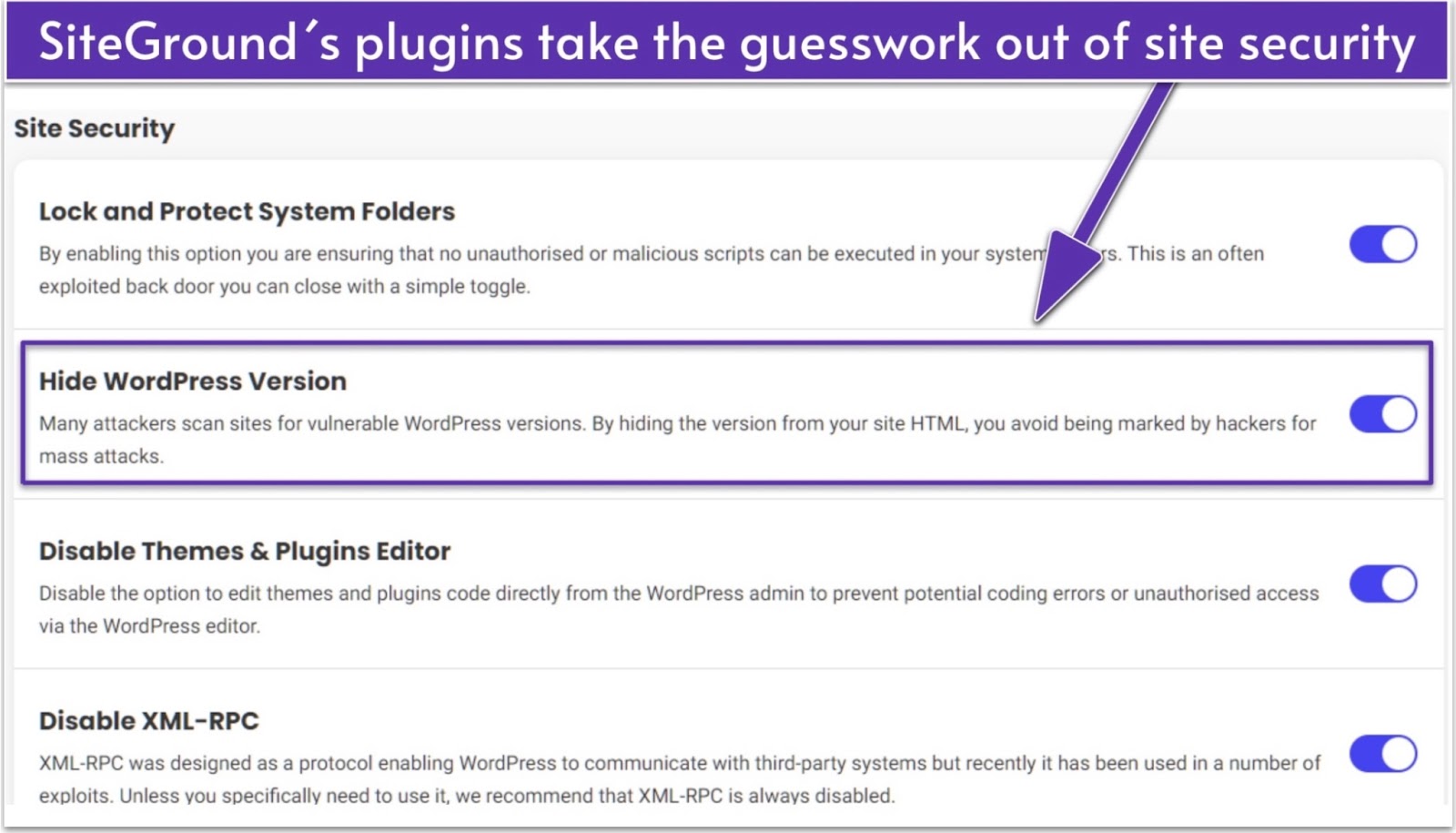
The SiteGround Security Optimizer plugin had most of my necessary options preselected
Every SiteGround plan also includes a full stack of protection tools that keep your site safe. It starts with the Security Optimizer WordPress plugin, which handles the basics like two-factor login, brute-force protection, and hiding your WordPress version from bots.
There’s also a Post-Hack Actions panel inside the Security Optimizer dashboard that lets you quickly reinstall clean plugin copies and reset passwords, so recovery takes minutes instead of hours. I liked that most of the recommended options were already pre-selected, meaning it’s built for people who want solid protection without having to think about it too much.
SiteGround runs its own web application firewall (WAF) and AI anti-bot system, which block attacks in real time. Daily off-site backups keep clean copies of your site, so you can quickly restore files, databases, or emails if something goes wrong. Sites built with the SiteGround Website Builder even get free professional restores, with backups stored for 30 days to give you extra peace of mind.
Email Solutions Made for Business
Every SiteGround plan includes unlimited professional email accounts linked to your domain, a feature many other hosts charge extra for. You can access your inbox via Webmail, desktop clients (like Microsoft Outlook), your iOS or Android phone, and even integrate with Gmail through SMTP if that’s your preferred setup.
If you’re moving from another provider, SiteGround’s free Email Migrator tool makes it easy to bring over your existing mailboxes without data loss. For those ready to go beyond basic email, SiteGround offers paid Email Marketing with a no-code builder, AI-assisted writing, automations, and segmentation, all managed from the same dashboard as your hosting.
SiteGround Features at a Glance
Free domain name
✔ (select domains)
Free backups
✔
Free email
✔
Money-back guarantee
30 days
Uptime guarantee
99.9%
Data centers
4 in US, 5 in Europe, 1 in Asia, and 1 in Australia
4.9
Ease of use
My Hosting Experience With SiteGround
To see how beginner-friendly SiteGround really is, I set up a new WordPress site and went through the entire process myself. From signing up to launching the site, it was one of the smoothest hosting setups I’ve tested so far.
Everything is laid out in plain language, so there’s no guessing or confusion about what’s what. The ordering process only took a few minutes to complete, and once I was ready to start building my site, SiteGround added a little something extra that really impressed me.
Creating a New Account With SiteGround
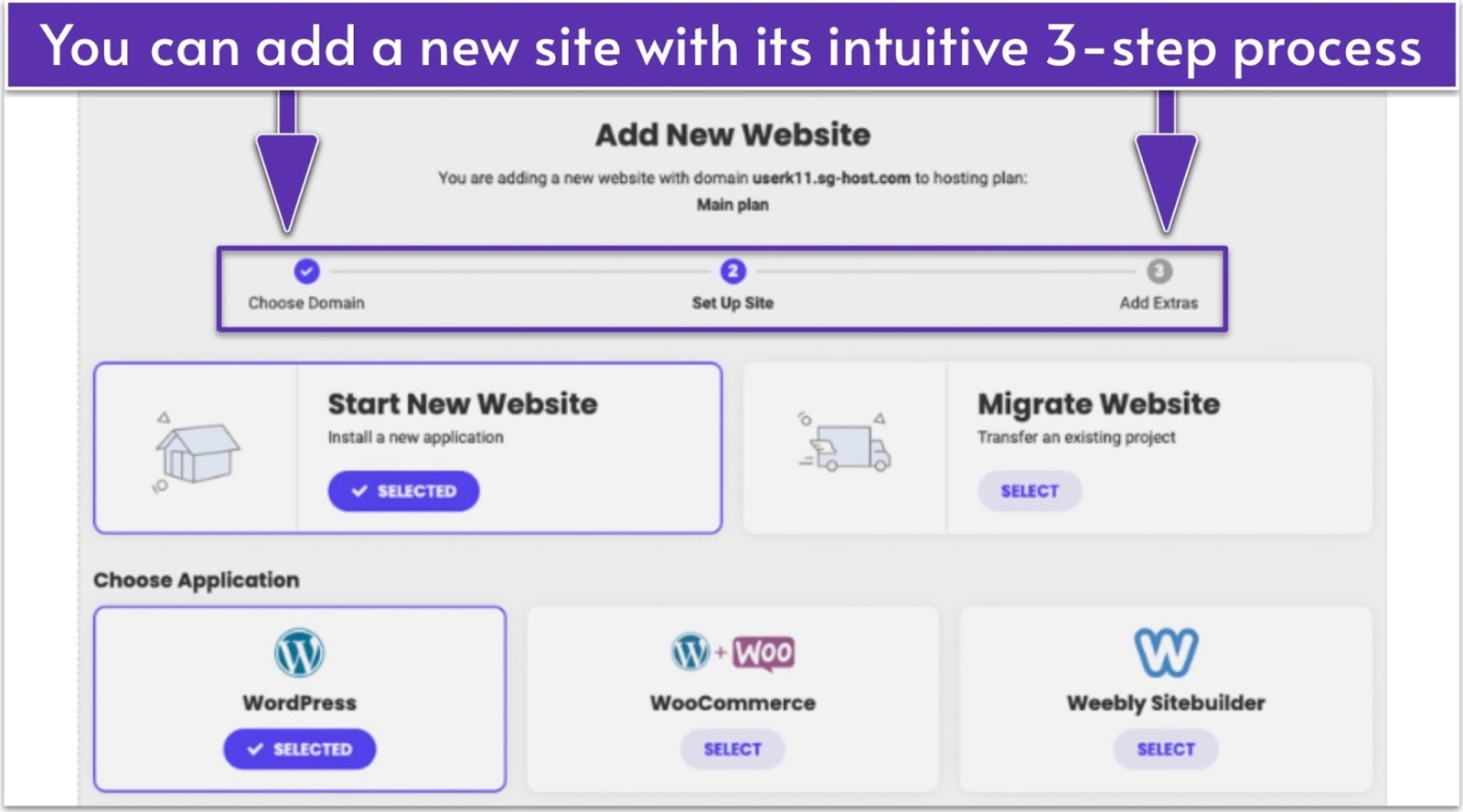
Creating a new account with SiteGround is a straightforward three-step process. The first step is to choose your plan. With the detailed plan descriptions, deciding on the right plan for your needs is simple and easy.
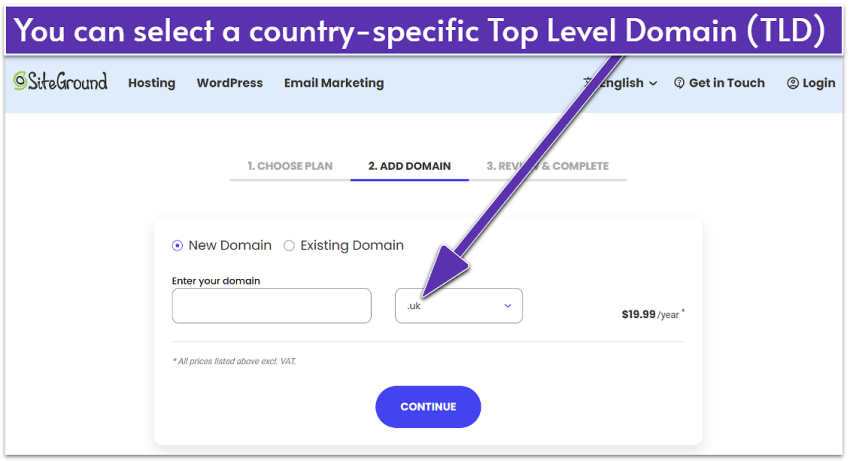
The second step of SiteGround’s signup process gives you the option to choose and register your domain with the host
Step two of the signup process offers you the opportunity to register your new site’s domain. While common extensions like .com and .org are free for one year, other extension types carry their own fees. You can also transfer an existing domain for a fee.
Once the domain was taken care of, step three asked me to review my order, add my personal and payment info, and complete my payment. You can pay with Visa, Mastercard, American Express, or Discover.
I was given the choice to add on SiteGround’s Site Scanner monitoring service, but I chose not to as we use the third-party UptimeRobot to monitor our test sites. One thing to note: the Site Scanner option wasn’t preselected, as so many other hosts choose to do with add-ons during checkout. Another win for SiteGround in my book.
Connecting a Domain and Installing WordPress
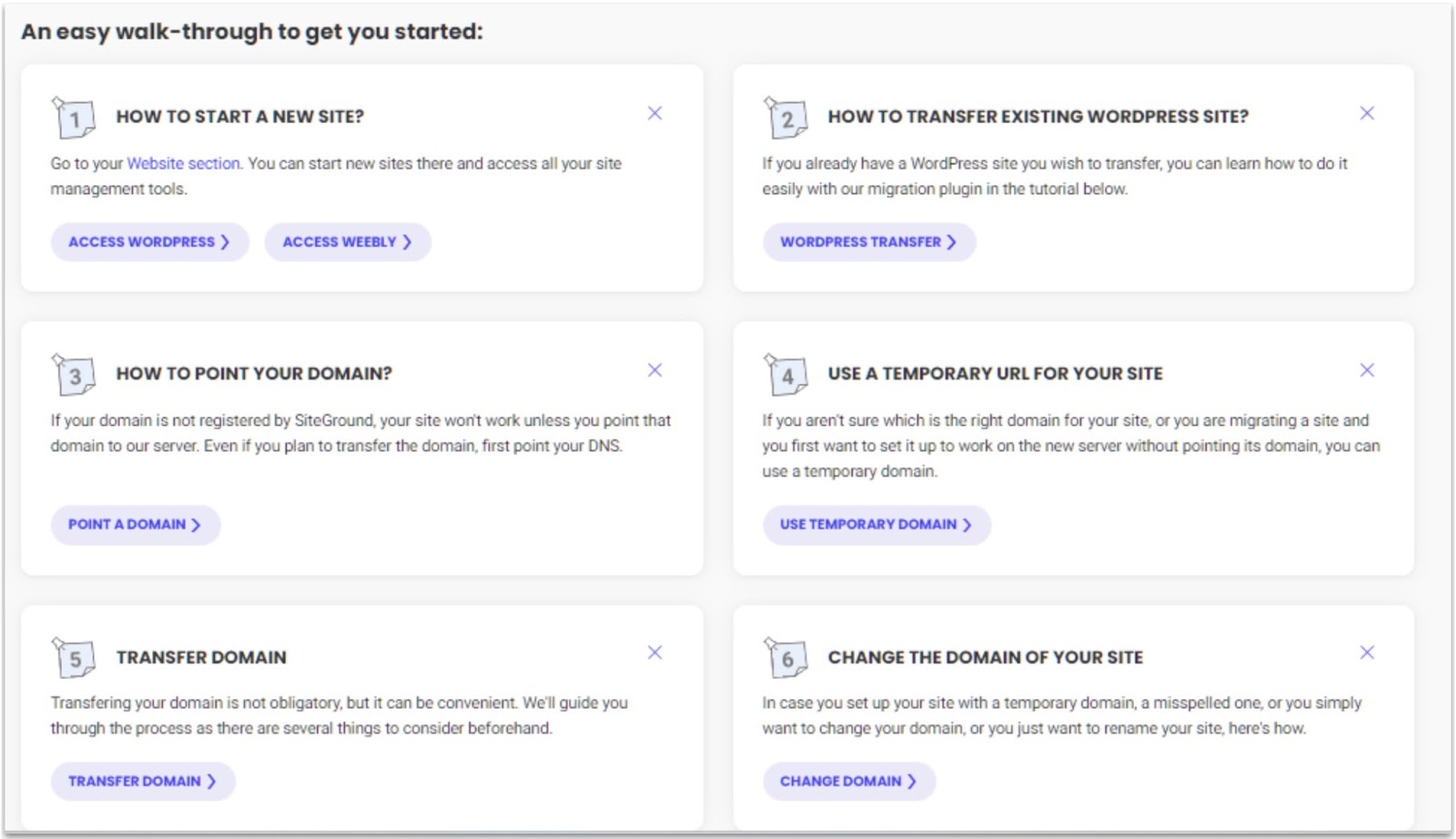
SiteGround’s startup walk-through makes setting up your new site a breeze, even if you’re a beginner
The startup walk-through is SiteGround’s “little extra” that’s actually not so little. When you first sign in to your new SiteGround hosting account, you’re met with a screen full of options for getting started. Each walk-through option leads to a step-by-step guide, tool, or tutorial that helps you complete the task at hand. I honestly can’t remember the last time I set up a site as easily as I did my SiteGround test site.
The Website Setup Wizard is another way SiteGround makes things as easy and stress-free as possible
When it came to setting up my domain and installing WordPress, I used a combination of the startup walk-through and the Website Setup Wizard, another tool provided by SiteGround to get you up and running quickly and easily. I followed the steps in the startup walkthrough to point my domain name to my SiteGround site. In a matter of minutes, it was all set up and ready to go.
Then, on to step two. You are presented with the option to set up a new site or migrate an existing one. Once I selected WordPress for my new site, I was taken to a page that walked me through the downloading and installation process with a few simple mouse clicks. Again, I can’t really remember when setting up a new site was as fast and as easy as SiteGround made this experience. And it didn’t stop with setup either.
Other Ease of Use Features
Exclusive Web Hosting Control Panel
The Site Tools dashboard takes “ease of use” to another level
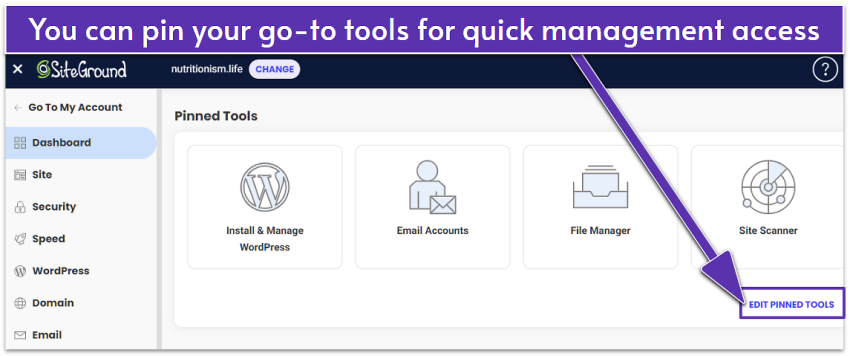
SiteGround’s proprietary Site Tools dashboard replaces the old cPanel with something much more intuitive. It’s designed to make everyday site management easier for both beginners and agencies. You can pin your most-used tools, install apps, manage files, and access your email accounts, all without leaving the same interface.
What really makes Site Tools stand out is how it streamlines your workflow. Features like the WordPress Starter plugin, WordPress Migrator, and staging environment help users launch and maintain sites faster with fewer technical errors. Even if you’re managing multiple client projects, everything you need, from backups to CDN setup, is available in one place.
Free SiteGround Website Builder
Every SiteGround hosting plan includes a free proprietary website builder, letting you create a professional-looking website at no extra cost. You can choose from ready-made templates and customize pages with a drag-and-drop editor. Each layout automatically adjusts to mobile, so you don’t have to worry about responsiveness.
The best part is its built-in AI Assistant, which can generate page text, headlines, or product descriptions in seconds. Combined with free access to a library of over six million stock photos and smart image resizing, you can have a polished site ready to publish in under an hour. The builder also includes integrated SEO and analytics, so you can track performance without relying on third-party tools.
WordPress Website Migration Plugin
If you’re moving from another host, the SiteGround Migrator plugin makes the process quick and straightforward. You can install it on your existing WordPress site, enter the token provided in your SiteGround account, and the tool will automatically transfer your files, databases, and settings.
It’s part of the WordPress Starter plugin, so you can choose to migrate an existing site or start fresh right from Step 2. For anyone switching from another host, this tool saves considerable time and eliminates the risk of losing data during manual transfers. If you prefer expert help, SiteGround also provides a professional migration service for an additional fee.
4.9
Performance
Fast, Reliable, and Built for Growth
To see how SiteGround performs, I ran a WordPress test site using GTmetrix and UptimeRobot. Normally, we also use Sucuri Load Time Tester to check results from multiple regions, but it appears that SiteGround’s network blocks that service. If you’d like to learn more about how we evaluate hosting performance, you can check out our testing process.
SiteGround runs on Google Cloud infrastructure with 11 data centers across the US, Europe, Asia, and Australia, plus CDN locations on every continent, including Africa and South America.
It also uses Ultrafast PHP for quicker response times, custom MySQL tuning for faster database queries, and its proprietary SiteGround CDN 2.0, which automatically routes visitors through the nearest edge location. Combined with SuperCacher and Speed Optimizer’s caching layers, these tools help keep sites fast and stable for both local and international audiences.
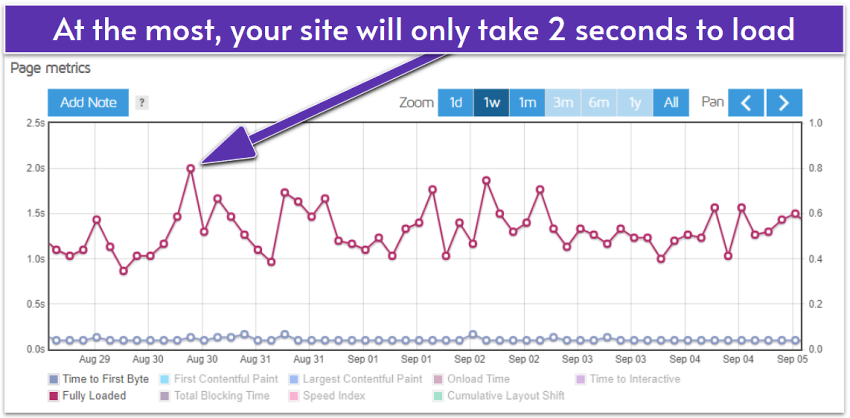
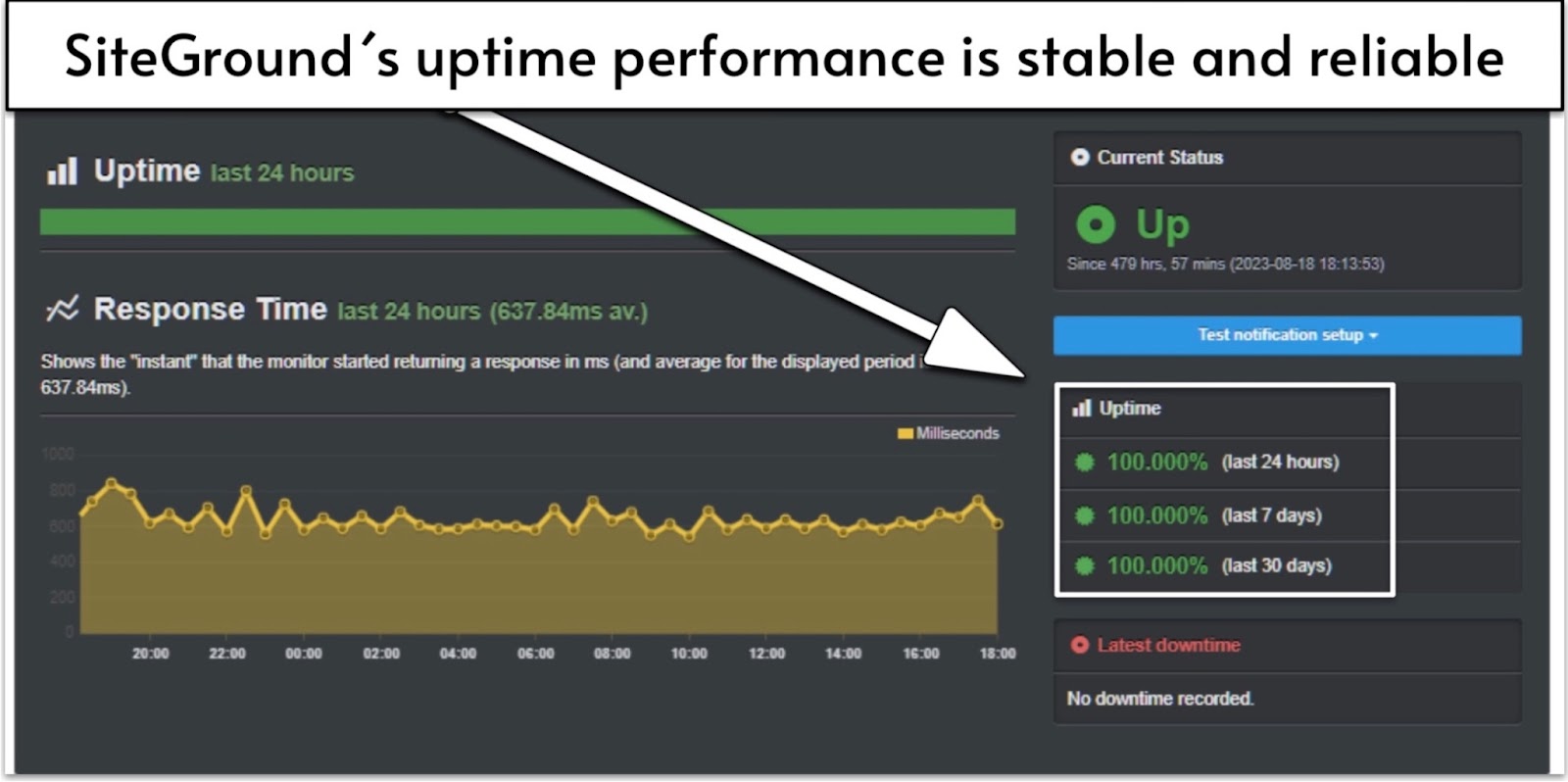
During our tests, SiteGround earned a solid A rating from GTmetrix, with load times that were mostly between 1–2 seconds. It also maintained 100% uptime over the full testing period.
GTmetrix
A week of tests with GTmetrix showed a fair amount of variance, but good overall performance
Our WordPress test site maintained fast and reliable speeds throughout the testing period. While results varied slightly across the week, the site consistently loaded in around 1–2 seconds, which is well within the optimal range for user experience and SEO.
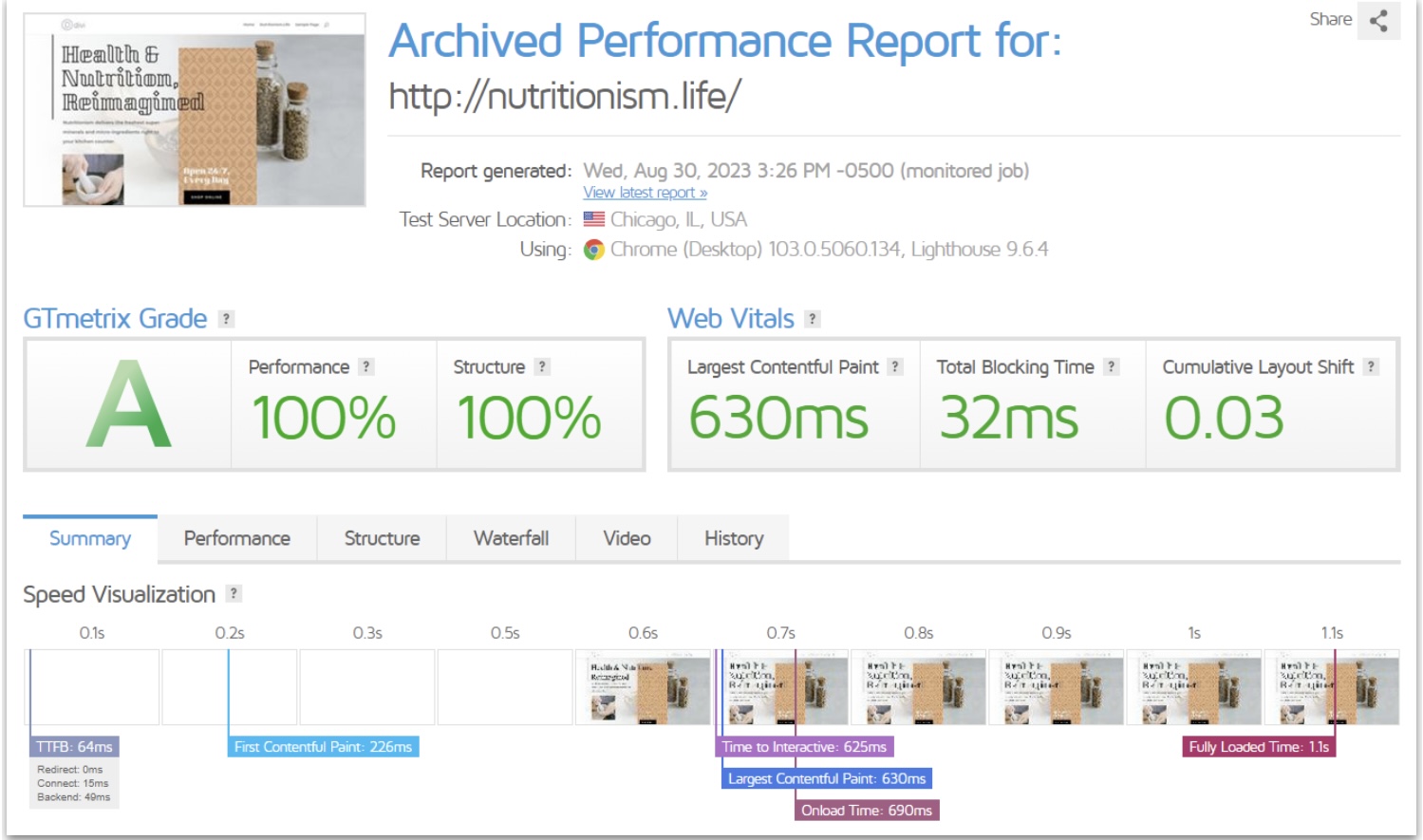
An ‘A’ for typical site performance from GTmetrix proves SiteGround still has what it takes
Our test site regularly pulled off 100% A grades from GTmetrix. This confirms that SiteGround’s current tech stack delivers the kind of speed and stability that makes it one of the most dependable hosts in its class.
UptimeRobot
Another solid 100% score delivered by SiteGround hosting was a bit of a surprise
When it comes to uptime, SiteGround guarantees 99.9%, but our results were even better. UptimeRobot recorded a 100% uptime score throughout the entire monitoring period, with no dips or interruptions detected.
Its Google Cloud setup, real-time monitoring, and built-in optimization tools kept the site running smoothly the whole time. This kind of reliability is great for small businesses, agencies, or WooCommerce stores that need their sites online around the clock.
4.8
Support
SiteGround Support Didn’t Disappoint – Almost
SiteGround provides several ways to get help, including live chat, phone, tickets, an AI search tool, and a detailed knowledge base. Support is available 24/7, and response times are generally fast once you reach an agent.
I tested both phone and live chat. On the phone, I called on a weeknight evening and was connected in under five minutes. The page displaying the phone number also showed my estimated wait time and a reference number, which made the process super clear. The agent helped me locate and activate the free CDN and explained everything in plain language. It was handled so efficiently that the entire call lasted about five minutes.
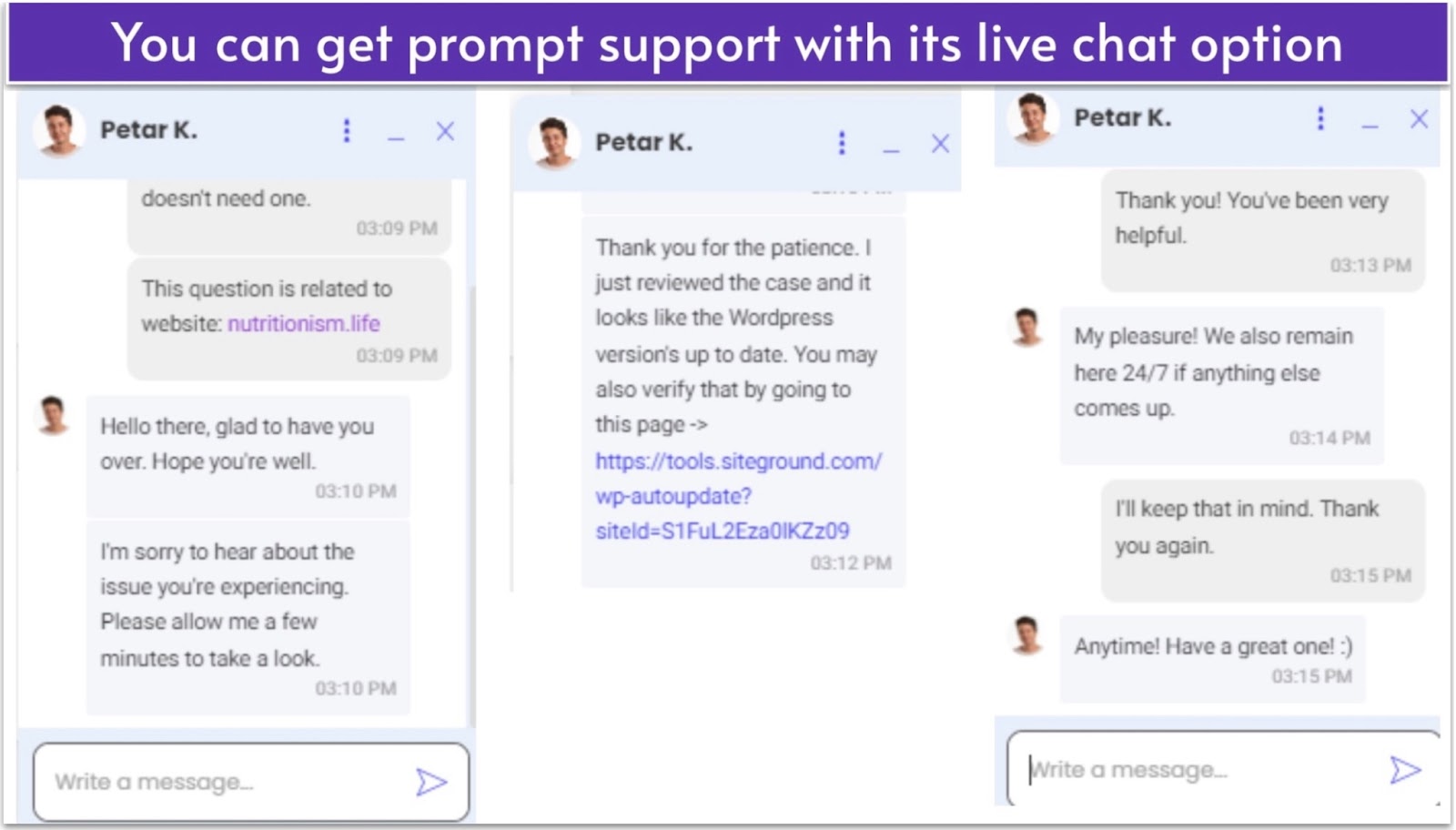
My live chat agent was helpful, friendly, and efficient. Can’t ask for much more, can you?
My experience with live chat was just as smooth. I reached out on a Tuesday to ask about repeated WordPress update prompts. Within four minutes, the agent checked my site and confirmed there were no issues. They were friendly, professional, and solved the problem right away.
SiteGround’s knowledge base also deserves credit. It includes clear articles, tutorials, and videos on its tools, which makes it easy to learn without contacting support. The AI assistant quickly directs you to the right resources, which is great for quick fixes.
The only drawback is that reaching an agent takes a few extra steps. The system guides you through automated suggestions and DIY options before showing live contact choices, and not every channel is always available. The short queues are nice, but the process can be frustrating when you just need direct help.
4.7
Pricing
Premium Performance Comes at a Price, but It’s Worth It
I’d heard SiteGround was one of the pricier hosting providers, and at first glance, I thought that wasn’t true. The introductory prices look great, especially when you commit to a longer term. A 24-month plan gives you the biggest savings, while shorter terms can cost up to ten times more per month. Renewals increase after the first term, but you can sometimes get a discount by contacting support directly.
From my experience, SiteGround offers excellent value for money, even when compared to top-rated budget hosts like Hostinger. The difference is that SiteGround includes more features in its entry-level StartUp plan, such as daily backups and a built-in CDN.
You also get unmetered traffic, unlimited databases, managed WordPress tools, and access to its custom dashboard with caching and security features. This makes the StartUp plan ideal for small businesses, agencies, or WooCommerce users who want consistent performance.
If you manage several sites or run an online store, upgrading to GrowBig or GoGeek adds staging, on-demand backups, and faster speeds. When your site outgrows shared hosting, you can switch to cloud hosting, which runs on the same Google Cloud infrastructure but scales to handle heavier traffic.
For the uptime and managed features you get, SiteGround’s pricing is fair – just plan ahead for those renewal rates. If you change your mind, there’s a 30-day money-back guarantee, so you can test it without risk.
SiteGround is a premium managed WordPress host built on Google Cloud, offering fast speeds, consistent uptime, and excellent support in one package. It’s ideal for small businesses, agencies, and WooCommerce users who want dependable performance with minimal maintenance.
The renewal prices are higher than entry-level hosts, but the strong performance, built-in security, and daily backups make it worth the investment.
FAQ
What’s the difference between SiteGround’s web hosting and WordPress hosting plans?
There’s no real difference between SiteGround’s web hosting and WordPress hosting plans. Both use the same infrastructure and tools, including daily backups and built-in caching. The only difference is, WordPress plans come pre-configured for WordPress, while the standard web hosting option lets you install any CMS or custom site you like.
Is SiteGround good for beginners?
Absolutely. SiteGround is one of the easiest hosts to get started with, thanks to its guided Setup Wizard, simple Site Tools dashboard, and beginner-friendly support. You don’t need to know anything technical to launch a website here, as SiteGround walks you through each step.
Is SiteGround a secure web host?
Yes, SiteGround takes security seriously. Every plan includes a free SSL certificate, anti-bot protection, a web application firewall (WAF), and the Security Optimizer plugin. It also performs daily backups and monitors your site 24/7, adding a strong layer of protection that most budget hosts don’t match.
Does SiteGround deliver good performance?
It does. Our tests showed an average load time of 1–2 seconds and 100% uptime during the monitoring period. SiteGround’s performance edge comes from its Google Cloud servers, Ultrafast PHP, and built-in CDN, which keeps speeds consistent for visitors around the world.
Does SiteGround support WooCommerce?
Yes, SiteGround fully supports WooCommerce and even offers specialized WooCommerce hosting plans. You get pre-installed WooCommerce, automatic updates, and caching optimized for online stores. Features like daily backups, staging, and CDN integration make it an excellent choice for growing e-commerce sites.
Who do we not recommend SiteGround to?
SiteGround isn’t the best fit if you’re on a tight budget or running a large, resource-heavy site that could quickly exceed shared hosting limits. Its renewal prices are higher than average, and while the performance justifies it, some users may prefer a more affordable starting point. In that case, Hostinger is a solid alternative for beginners or small projects.
Sara is a former Website Planet writer, specializing in writing about web hosting, domain registrars, and digital tools that help businesses get online faster. Before joining Website Planet, she spent over eight years as a freelance content writer and editor, working with more than 100 clients across SaaS, tech, and finance. She holds a BSc in Audit and Accounting. When she’s not reviewing hosting platforms, Sara is usually exploring SEO trends or enjoying her coffee.
Danielle is a former editor at Website Planet, with expertise in editing product reviews, comparisons, and roundups. She ensures that published content is up to date and easy to read. With over a decade of content marketing experience, Danielle is familiar with digital marketing tools, and she enjoys learning about technical SEO and experimenting with website builders. Outside work, she’s a novice vegetable gardener and a regular concertgoer.
Siteground is THE BEST and I recommend them to all my clients. Service, backups everything top notch in reasonable price.
Very sad that they are not going to provide services in India anymore.
Siteground ExpertCare really went above and beyond
I had multiple concerns that have been addressed by Siteground ExpertCare, and I wasn't clear enough about what I exactly wanted the first time I used them. I was thankful they took extra time to share what might work and were patient with me. They also kept me in the loop with screenshots and code so I knew how my site was being altered. I appreciated that they were so willing to dig deep and help. The site speed improved dramatically, and my site design was exactly what I had in mind. I thank the ExpertCare team at Siteground for helping me to improve my website in more ways than one! I look forward to using their services in the future. I appreciated that they also asked questions to further understand what I was looking for in my website. Thanks for being patient!
Our company has been using Site Scanner for several years now and today I was notified of malware. At first, I was very concerned as to how to remove the malware, but there were clear detailed instructions to follow and when I did run into an issue SiteGorund support was there to assist and fix the issue. I highly recommend using Site Scanner.
When our site went down because the storage was maxed out, I put in a ticket, and the issue was resolved in less than 15 minutes. Daniel Stoychev handled the case by removing a file that was taking up a lot of space and sending detailed instructions and suggestions about how to make changes to prevent this from happening again! I was very impressed with the fast service and relieved to have our site back up and running so quickly!
Amazing customer service;Might have saved our business
We cannot say thank you enough! Within one hour our site was up and running again. This was after months of trying to fix an unknown issue on our own. We will continue to sing our praises to everyone we know about the incredible team that siteground employes in both customer service and tech support. Thank you all!
Family sharingMulti User SharingExpert SupportBackupSmart syncPersonal SolutionBusiness SolutionTeams optionsOffline foldersFile history and recoveryRead more reviews
 Website Planet