Running a construction project is like juggling blueprints, budgets, and inspection deadlines – all while standing in the middle of a noisy job site. Too often, construction teams are stuck digging through email chains for critical RFIs or struggling to access updated plans when they’re out in the field. Without the right tools, miscommunications pile up, schedules slip, and costs spiral.
To cut through the noise, I’ve tested the leading free construction project management software for scheduling, document control, and mobile functionality. My goal was to find solutions that help contractors and site supervisors keep every moving part in sync.
One standout is monday.com, which delivers the tools to keep your projects on time and under budget. Its built-in document builder makes it easy to update and share punch lists and change orders without juggling multiple apps. And with its fully featured mobile app, crews can pull up plans, track progress, and log issues directly from the job site.
Test out monday.com for free or read on to discover my other top choices for streamlining construction operations.
Short on Time? These Are the Best Free Construction Project Management Software in 2026
- monday.com – Built-in document management and a feature-rich mobile app for easy communication and on-site access.
- Smartsheet – Flexible spreadsheets and built-in tools for tracking daily progress and RFIs.
- Teamwork – Robust tools for tracking time and budgets, plus free collaborator seats.
What We Look For in Free Construction Project Management Software
In my testing, I focused on specific features to evaluate the effectiveness of free construction project management software for small-to medium-sized construction firms.
- Document storage. Centralized, cloud-based storage ensures crews always have access to the latest blueprints, safety protocols, and material specs. This eliminates mistakes caused by outdated plans and reduces downtime hunting for paperwork.
- Mobile functionality. A robust mobile app allows foremen, site supervisors, and subcontractors to update progress, report issues, and access project data from anywhere on site. That way, field and office teams can stay connected in real time.
- Compliance tracking. Built-in compliance tools help monitor key requirements like safety inspections, environmental permits, and regulatory deadlines. It reduces the risk of fines or costly rework due to overlooked requirements.
- Budgeting and cost tracking. These features are essential for managing project expenses and staying within budget. They ensure that construction firms can monitor their financial health and make informed decisions.
- Reporting. The platforms on my list come with efficient reporting tools. These provide valuable insights into project performance and areas for improvement.
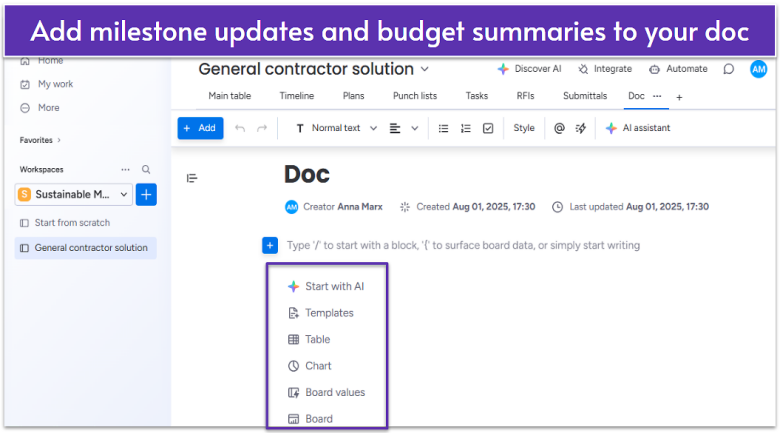
monday.com’s free plan allows up to two users and includes three boards for tracking projects. It also provides over 200 templates, including construction-specific options like construction project tracking and general contractor management.
The free plan gives you access to Workdocs, a built-in document builder to store blueprints, permits, and safety protocols in one place. Field teams and subcontractors can co-edit in real time, and you can embed live project data like Gantt charts to reflect the latest project status. You can even turn notes like job site reports into board tasks without leaving the doc.
While monday.com’s free plan works great for small teams, it lacks integrations and time tracking. For larger teams, I recommend using the 14-day free trial to try the Pro plan. You’ll get AI tools and automations to save time on repetitive tasks, as well as 20 GB of file storage and the ability to add unlimited users.
Features
- Mobile app. monday.com’s mobile app ( iOS and Android) lets you update tasks, add comments, and track time. On iOS, you can sync tasks with your phone’s calendar and view completion progress in the Battery view.
- Over 20 column types. Customize your construction project boards with over 20 column types. For example, you can add a “status” column to track task progress, or a “priority” column to sort competing assignments.
- monday AI. On all paid plans, you get access to monday AI, a set of AI tools to help streamline your workflows. For instance, you can use AI to summarize site reports, allocate crews, or set reminders about upcoming inspections.
- Multiple project views. The free plan includes Kanban (tasks as cards on a board) view, Files view to see all uploaded files per board, and Form view for collecting input via forms.
Read our expert monday.com review for more details.
| Free plan limits | Two users, three boards, 500 MB of storage, no automations or integrations |
|---|---|
| On-site mobile access | ✔ |
| Integrations with construction tools | Procore; SiteDocs, Fluix, and Buildbite (via third-party apps) |
| Starting price | $9.00 |
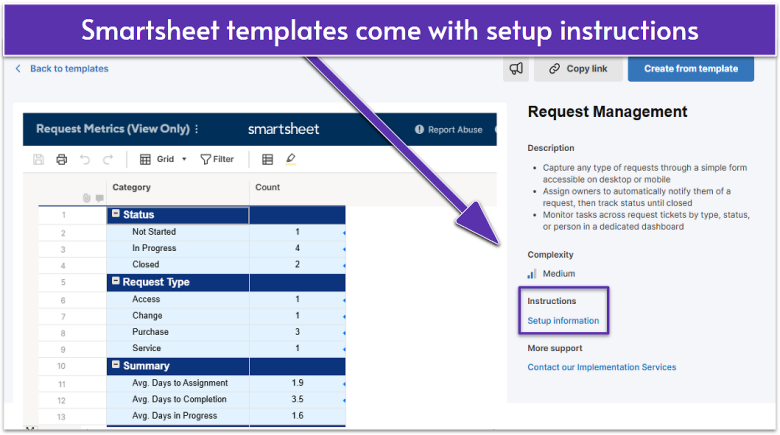
I found Smartsheet particularly effective at managing complex construction projects due to its simple grid-based interface. It resembles familiar spreadsheet tools, only with more power – letting you scan, sort, and evaluate large amounts of data at once.
Smartsheet’s spreadsheet-style flexibility makes it easy to track RFI (Request for Information) documents. For instance, you can build an RFI tracker with columns like Requestor, Subject, and Response Date and attach related documents, like photos and correspondence, directly to each row. Also, you can set up alerts when an RFI is assigned or approaching its due date, keeping communication clear and deadlines visible.
Smartsheet doesn’t have a free plan, but it offers a 30-day free trial of its Business plan, which includes a document builder, activity log, and workload tracking. Unlike monday.com, Smartsheet makes AI tools available only on its most expensive plan. Still, the Business plan includes 1 TB of attachment storage, which is ideal for big projects.
Features
- File library. Smartsheet’s file library serves as a central hub for storing and collaborating on project-related files. Office staff and field teams can add comments and annotations to drawings or videos to highlight specific areas and provide context.
- Offline mobile access. Smartsheet’s mobile app lets you edit sheet data, upload photos, and view documents. You also get offline access to forms, so crews can submit daily job site reports, before/after project shots, evidence of completed work, and more.
- Activity log. This feature lets you see recent changes like views, edits, and comments on a specific item. It helps you get a clear view of updates like change orders, inspection results, or punch list completion.
- Automated workflows. On all plans, you get access to automations to save time on routine tasks. For instance, when an RFI is submitted, it’s automatically routed to the right project manager or engineer for review.
See our expert Smartsheet review for more information.
| Free plan limits | No free plan, but there is a 30-day free trial |
|---|---|
| On-site mobile access | ✔ |
| Integrations with construction tools | Procore, others available via third-party connectors |
| Starting price | $9.00 |
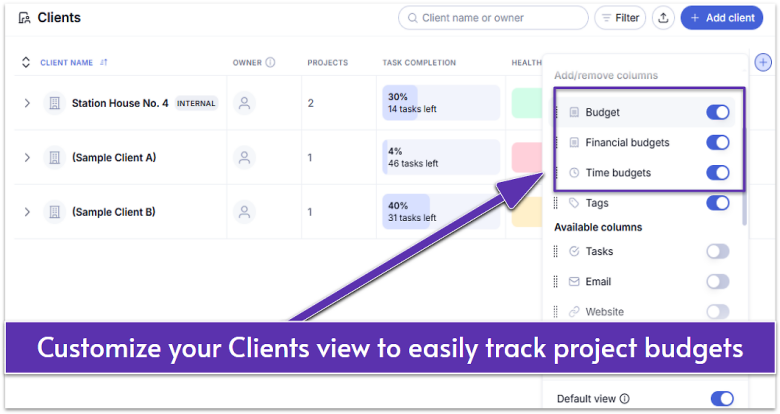
Teamwork’s client company management tool allows you to track all client-related information in one place, similar to a CRM. You can manage contact details, track project progress, and view metrics for each client. Teamwork’s built-in time-tracking (available on the free plan) makes it easy to log billable hours and keep costs under control.
On Teamwork’s free plan, you can set up task dependencies to coordinate multiple teams, such as electricians and plumbers. Dependencies clearly show when each crew should start, reducing downtime. You can also monitor progress through milestones, which act as key checkpoints (e.g., “Foundation complete” or “Roof installed”).
While Teamwork’s free plan includes AI tools and automations, you’ll need to upgrade to access the collaborative document management. Still, as your business grows, the paid plans are worth considering. For instance, upgrading to Teamwork’s Grow plan gets you advanced reporting tools and more automations, offering good value.
Features
- Free collaborator seats. Even on the free plan, you can create unlimited free collaborator accounts. This means you can bring external stakeholders like architects and suppliers into the project workspace with no extra cost.
- Flexible invoices. Teamwork lets you create invoices based on billable hours logged, fixed prices, or expenses incurred during a project. You can easily export invoices to your preferred accounting software, such as QuickBooks or FreshBooks.
- My Calendar. This free feature helps keep on-site staff and managers in sync. Everyone can see their own tasks and assigned site visits in one place. You can also add dates for subcontractor visits and inspections so they don’t get missed.
- Progress tracking. Teamwork’s Planned vs. Actual and Time and Progress reports compare estimated vs. actual completion times. This can help you improve future project planning and bidding accuracy.
Read our in-depth Teamwork review for more on reporting tools.
| Free plan limits | Up to 5 users, up to 5 projects, 100 automation actions per month |
|---|---|
| On-site mobile access | ✔ |
| Integrations with construction tools | ✘ |
| Starting price | $19.99 |
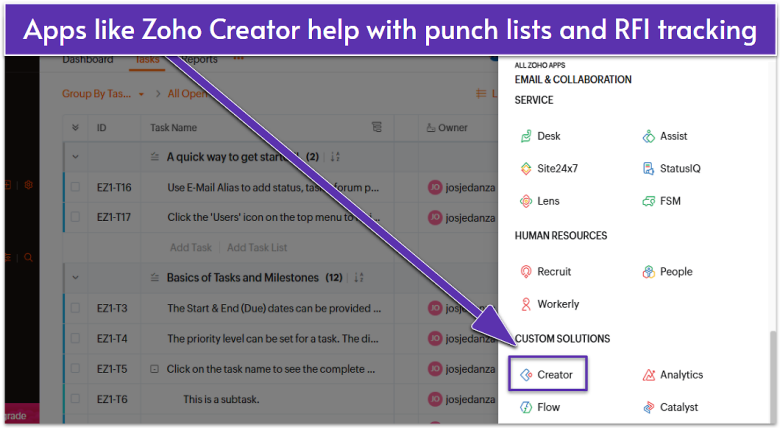
Zoho Projects’ biggest plus is the ability to integrate with other apps from the Zoho suite, streamlining all your construction processes. Even on the free plan, you can add Zoho CRM to automate workflows like quote approvals. You can also add Zoho Meetings for virtual site inspections and training sessions, among other things.
Zoho Projects offers Gantt charts and various reporting tools to help you stay on track. For instance, you can use the Critical Path feature to view the longest sequence of dependent tasks on a Gantt chart, with critical tasks colored in red. Then, with Zoho Projects’ Strict Project feature lets you can lock project deadlines so teams can’t move forward without completing key tasks first.
While it isn’t as intuitive as Teamwork, Zoho Projects offers plenty of functionality at low prices. The free plan includes task management and document sharing, but even the cheapest plan gives you access to time tracking and blueprints. You can try out all paid plans with a 15-day free trial.
Features
- Blueprints. This feature lets you design step-by-step workflows for project tasks. You can use the drag-and-drop editor to set task statuses and assign team members for each stage, from planning to inspection.
- Issue tracker. With this tool, you can log and monitor problems such as safety hazards and material delays. You can also set up automated alerts to keep stakeholders informed about issues or updates.
- Workload report. On Zoho’s Premium plan, you get access to workload reports. These show how tasks are distributed among team members, helping managers balance assignments across crews and subcontractors.
- Zia Insights. Available for free, Zia, Zoho’s AI assistant, analyzes project data to provide insights and recommendations, such as predicting delays or identifying resource bottlenecks.
Want to learn more? Read our expert Zoho Projects review.
| Free plan limits | Up to 5 users, 3 projects, 5GB of storage, basic task/issue reports |
|---|---|
| On-site mobile access | ✔ |
| Integrations with construction tools | Procore via Zapier |
| Starting price | $4.00 |
5. Jira: Adaptable Software for Construction Design Changes
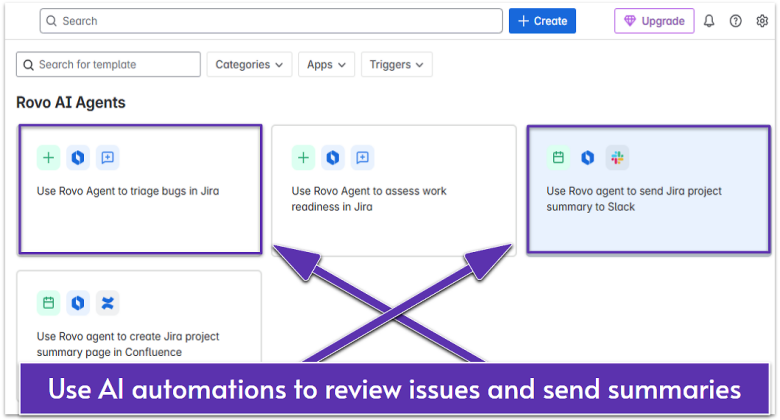
Jira’s Agile methodology associates workflows with specific “issues” (tasks), making it well-suited for projects with multiple stages. Construction teams can use Jira for logging and prioritizing on-site problems, such as delivery delays or design change requests. Also, thanks to Jira’s short cycles (sprints), even if a building design changes mid-project, teams can quickly re-prioritize tasks and shift resources without disrupting the overall plan.
I was really impressed by Jira’s integrations. Even on the free plan, you can access over 3,000 free and paid apps to streamline your work. For instance, you can add construction-specific tools like PlanGrid for digital blueprints and Fieldwire to keep up with on-site progress.
Jira’s free plan is quite generous, allowing up to 10 users and unlimited projects. You also get access to automations and multiple project views, which is a good offer for small construction businesses. However, you’ll have to upgrade to a paid plan to set user roles and permissions.
Features
- Automation library. Jira can automatically trigger actions when certain conditions are met. For example, if a site safety inspection task fails, Jira sends a Slack or email alert to the safety officer and project manager.
- Confluence. Like Jira, this collaboration platform is a part of the Atlassian suite of products. You can seamlessly integrate it into your Jira account to store important documents and share information.
- Free project views. Jira offers Kanban boards, Gantt charts, and timelines, which work well for managing construction projects. The Backlog view is particularly useful for staying on track, as it shows the tasks you want to do in the future.
- External access. On the Standard plan and up, you can let stakeholders or clients view or create tasks without logging in, facilitating communication.
Check out our in-depth Jira review to learn more about the Jira environment.
| Free plan limits | Up to 10 users, 2GB of storage, 100 monthly automation rules, 100 monthly emails |
|---|---|
| On-site mobile access | ✔ |
| Integrations with construction tools | Procore, PlanGrid / Autodesk Build connectors, Fieldwire |
| Starting price | $7.53 |
6. ClickUp: Robust Collaboration System to Keep Teams in Sync
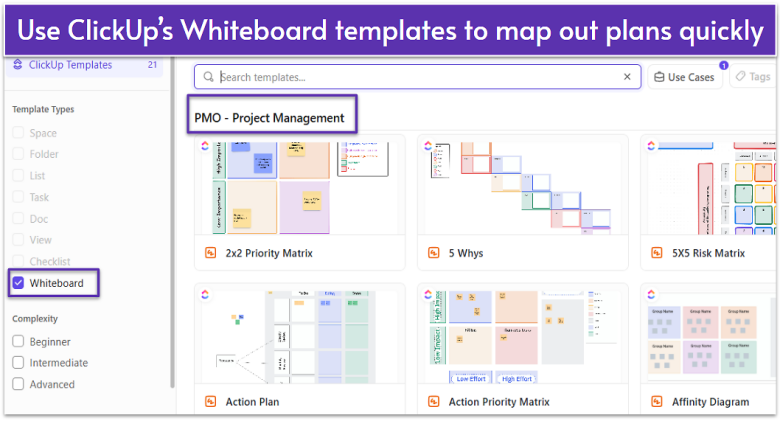
ClickUp’s Whiteboards feature acts as a central, visual space to map out projects and timelines. You can use it to sketch site layouts, link tasks to specific project phases, and collaborate on design changes instantly. Whiteboards integrate directly with ClickUp tasks, so any updates made on the board can be turned into actionable to-dos.
While Whiteboards focus on visual planning, ClickUp’s Docs help you organize project information that teams can reference anytime – whether in the office, on-site, or in client meetings. You get real-time editing, version history, and permission controls to ensure everyone is working from the most up-to-date documents.
ClickUp lets you add unlimited users on the free plan. Still, there are some limitations. For instance, you can’t control guest permissions, meaning clients or collaborators get full access to your projects. Upgrading to paid plans provides more functionality, but there’s a learning curve – ClickUp’s sheer number of features can make its interface overwhelming for beginners.
Features
- Bulk action toolbar. ClickUp lets you quickly update, assign, or move multiple tasks at once. This saves time when managing large project schedules, change orders, or subcontractor assignments.
- Task checklists. This feature lets you break down complex construction activities into smaller, trackable steps, such as site prep, inspections, and material delivery. You can start from scratch or use a checklist template from the Project Checklist library.
- Proofing. Construction teams can mark up and comment directly on blueprints, design mockups, or site photos, streamlining review and approval.
- Timesheets. Even on the free plan, you can track billable and non-billable hours across different crews and job sites. Timesheets allow project managers to monitor labor costs in real time.
For more pros and cons, see our in-depth ClickUp review.
| Free plan limits | 60 MB of storage space, 60 uses of Gantt chart, 3 Whiteboards |
|---|---|
| On-site mobile access | ✔ |
| Integrations with construction tools | Procore, Autodesk Build |
| Starting price | $7.00 |
Other Notable Free Construction Project Management Software
If you’re still unsure which free construction project management software to choose, here are a few options that might be a good fit for your business.
7. HubSpot
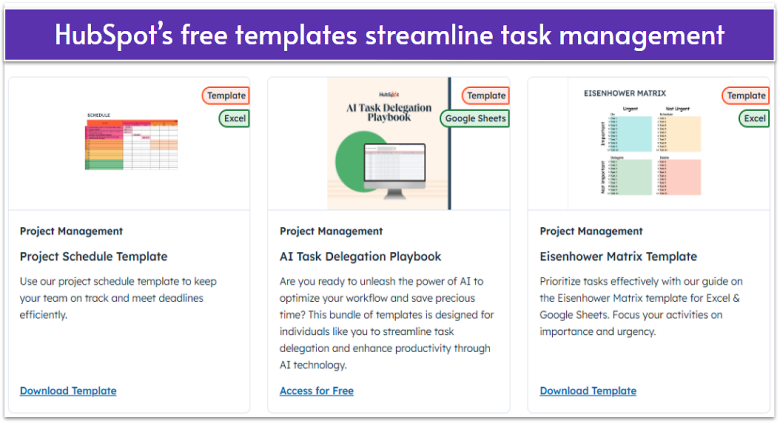
HubSpot offers a range of free built-in project management tools as part of its different software suites, or “Hubs.” For that reason, HubSpot is best for teams that plan to use its suite of marketing, sales, or service tools.
One nice perk is that you can create custom fields to track onboarding details, like training materials or key stakeholders’ contact information. However, it’s worth noting that HubSpot lacks features like Gantt charts, forecasting, and project budgeting, which could be a dealbreaker for some construction teams.
8. Striven
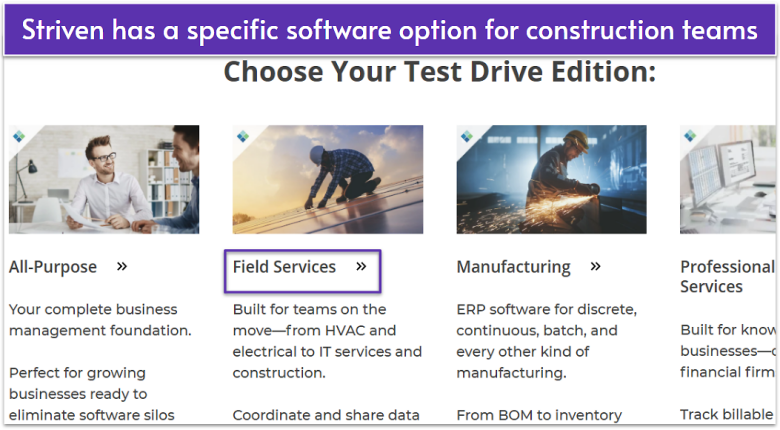
Striven integrates project management with CRM, accounting, and HR tools, so it’s well-suited for construction firms seeking a comprehensive business solution. It enables seamless management of various construction business aspects within a single platform.
The built-in time tracking and invoicing features are particularly useful for managing project costs. However, Striven can be challenging to navigate if you’re not familiar with integrated business management systems. Plus, its lack of a free plan (7-day trial only) isn’t ideal for small-scale contractors.
9. TeamGantt

TeamGantt’s intuitive Gantt chart capabilities make it great for visualizing construction project timelines. You can easily create, assign, and edit project plans. You also get features like task-level tags and milestones to help keep projects organized.
TeamGantt’s free plan only allows up to three users and one project, so if you want to continue using it for future projects, you’ll have to upgrade. Just bear in mind that features like custom boards and project health reports are only available as paid add-ons, which can result in a higher cost than with other similar software.
10. Bonsai

Bonsai is tailored for self-employed contractors and small teams. It includes task management, contract handling, and payment tracking. You can manage projects, track time, and handle invoicing all in one place.
On the other hand, Bonsai’s limited collaboration features make it less suitable for larger construction teams. While the platform excels in handling freelance-specific needs, it may lack some of the advanced project management features found in other tools.
These Are the Best Free Construction Project Management Software
If you’re a site supervisor with a limited budget, it can be challenging to find a free solution that streamlines operations and keeps every stakeholder on the same page. You need a tool that is packed with essential features, like document control, budgeting capabilities, and mobile functionality.
The best overall solution is monday.com. Its document management system makes it easy to collaborate with teams, and thanks to a fully functional mobile app, you can do it on the go.
Alternatively, use Smartsheet if you handle big projects. Smartsheet offers spreadsheets to help you analyze large chunks of data quickly. It’s particularly useful for tracking RFIs, and its mobile app lets you submit forms even when you’re offline.
Or, go with Teamwork to improve client management. You can monitor your budgets, expenses, and invoices from a single place and add unlimited collaborators for free.
| Free Plan | Free Trial | Best Feature | Best For | Starting Price | ||
|---|---|---|---|---|---|---|
| monday.com | ✔ | 14 days | Collaborative document builder | Construction teams looking for document management and mobile access | $9.00 | |
| Smartsheet | ✘ (free trial only) | 30 days | Powerful spreadsheets | Construction teams handling complex projects | $9.00 | |
| Teamwork | ✔ | 30 days | Free collaborator seats and built-in client tools | Construction businesses focusing on client management | $19.99 | |
| Zoho Projects | ✔ | 15 days | Proprietary suite of apps | Construction teams looking for an integrated ecosystem | $4.00 | |
| Jira | ✔ | 7 days | Extensive integrations | Construction teams looking to coordinate short-term project phases | $7.53 | |
| ClickUp | ✔ | 14 days | Detailed task management | Construction teams in need of project planning tools | $7.00 |