
Most DIY website builders promise the same thing: that they’ll help you build a site quickly without needing to code. But when you actually try them, the problems show up fast. You spend hours setting up a site, only to discover you can’t change the layout, you’re forced into a clunky template, or the “free” plan hides basic features behind pricey upgrades.
I’ve been there – and that’s why I tested the most popular DIY builders that let you build your site from scratch. The result is a list of 10 platforms that actually deliver: they’re easy to use, beginner-friendly, affordable, and flexible enough to make you a website you’re proud of.
Out of all of the web builders I tested, Wix proved to be a powerhouse. It combines drag-and-drop simplicity with enough creative control to build almost any type of site. You can try Wix for free or read on to find the builder that has the best features for your business or personal brand.
Short on Time? These Are the Best DIY Website Builders in 2026
What We Look For in the Best DIY Website Builders
These are the features I focused on when testing dozens of popular website builders to find the best do-it-yourself services.
- Good templates. If you’ve decided to build your own website, you need a great foundation. Some builders on this list offer more templates than others, but all of them have good-looking and mobile-responsive options.
- Ease of use. Every DIY builder should have an intuitive interface that makes it easy for beginners to create an attractive, functional website. Each site builder on this list qualified as “beginner-friendly” in my testing.
- Helpful customer support. Responsive customer service is essential, especially for those with limited experience. Phone or live chat is best, but email support is also okay. I tested the customer service of each builder here.
- SEO and marketing tools. Even a builder’s free or least expensive plan should have basic tools to boost your website’s placement in search results, tell you how visitors interact with your content, and help you connect with your audience. All builders here offer some form of this.
- A free plan or trial. You should be able to test the service before committing. A free plan is best, but a free-trial period or a money-back guarantee will do.
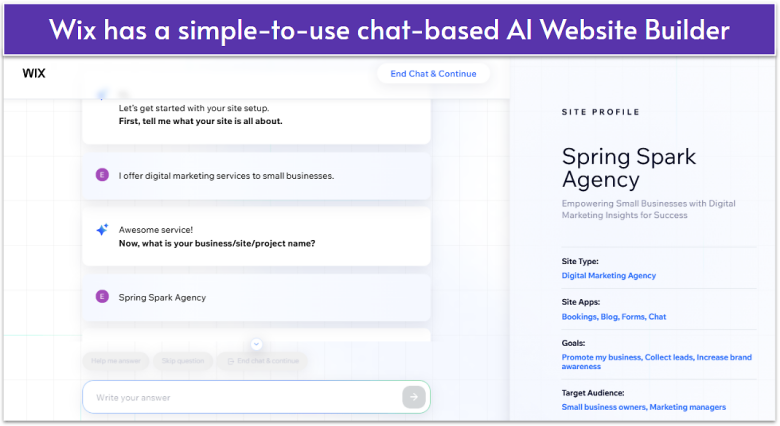
Wix gives you 2500+ high-quality templates (plenty of blank options and ones that are mobile-optimized depending on what you want). Best of all, Wix’s free plan lets you access all templates and editing tools. This includes access to its AI website builder that lets you set up a custom site just by answering a few simple questions.
Most Wix templates have essential features already built-in, from contact forms to menus. Of all the website builders I’ve tried, Wix offers the most flexible drag-and-drop editor. You can fine-tune every detail and freely add, move, or stack elements in any arrangement you like.
Having so many options may be overwhelming for some, but Wix’s editor and well-made templates keep things as user-friendly as possible. That’s why Wix is a great all-around editor, whether you’re a beginner or someone with advanced needs.

Save up to 50 % on your Wix plan!
Sign up for an annual plan and enjoy the savings.
Plus get a free custom domain for 1 year!
Features
- Wix Stores. Wix Stores is an easy-to-use app that lets you connect an online store to your site. You can install it for free with a Business subscription, and it’s a great option if you have a small selection of products to sell.
- Personalized SEO plan. Wix SEO Setup Checklist analyzes your website and creates a personalized plan to help you optimize your site for search engines and boost visibility.
- App market. All plans can use Wix’s app store, which offers easy access to hundreds of (paid and free) third-party tools. Any additional functionality can be found there, from apps for selling event tickets to live chat apps for connecting with clients.
- Advanced business solutions. Ascend is a suite of business tools that includes a CRM, email marketing, an invoice generator, and a video maker. All accounts come with a free Ascend plan, but you’d need to upgrade for its full power.
Read our expert Wix review for more details.
| Free plan available | ✔ |
|---|---|
| SEO and analytics tools | ✔ |
| Type of customer service | Support center, 24/7 callback support line |
| Starting Price | $17.00 |

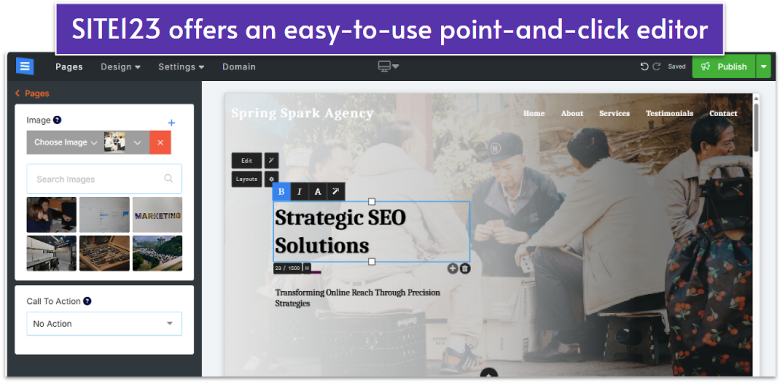
SITE123 is all about speed and simplicity. Its free plan lets you launch a site in minutes using one of 80+ responsive templates, organized into 10 different categories, like business, blog, restaurant, etc. Each template comes with features relevant to its niche, to make it even easier to get your site online quickly. For example, the templates with artists in mind come with sleek gallery elements for showcasing artwork.
SITE123’s editor features four menus – Pages, Design, Settings, and Domain. Selecting any option opens its specific tools in a panel on the left. Once you’ve picked a template, the point-and-click editor is incredibly user-friendly. Simply hover your cursor over a design element – like your site’s header or an image – click, and make your changes.
Overall, from my tests, SITE123 is arguably the simplest DIY website builder to use. However, while you can add new page elements as needed, the basic layout of your site is mostly fixed. But if you prioritize ease of use, or need to get online quickly, SITE123 can’t be beat.

Get 40 % OFF SITE123
Save 40 % when you sign up for SITE123's annual plan
Features
- Plugins. You can integrate dozens of third-party tools with your website. SITE123’s plugin selection isn’t huge, but all the basics are there – like Twitter, Facebook, and Pinterest conversion tracking, or SEO tools like Google Search Console.
- Easy contact forms. SITE123 has several pre-built forms, so you can easily swap out your template’s offering if you don’t like it. Plus, you can use the custom form builder to make something perfectly tailored to your business.
- Advanced language tools. SITE123 lets you display your site in up to five languages, which is quite handy if you want to attract an international audience. Also, you get built-in multilingual SEO features to help you rank higher on search engines in your chosen language(s).
- Booking and reservations. The schedule booking tool lets your clients book appointments online, and the reservations tool makes it easy for customers to reserve seats at your establishment.
Learn more from our in-depth SITE123 review.
| Free plan available | ✔ |
|---|---|
| SEO and analytics tools | ✔ |
| Type of customer service | 24/7 live chat support |
| Starting Price | $12.80 |
3. Webador: Excellent Visitor Engagement Tools
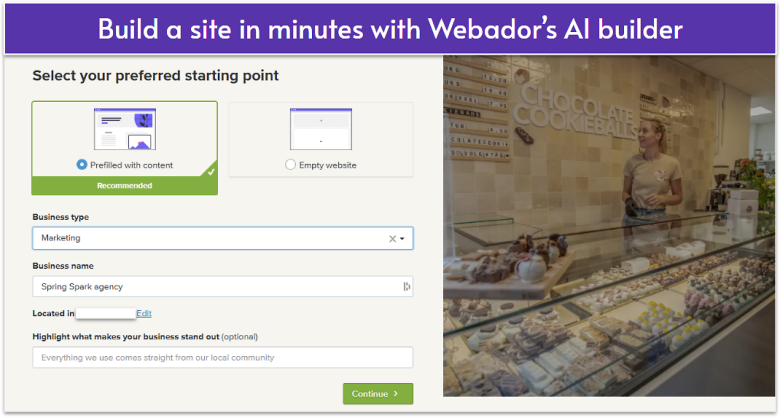
Webador has a very intuitive drag-and-drop editor, which makes it a great choice for beginners who want to create a website quickly. Every element you place onto your page automatically snaps into a grid, ensuring visual clarity without any extra work. In my opinion, one of Webador’s strongest points is its direct communication tools, such as a five-star rating system and comment box.
The free plan is surprisingly generous: unlimited image storage, access to all templates, and blogging tools included. Plus, rather than spending time tweaking an existing template, Webador’s AI can automatically fill in content using a few basic details. Just tell it what you’re looking for and it’ll generate a professional site for you in minutes.
That said, if you aren’t a beginner and want detailed and specific ways to change your website, Webador might not meet your needs. It’s simple and straightforward, but that comes with limits on how much you can tailor your site’s look.
Features
- Built-in file-sharing and media-streaming widgets. Webador includes its own video and audio players, designed to integrate seamlessly with your website. If you’re a part of a team, Webador’s document-sharing system will allow you to easily collaborate with others.
- Intuitive blogging. Webador’s beginner-friendly what-you-see-is-what-you-get (WYSIWYG) blog editor lets you easily create compelling posts and keep your audience up-to-date about your upcoming projects.
- Free stock images. If you don’t have your own images ready, Webador gives you free access to its library of over 100,000 professional stock photos you can use to elevate your site’s look.
- Easy SEO to grow your traffic. Webador makes it easy to adjust your SEO settings, which can improve your site’s rankings. You can modify individual page titles and meta descriptions as well as choose whether you want them to be indexed by Google search by simply toggling a button.
Read our in-depth Webador review to learn more.
| Free plan available | ✔ |
|---|---|
| SEO and analytics tools | ✔ |
| Type of customer service | Email/ticket system |
| Starting Price | $5.00 |
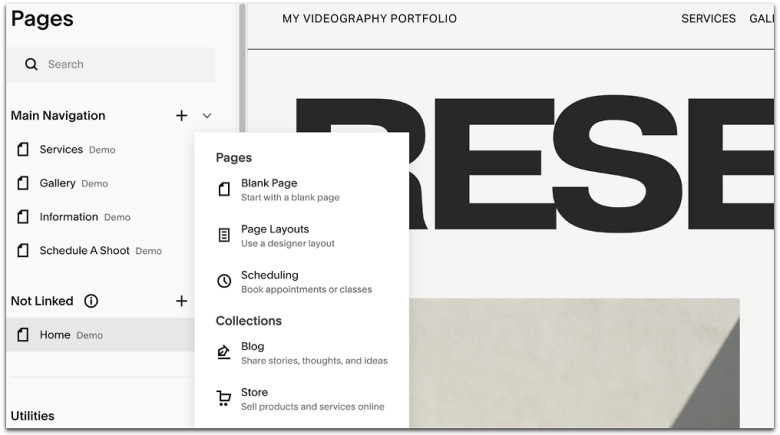
Squarespace’s easy-to-edit templates live up to the hype. Almost every Squarespace template comes with a striking portfolio or gallery you can use to show off your artwork, projects, or products. You choose from four different layouts – carousel, grid, slideshow, or stack – and customize elements like spacing or add interactive elements.
What makes Squarespace stand out is how quickly you can create a site that looks professional, with or without its Blueprint AI website builder. The drag-and-drop editor is beginner-friendly, and since the templates are polished from the get-go, you won’t spend hours tinkering with the design.
Beyond looks, Squarespace gives you unlimited bandwidth and storage on all plans and a strong suite of built-in e-commerce tools such as product catalogs, payment processing, and scheduling. However, Squarespace is pricier than free builders like Wix and you’ll need a paid plan to publish your site.


Save up to 36 % on your Squarespace plan today!
Plus get a free domain for one year!
Features
- Built-in photo editing. You can adjust an image’s brightness, contrast, color saturation, and aspect ratio. You can even change the focal point and add a lightbox effect.
- Premium integrations. Squarespace can seamlessly connect with dozens of third-party extensions like ShipStation and QuickBooks, making it easier for you to manage your business.
- Scheduling. Acuity Scheduling helps your clients and gives you time to focus on your business. Your clients can check appointment availability and book time slots, and you can sync appointments to your Google, iCloud, or Office 365 calendar.
- Blogging tools. Squarespace can help you build a stylish blog that engages your audience and helps with SEO. Its beginner-friendly interface allows you to easily save drafts, categorize and schedule posts, and enable reader comments.
Check out our full Squarespace review for more.
| Free plan available | No, but there is a 14-day free trial |
|---|---|
| SEO and analytics tools | ✔ |
| Type of customer service | Live chat support, 24/7 email support |
| Starting Price | $16.00 |
5. Hostinger Website Builder: Build a Professional Site With the Help of AI
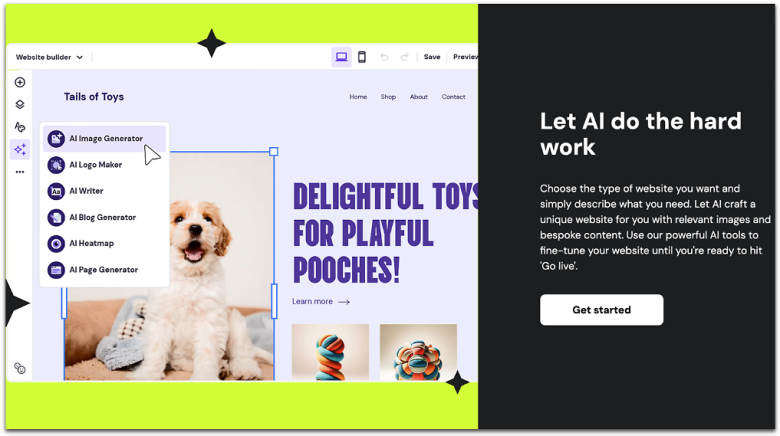
Although many website builders have AI tools, Hostinger is one of the few to offer a complete AI suite with every plan. Based on my experience, the blog title generator and AI writer (for keyword-rich content) produce the best results.
Hostinger’s user-friendly interface and back-to-basics approach help you create a functional website, even if you’re inexperienced. The site setup checklist tool helped with tasks like editing headings, uploading images, and adjusting paragraph text. Hostinger is more affordable than some of the builders on this list and is better for lower-budget projects.
Still, Hostinger lacks some customization power and it integrates with few third-party services (fewer than 10). It’s a good option for basic websites, but if you want more creative power and additional functionality, you might need to look elsewhere.
Features
- Drag and drop editor. Hostinger lets you place elements anywhere on your site, including text, buttons, or images. Plus, if its premade sections aren’t to your liking, you can create your own.
- Online store functionality. By clicking “Online Store” in its editor, Hostinger allows you to easily add up to 500 products, manage orders, enable bookings, and create categories.
- Guided tour. Unlike other website builders I’ve reviewed, Hostinger takes ease-of-use one step further and takes you through the entire setup and building process step-by-step.
- Fully functional mobile editor. In addition to mobile responsive templates, Hostinger lets you edit your site via your smartphone. It feels like a mobile app that allows you to use its AI features, blog editor, and advanced analytics.
Want to learn more? Read our expert Hostinger review.
| Free plan available | ✘ |
|---|---|
| SEO and analytics tools | ✔ |
| Type of customer service | 24/7 live chat and support |
| Starting Price | $2.99 |
6. IONOS Website Builder: Most Affordable DIY Builder
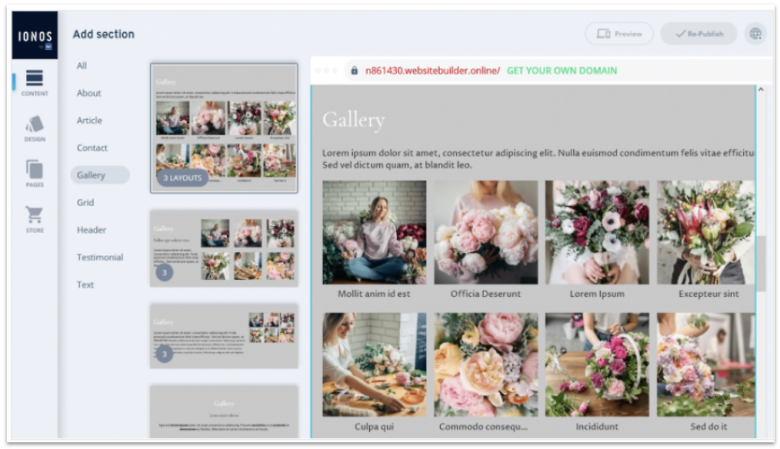
IONOS is one of the cheapest ways to get a professional site online fast. It works great for getting a simple, professional website online with minimal hassle. If you’re in a hurry, you can use its AI Website Builder to generate a fully customizable website for you in minutes with just a few simple prompts.
Or, if you want to design your website the old-fashioned way, you can pick one of IONOS’s prebuilt templates and customize it to fit your needs. IONOS has an intuitive interface, but its customization scope is limited, making it best suited for beginners who don’t want to dwell too much on website design.
All IONOS plans include domain registration and email hosting, which can save you a lot of money. It also comes with solid SEO tools and reliable performance, so even on a budget, you’re not missing out on the essentials. That said, I often had trouble reaching my assigned support agent and ended up using live chat instead, which wasn’t as helpful.
Features
- Online store builder. Higher-tier plans include e-commerce features like product catalogs, shipping integrations, and secure checkout.
- Analytics dashboard. IONOS gives you insights into your site’s performance, helping you track visitors, traffic sources, and engagement.
- Multilingual support. You can easily create websites in multiple languages, which is especially helpful for global businesses.
- SSL certificates. All plans come with free SSL, giving your site an automatic layer of security and boosting trust with visitors.
Want to learn more? Check out our full IONOS Website Builder review for more.
| Free plan available | ✘ |
|---|---|
| SEO and analytics tools | ✔ |
| Type of customer service | Live chat and 24/7 phone support |
| Starting Price | $1.00 |
7. Shopify: All-in-One Online Store Builder
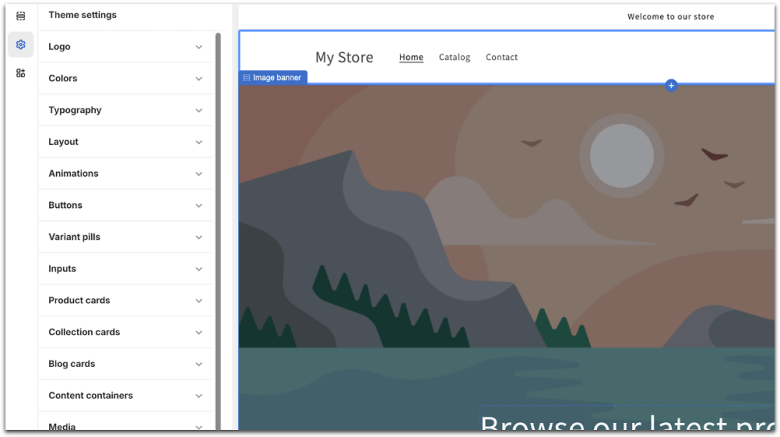
If you’re looking to build a fully-featured online store without grappling with a steep learning curve, Shopify is hard to beat. From adding products to your store to setting up payment methods, Shopify’s straightforward interface makes it easy to launch and manage your business.
Shopify also offers plenty of high-quality, mobile-responsive themes, suitable for various industries. Themes have handy features built-in, such as image slideshows to put your products in the spotlight, countdown timers to generate excitement before sales, and sticky headers for easy navigation. These features don’t come cheap though, as Shopify’s designs can be quite pricey.
That said, while Shopify’s prices may be on the higher side, even the cheapest plan offers good value. You’ll get features such as unlimited products, multi-channel selling, and abandoned cart recovery, which most other similar platforms provide only on higher-tiered plans. Whether you choose to go with Shopify or not, you can use its free trial to test the features risk-free.
Features
- Multi-channel selling. Apart from selling directly from your website, Shopify allows you to sell from other channels such as Instagram, Amazon, and Walmart. You can easily manage all channels from your Shopify dashboard, even if you’re new to online selling.
- Built-in email marketing. With Shopify’s native email marketing tool, you can send up to 10,000 monthly emails for free to keep your customers in the loop. You can choose from prebuilt email templates that automatically display your store logo and colors, helping you maintain brand consistency with minimal effort.
- Various payment options. In addition to over 100 third-party payment gateways you can add to your site, Shopify offers its own payment solution, Shopify Payments, which eliminates transaction fees. If you already have a brick-and-mortar store, you can use Shopify’s built-in POS tool to sync up your physical and online shops.
- Huge app market. Shopify’s ever-growing app store has over 8,000 free and paid apps. You’ll find easy-to-use and beginner-friendly integrations for design, SEO, marketing, and much more.
Find out more about Shopify in our comprehensive review.
| Free plan available | ✘ |
|---|---|
| SEO and analytics tools | ✔ |
| Type of customer service | Live chat, email, and callback support |
| Staring Price | $29.00 |
Other Notable DIY Website Builders
If you’re still unsure which website builder to pick, here are a few more DIY options to consider.
8. BigCommerce
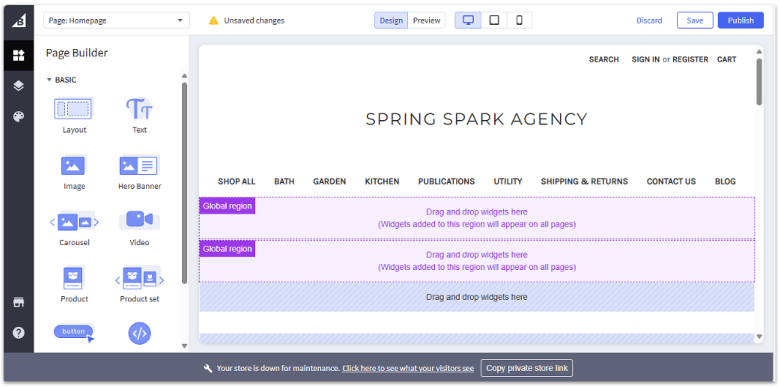
BigCommerce packs in advanced tools built for serious online stores. If you’ve worked in e-commerce before, you’ll find BigCommerce’s UI simple and easy to use. Features like abandoned cart recovery, customer segmentation, international sites, and omnichannel selling are all seamlessly built-in for quick and easy access.
I noticed that its sidebar is quite extensive and can be daunting to beginners, but you won’t have to use all its features to create a fully functional and responsive website. There’s no permanent free plan here, but BigCommerce does offer a 15-day free trial so you can explore all the core features with no commitment needed.
9. WordPress
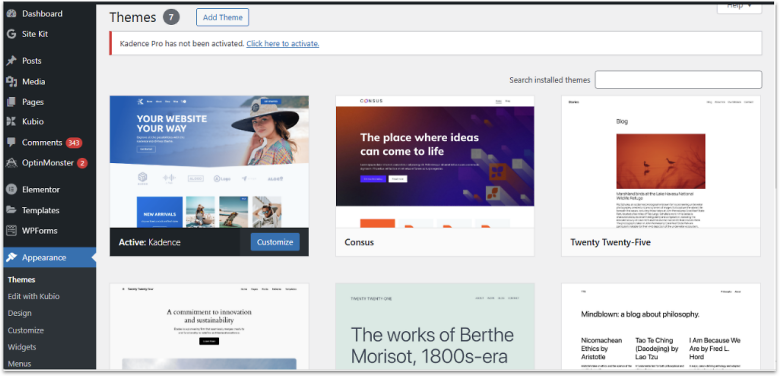
If you want to prioritize blogging, WordPress.com will be a great fit. Its block editor allows you to easily add and edit text, images, and other elements, making it simple to create dynamic blog posts. However, you may find the block editor less intuitive for designing full site pages – meaning you’ll have to switch to a separate editor to make large, site-wide changes.
It also supports thousands of beginner-friendly plugins, from building forums to adding page builders. While there’s a bit of a learning curve, it’s worth it for the value you get from features like easy social media sharing, content scheduling, and site monetization options. If you don’t mind the free site’s ads and subdomain, WordPress.com lets you test, write, and grow.
10. Network Solutions (formerly Web.com)
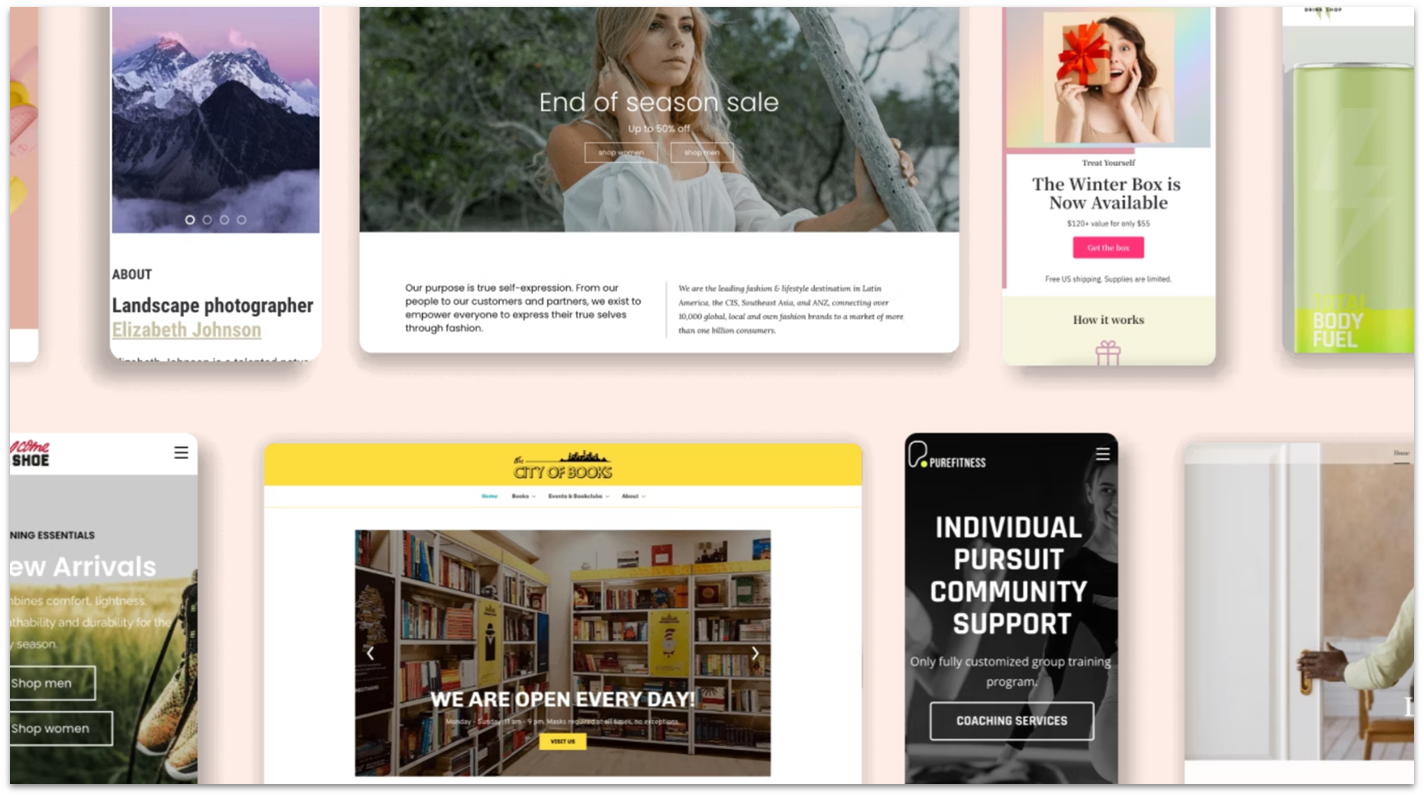
Network Solutions offers a robust suite of content, branding, and e-commerce tools, along with a high degree of creative freedom. It now includes an AI Website Builder that helps you get a complete draft site in just minutes after you answer a few questions. That said, if you’re just starting out, you may feel overwhelmed by its large number of features and an interface that isn’t so beginner-friendly.
While Network Solutions (formerly Web.com)’s initial pricing is budget-friendly, the price increases after the first billing cycle. Though the plans are fairly priced considering the tools you get in return, the renewal fees are definitely something to keep in mind before committing.
Choose the Right DIY Website Builder for Your Needs
When selecting the ideal website builder, you should take into account how easy it is to use and whether the features it offers can help you create a functional website quickly. I recommend thoroughly evaluating the builders listed here to gain a better understanding of their capabilities. Keep in mind that once you publish your website, transitioning it to another service can be challenging.
Because it has the best combination of ease of use and flexibility, Wix is my top recommendation. There are enough templates and features to suit every need, and the sheer flexibility of the site editor and AI website builder makes it easy to ensure your site fits your unique brand without a steep learning curve.
Use SITE123 if you’re short on time to get an attractive site online quickly. It’s simple, but that makes for faster editing – plus, it offers sleek templates.
Webador’s drag-and-drop editor keeps your design clean, while its visitor engagement tools – like ratings and comment boxes make it easy to connect with your audience.
| Free plan | Best feature | Best for | Starting price | ||
|---|---|---|---|---|---|
| Wix | ✔ | Intuitive drag-and-drop builder | People who want ease of use and customization power | $17.00 | |
| SITE123 | ✔ | Simple editing interface | Beginners or those short on time | $16.00 | |
| Webador | ✔ | Built-in media streaming tools | Encouraging visitor interaction | $5.00 | |
| Squarespace | ✘ | Stunning templates and portfolios | Sites for creative industries (photography, design, etc) | $16.00 | |
| Hostinger Web Builder | ✘ | Innovative AI features and effective business tools | Creating a professional-looking website on a budget | $2.99 | |
| IONOS Web Builder | ✘ | AI-powered quick site setup | Affordable, no-frills websites for beginners | $1.00 | |
| Shopify | ✘ | Powerful built-in e-commerce tools | Robust third-party functionality | $29.00 |
FAQ
Which website builder has the best templates?
It depends on the type of site you want to make. Squarespace has the best-designed templates, but they’re oriented towards creative industries. Meanwhile, Wix has 800+ beginner-friendly templates that are easy to edit and personalize, so if Squarespace’s selection isn’t to your taste, Wix will have something for you.
Which DIY website builder is the easiest to use?
It depends on whether you prefer builders with a drag-and-drop editor (like Wix), a point-and-click editor (like SITE123), or a block editor (like WordPress.com). SITE123 is the easiest to use overall, but Shopify is the simplest for online stores.
Can I build my own website for free?
Yes, many website builders offer free plans. Wix for example, allows you to build a fully functional website without having to pay a cent. However, you won’t be able to connect a custom domain, which doesn’t contribute to a professional look. Upgrading to a paid Wix plan not only lets you use your own domain, but also provides additional functionality at a fair price.
What is the best DIY website builder in 2026?
All things considered, Wix is the best DIY builder for most. It has a vast template library, hundreds of third-party apps, virtually unlimited customization options, and is still easy to use despite all that. To get a better sense of how Wix compares to other great options, you can see our list of the best website builders in 2026.