Both Nexcess and Kinsta provide premium managed WordPress solutions, aimed at individuals and businesses. But if you’re going to be paying a premium, you should expect very good service, and I’ve evaluated both of these web hosts to find out which gives you the best.
I tested and compared pricing, performance, features, and more. The results? It was tight, but Nexcess offers more useful, time-saving WordPress features – and it gives you more resources, despite being less expensive.
Click here to check out Nexcess’ latest deals, or keep reading for all the juicy details on how Nexcess and Kinsta compare.
1. Plans and Pricing
Nexcess Offers More Resources for Less Money
As I mentioned earlier, Nexcess and Kinsta primarily offer managed WordPress. However, this isn’t the only type of hosting on offer by these providers. Nexcess also offers managed WooCommerce, managed Magento, cloud hosting, and enterprise hosting. Kinsta also provides cloud-based application and database hosting.
Both hosts allow you to subscribe on a monthly or annual basis. Nexcess offers seven managed WordPress plans, while Kinsta has ten to choose from. That said, Nexcess is significantly cheaper – its basic Spark plan costs only $5.00 per month, while Kinsta’s Starter plan costs $0 per month. A 30-day money-back guarantee is included with both hosts’ plans.
Despite costing less, Nexcess is more generous with resources. Kinsta’s Starter plan restricts you to 10GB SSD storage and 25,000 monthly visits. Conversely, Nexcess offers 15GB SSD storage and an impressive 2TB bandwidth with no limits on monthly visits.
Kinsta offers two free months of hosting with annual billing, but this isn’t enough to help it win the pricing comparison here. Although Nexcess’ new customer discount isn’t as impressive, it gives you lower prices overall.
So, who’s the winner of this section? It’s easily Nexcess – it’s cheaper, yet still offers you more for your money than Kinsta.
2. Features
Nexcess Offers Free Unlimited Email – Kinsta Lacks Email Hosting Entirely
Several features come as standard with Nexcess and Kinsta, such as free SSL certificates, SSD storage, automatic daily backups, and staging areas. But when it comes to WordPress management, these two hosts begin to differ.
Nexcess offers AI-driven plugin updates. Whenever an update is released for one of your plugins, a clone of your site is automatically generated. Here, the plugin update is tested, and the update is then applied to your live site only if no issues are detected. Nexcess then monitors your site for performance issues after the plugin has been installed.
Kinsta also allows you to test plugin updates safely, but it’s more of a manual and time-consuming process. It will automatically create a clone of your site with the plugin applied, but you will have to check for issues yourself.
While Kinsta falls short here, it shines elsewhere. For example, Kinsta checks your site for issues every 2 minutes. If it sees that your site is down, measures will be taken immediately to bring your site back online. Nexcess also offers 24/7 server monitoring, but it doesn’t make promises on how often it checks for issues or how quick its response will be.
But now to the biggest difference between these two hosts – Nexcess includes free email hosting, while Kinsta doesn’t offer email hosting whatsoever. If email forms an integral part of your daily operations, you’ll need to purchase a third-party email service on top of Kinsta’s already high prices.
Take a look at this detailed comparison table to compare Nexcess and Kinsta further:
| Nexcess | Kinsta | |
|---|---|---|
| Hosting Types | Managed WordPress, WooCommerce, Magento, cloud hosting, and enterprise hosting | Managed WordPress, cloud-based application & database hosting |
| Free Domain | ✘ | ✘ |
| Free SSL Certificate | ✔ | ✔ |
| Disk Space | 15 GB – 800 GB | 10 GB – 250 GB |
| Bandwidth | 2TB – 10TB | 25,000 monthly visits – 2,500,000 monthly visits |
| Automatic Backups | ✔ | ✔ |
| Control Panel | Nexcess Client Portal | MyKinsta |
| Email Accounts | Unlimited | No email service |
| Free CDN | ✔ | ✔ |
| Free Site Migration | ✔ | ✔ |
| Money-Back Guarantee | 30 days | 30 days |
While both hosts are both strong with regards to managed WordPress features, Nexcess wins this round as its included email hosting is a significantly useful feature.
3. Performance
Nexcess offers a total of 10 data centers, with six in the US, three in Europe, and one in Australia. On the other hand, Kinsta offers an impressive 35 data centers, with nine across the US, two in Canada, 10 in Europe, two in Australia, one in Israel, nine in Asia, and two in South America.
To improve its coverage further, Kinsta includes access to the premium Cloudflare Enterprise CDN (content delivery network) free with all plans. Your site’s assets are then cached on Cloudflare’s global server network in 275+ cities across the world. This means visitors far from your chosen data center will still be able to load your site quickly.
While Nexcess also offers the proprietary Edge CDN, it doesn’t quite measure up to Cloudflare Enterprise in terms of coverage, but it will give your site a boost with 20+ locations in North America, Europe, and the Asia-Pacific region.
Kinsta’s services make use of Google Cloud’s C2 machines – some of the best infrastructure available for web hosting. Nexcess’ plans use a shared hosting environment with an NGINX reverse proxy, and although this includes autoscaling to manage traffic, you’ll have to share server resources with other users.
While Nexcess speeds weren’t bad by any means in our tests, the limitations of shared hosting were made clear. Our test site loading time bounced between 1.1s and 2.8s, with an average of 1.6s. That said, there was no downtime, meaning Nexcess fulfilled its 100% uptime guarantee. See the results for yourself in our expert Nexcess review.
Kinsta offered consistently faster loading speeds for our test site, averaging out at an impressive 1.2s. Furthermore, it managed to deliver this great performance throughout the world without much slowdown. Kinsta also achieved 100% uptime, outdoing its 99.9% uptime guarantee. Check out these impressive results in our Kinsta review.
Kinsta’s global server locations and faster loading speeds make it the clear winner in the performance round.
4. Security
Kinsta Offers More Advanced Security Features
To protect your site, Nexcess uses the ModSecurity web application firewall to block online threats. In addition, it includes the premium iThemes Security Pro plugin for free with all plans. This is a WordPress security suite that monitors your core files for any unauthorized changes, automatically blocking malicious IPs, and protecting against brute force attacks.
Kinsta goes a step further. It uses a combination of Cloudflare’s enterprise-level firewall and the Google Cloud Platform IP-based firewall to block many attacks before they even reach your server.
While both hosts use their CDNs to mitigate DDoS attacks, Kinsta’s CDN offers unmetered enterprise-level DDoS protection that’s aimed at halting even major attacks. While the Nexcess CDN can definitely deal with smaller-scale threats, it may not have the resources necessary to mitigate the largest of attacks.
Kinsta also offers a dedicated malware team that monitors all servers 24/7 for malicious activity. This team will respond to and take care of any threats for you, and if your site is ever compromised, Kinsta guarantees it will fix it for free. With Nexcess no such guarantee exists.
All in all, Kinsta offers a much more impressive security suite, making it the winner of this section.
5. Support
Nexcess Has More Support Channels than Kinsta
Both Nexcess and Kinsta include extensive knowledge bases that contain numerous guides and tutorials on the basics. These can help you get started, but if you get stuck or run into issues, you may have better luck contacting support.
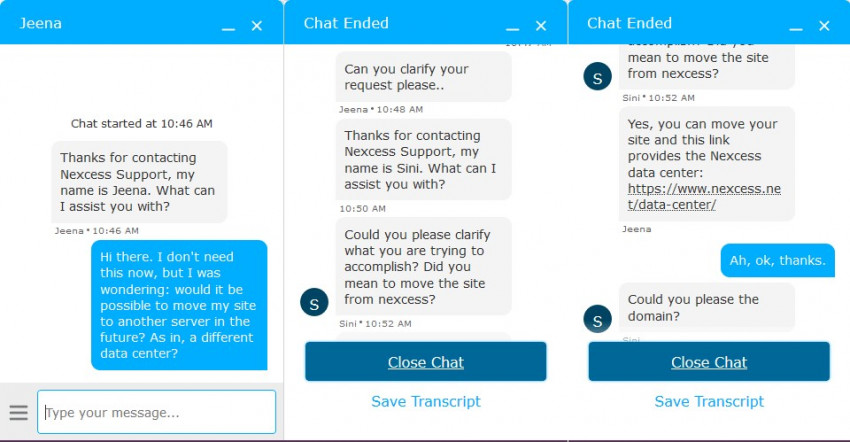
Nexcess support is available 24/7 through live chat, phone, tickets, and email. I decided to test its live chat for myself by asking whether it was possible to switch my website over to a different data center. Despite my initial query being rather unclear, the Nexcess support agent quickly linked me to relevant documentation after I provided further clarification.
Next up, I tried Kinsta’s support. Like Nexcess, Kinsta offers 24/7 support through live chat, tickets, and email – but there’s no phone support.
I found this disappointing. Although live chat is unquestionably convenient, contacting a support engineer by phone enables you to expeditiously convey your issue. This subtle distinction can prove pivotal during a site downtime emergency. Furthermore, in the event that Kinsta’s live chat support service were to become unavailable, you would only have access to the slower ticketing support.
With that said, I always did get a rapid response to my queries on live chat. The Kinsta support agents were polite, knowledgeable, and always happy to help.
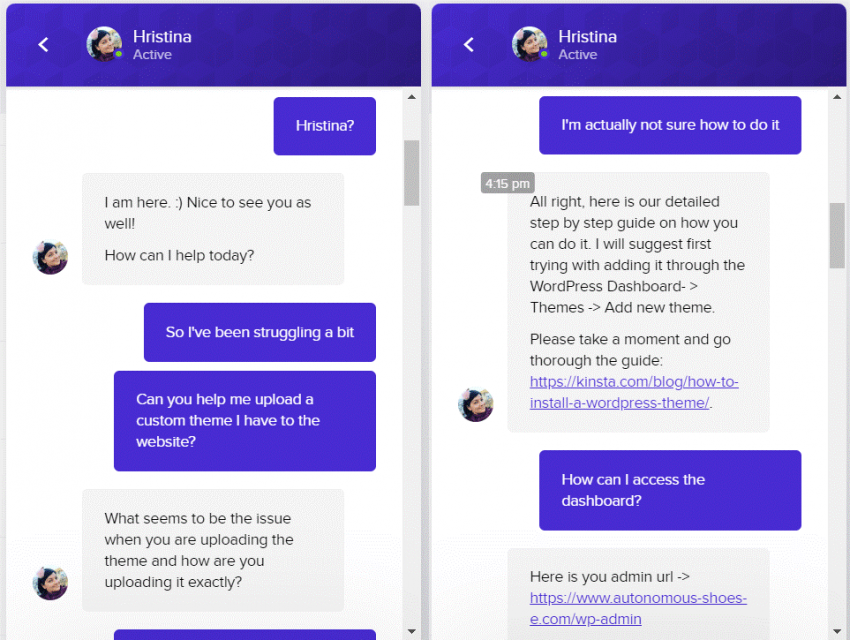
As both hosts’ agents provide responsive and helpful support on a 24/7 basis, it was hard to pick a winner for this section. However, I have to say Nexcess just barely gets the win here, thanks to its inclusion of 24/7 phone support.
Nexcess Beats Kinsta by a Slim Margin
In this neck-and-neck battle, Nexcess beat Kinsta in three out of five categories. Nexcess offers better value for money because of its lower prices, more generous resource sets, and slightly better WordPress management features.
Indeed, Kinsta provides superior performance. If each millisecond of your site’s loading time is critical to your business, Kinsta might still be a better choice over Nexcess.
While Nexcess is the winner this time, both of these hosts offer an impressive platform for WordPress. Both made our list of the top web hosting services for 2026. If you wish to continue comparing hosting options, I’d recommend starting there.