

I wouldn’t blame you if you came here thinking that GoDaddy would be the winner of this comparison. GoDaddy is really popular, and it’s certainly better-known than Hostinger. But I’ve actually tested both services for several months, and I’ll tell you right now that GoDaddy isn’t great.
To properly compare Hostinger vs GoDaddy, I’ve looked at everything from pricing to features, performance, security, and support. Hostinger came out on top in every single category. It’s cheaper, much faster, and far more generous with its plans.
Compared to Hostinger (and most other hosts in the industry), GoDaddy gives you far less value for your money. Some essential features are missing from its shared hosting plans, its performance is disappointing at best, and its customer support is simply a wreck. The domain registration service is still pretty good, but as far as hosting is concerned, it’s not a great choice.
Plans and Pricing
GoDaddy Is Significantly More Expensive, and for No Good Reason
Hostinger and GoDaddy offer a range of web hosting services to suit a variety of website types, including shared hosting, managed WordPress, and VPS. They are both best known for their shared hosting plans, which come with considerable discounts for long-term contracts and are best suited to small personal or business websites. That’s where the similarities end.
Hostinger’s entry-level Premium shared hosting plan is roughly half the price of GoDaddy’s Economy despite a similar set of resources. Hostinger’s Premium plan even covers 25 websites, while GoDaddy’s Economy only supports 1. This makes Hostinger a far better-value option for small businesses, especially if you have multiple websites to maintain.
If you need more resources or features as your business scales, then Hostinger still has GoDaddy beat – it continues to be roughly half the price of GoDaddy on higher-tier plans, without ever falling behind in resources. Hostinger is once again the lower-cost option for Managed WordPress plans, too.
One of the biggest issues I’ve always had with GoDaddy is the upselling. Want DDoS protection? You’ll get that included with Hostinger, but it’s an extra subscription at GoDaddy. That is, unless you specifically choose the Managed WordPress Basic plan. Yeah, a lot of GoDaddy’s pricing doesn’t make sense.
Features
Hostinger Has Better Tools
Both GoDaddy and Hostinger claim that their shared hosting plans are well-suited for beginners, but when it comes to the client dashboard, Hostinger has the upper hand.
GoDaddy uses the classic cPanel control panel, while Hostinger has developed a proprietary solution. cPanel isn’t bad by any means, but it’s not the most user-friendly tool and can take some time to learn. So, it’s not a solution I’d recommend if you’re a time-strapped freelancer or small business owner (ask me how I know). By contrast, Hostinger’s hPanel is less cluttered, better organized, and overall simpler to navigate. It’s far easier to get to grips with if you don’t have much experience with website management.
Both Hostinger and GoDaddy offer one-click installations for all the popular content management systems (CMS), including WordPress. This will save you a lot of time and headaches when you’re first setting up.
Interestingly, both hosting providers offer AI website builders, too. While I’m not covering all the ins and outs of these tools today, Hostinger’s AI website builder and GoDaddy’s Airo both let you set up a website quickly using a few simple prompts. However, it’s worth noting that the AI website builder is included with all Hostinger hosting plans, while you’ll only get Airo if you purchase a domain through GoDaddy.
GoDaddy also has a regular website builder offering a 7-day free trial and some basic templates. I can’t say it stands out in the website builder market, and neither GoDaddy’s nor Hostinger’s builders made our top 10 website builders list.
On top of that, Hostinger offers Horizons, which is an AI-powered web application builder. You’ll get a 7-day free trial of this with any Hostinger plan, so you can see if it’s the right fit for your business before you commit to an additional subscription. You can use this to build apps like restaurant table reservation tools, budget trackers. It’s a useful and flexible tool that GoDaddy fails to match in any way.
All in all, Hostinger stands out because it seems to continuously innovate and create new features and solutions, while GoDaddy lags two steps behind.
| Feature | Hostinger | GoDaddy |
|---|---|---|
| Hosting types | Shared, WordPress, cloud, VPS | Shared, WordPress, VPS, dedicated servers |
| Free domain name | Yes | Yes |
| Free SSL | Yes | Yes |
| Number of websites | 1 – 100 | 1 – 50 |
| Storage | 25 – 100 GB | 25 – 100 GB |
| Bandwidth | Unlimited | Unlimited |
| Control panel | hPanel | cPanel |
| Free CDN | Yes, Business plan only | Yes |
| Email accounts | 1 – 100 | 2 – 5, free for one year only |
| Money-back guarantee | 30 days | 30 days |
| Automatic Backups | Yes, weekly on Premium plan, daily on Business plan and up | Yes, weekly on all WordPress plans, daily with the Site Security Advanced (and up) subscription |
| Free Site Migration | Yes, DIY and DFY | Yes, DIY |
Performance
GoDaddy Can’t Compete with Hostinger
Even on paper, Hostinger’s infrastructure is superior to GoDaddy’s. GoDaddy uses the older Apache web server, whereas Hostinger has LiteSpeed, which is significantly faster and more stable.
Both hosts let you choose from multiple data centers, but GoDaddy is pretty secretive about its locations. With Hostinger, you can host your website in the US, Brazil, the UK, the Netherlands, Lithuania, France, India, and Singapore. Meanwhile, GoDaddy says that it has servers in North America, Europe, and Asia, but offers no further details.
GoDaddy only offers Cloudflare with its managed WordPress plans. On the other hand, Hostinger lets you activate Cloudflare on all but its starter plan, so you can expect excellent performance around the world.
As for website caching, GoDaddy mostly pretends that it doesn’t exist. They offer it but make little mention of it anywhere. On the other hand, Hostinger provides LiteSpeed caching technology with every plan, including its entry-level shared hosting.
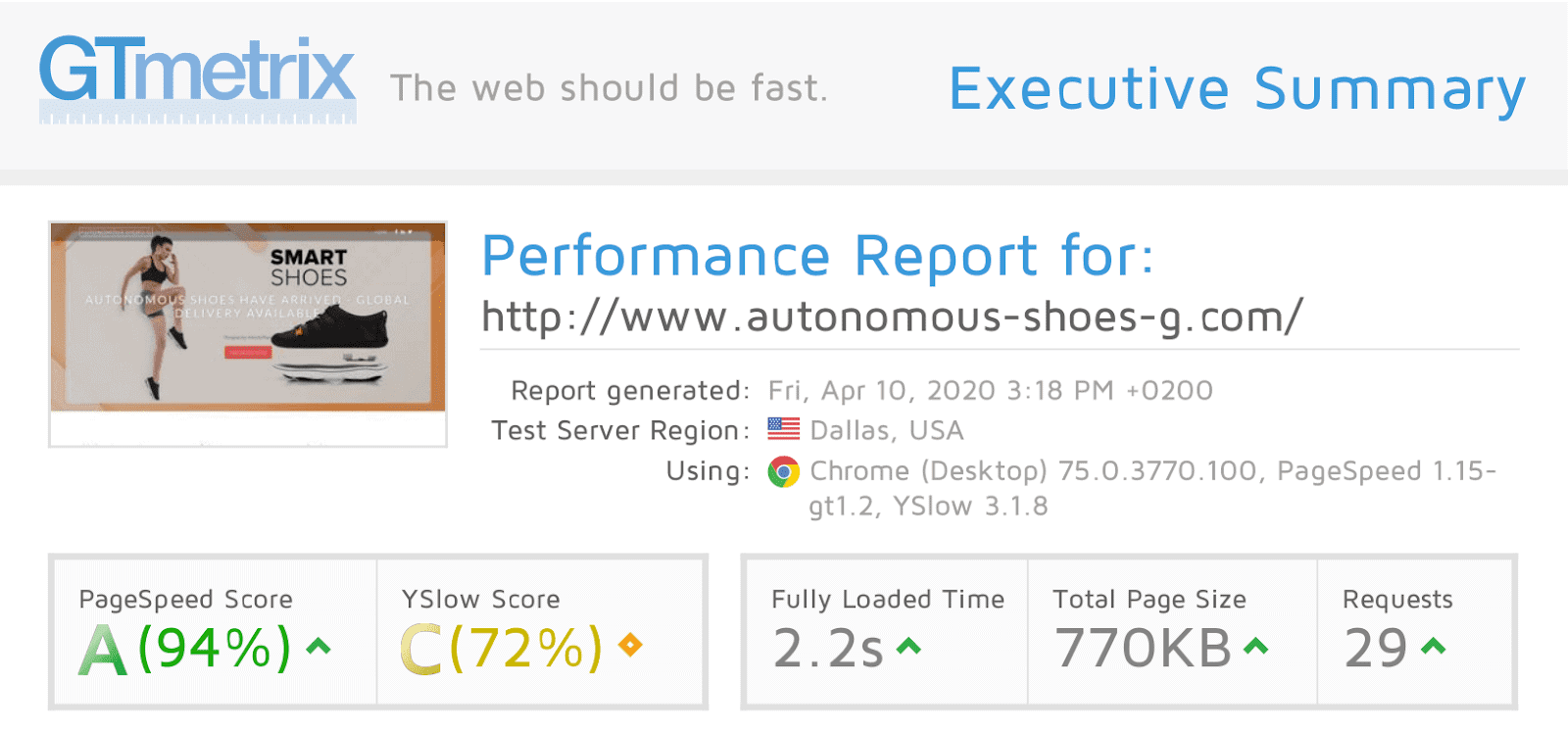
To be honest, I expected Hostinger to have superior performance results, but I was surprised that GoDaddy was this bad. After testing both hosts for several months, GoDaddy’s average page loading time on GTmetrix was an appalling 2.94 seconds, with a best recorded time of 2.2 seconds. You can see the full test results in our in-depth GoDaddy review.
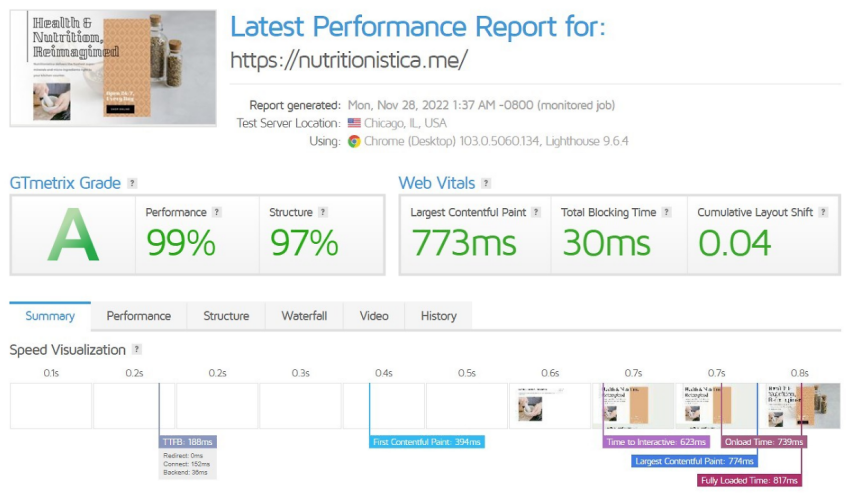
Hostinger performed exceptionally well for a shared hosting platform, with an average page loading time of 0.8 seconds. This made it one of the fastest shared hosting services we’ve tested. Find out more in our full Hostinger review.
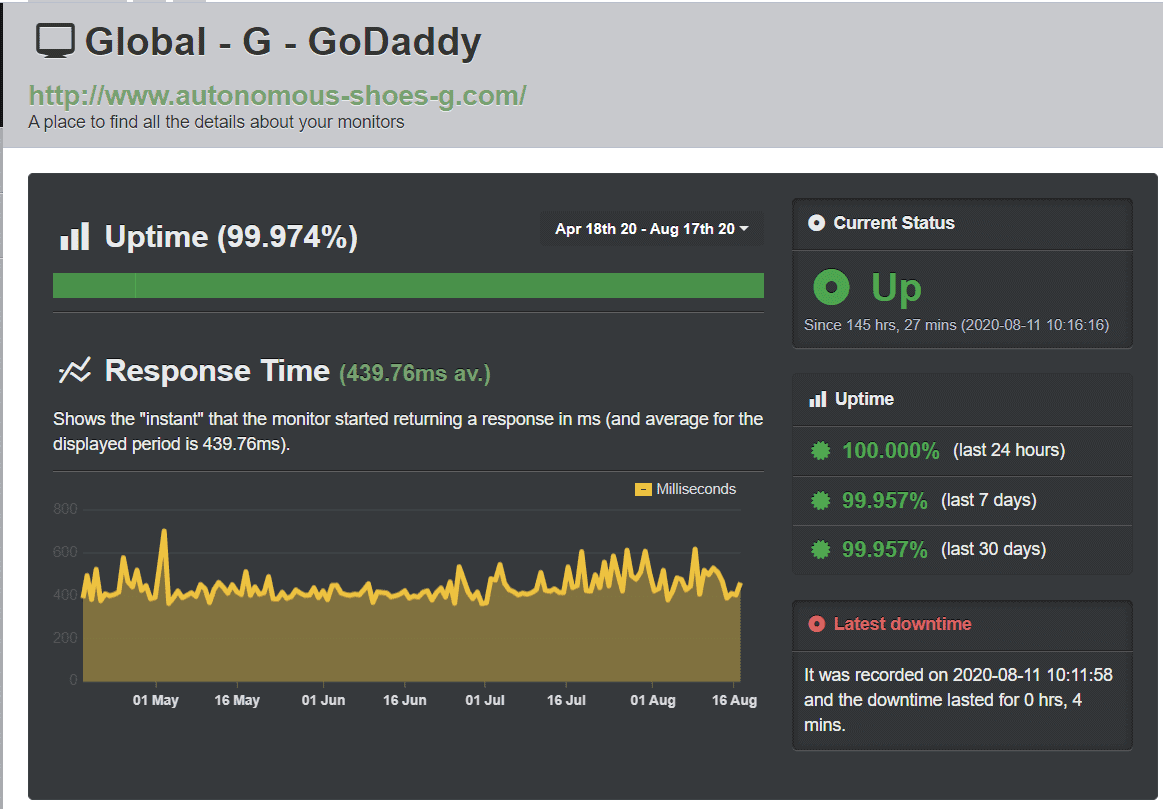
I also tracked uptime for both hosts, and while GoDaddy did okay, Hostinger still came out on top. With GoDaddy, I recorded 99.974% uptime, but there were quite a few drops in availability.
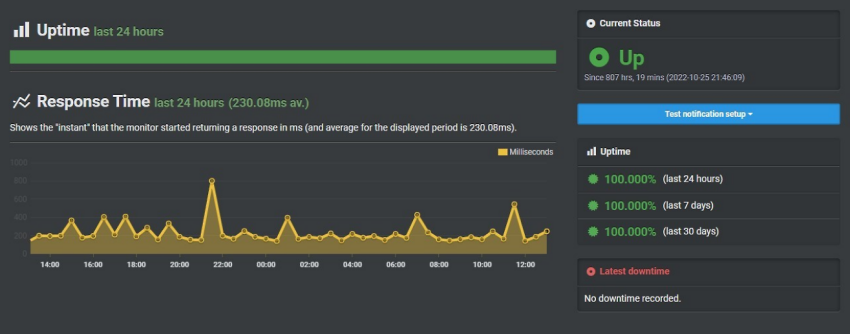
On the other hand, Hostinger had 100% uptime, a perfect record.
Overall, uptime shouldn’t be a problem with either Hostinger or GoDaddy, but GoDaddy’s horrible loading speeds make it very undesirable. Especially since a cheaper service like Hostinger is so much better.
Security
Hostinger Keeps Your Website Safe, GoDaddy Charges Extra
Hostinger not only gives you free unlimited Let’s Encrypt SSL certificates on all plans, you also get automated weekly backups (daily on the Business plan), BitNinja security, and Cloudflare protection. This makes your website less vulnerable to DDoS attacks, malware, brute force attacks, and more.
GoDaddy also has basic DDoS protection and a 24/7 monitoring system, and expects you to either use cPanel’s AutoSSL or pay extra for an SSL certificate. A quick glance at the GoDaddy community shows a lot of customers unhappy with their AutoSSL service, but that’s all GoDaddy gives away for free. With GoDaddy, if you want any kind of malware scanning and removal, they require an additional payment for its Securi-based Website Security program.
GoDaddy says you should be smart and buy its security add-ons. I say you should be smart and go with a different host altogether. Because if there’s one thing I really don’t like, it’s being forced to pay extra for essential things like website security.
Support
Hostinger’s Support Isn’t Stellar, but GoDaddy’s is Much Worse
Both Hostinger and GoDaddy offer 24/7 customer support. Hostinger has live chat and email, while GoDaddy has live chat, WhatsApp, and phone. Unfortunately, I had some issues with both hosts. Let’s start with Hostinger.
Hostinger’s support team leans strongly on its database of articles. You have the option to reach out to Hostinger’s support directly from your hPanel, simply by tapping on the speech bubble symbol. They will inquire about the subject of your problem. After that, they will provide you with links to useful information in the database of articles.
Granted, Hostinger’s knowledge base is pretty extensive and informative. It even includes video tutorials and detailed step-by-step guides to walk you through some of the more common admin issues. However, it’s not all-encompassing, and those links might not resolve your problem. In that case, you’re given the option to contact support via live chat.
I wanted some detailed info on setting up Cloudflare CDN. Not only did it take 14 minutes to get a response, but the agent primarily responded with guess what? More knowledge base articles!
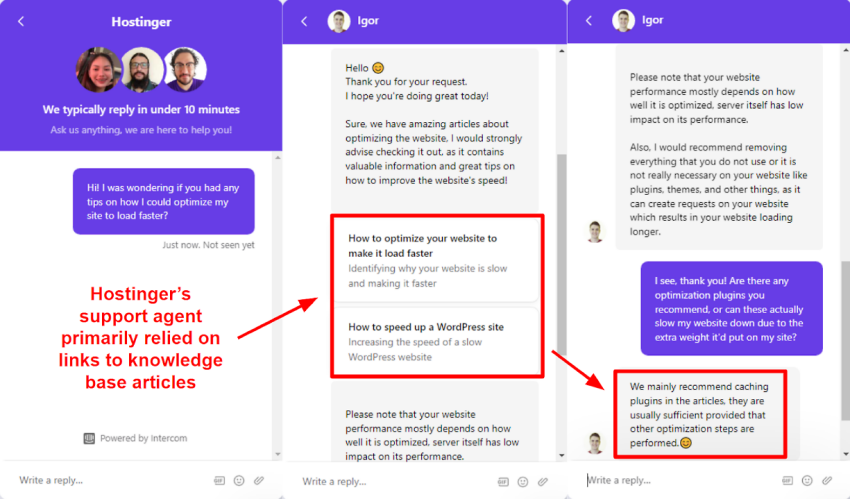
On top of that, the agent never asked me for any specifics about my site, my loading speed, or my issue with the CDN. Call me a cynic, but if all your support agents can do is refer you to the knowledge base, how are they any better than an AI bot?
As a last resort, I tried contacting support via email. In a relatively lightning-fast 22 minutes, I got my response. The email contained more links to knowledge base articles, but it went a bit further, adding in some other resources I hadn’t been presented with before.
My experience with GoDaddy’s support was even worse. I had difficulties connecting my domain, which at GoDaddy is no easy thing to do. The agent kept telling me it was already connected. I kept checking and checking, and it wasn’t. I could only conclude that the agent was either lying or had no idea what they were talking about.
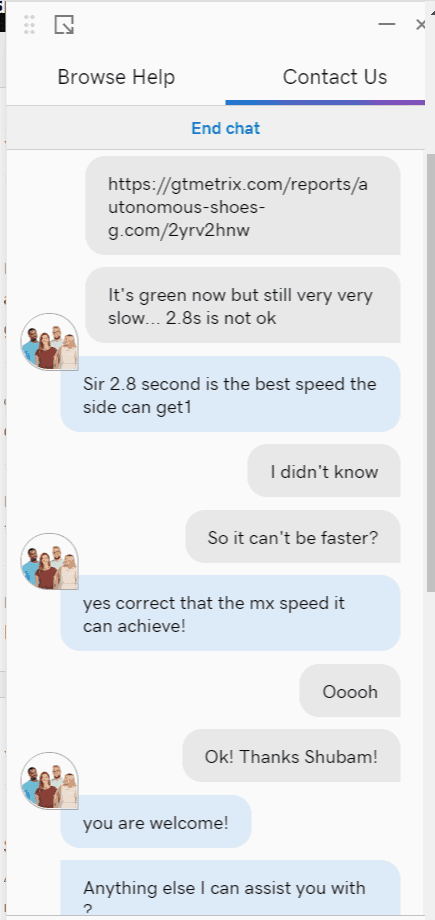
Next, I tried the chat support. This time, I wanted to see if GoDaddy could offer any help with those dismal GTmetrix loading speeds. I was told that those 2-something seconds were the best I could hope for. As far as GoDaddy was concerned, I was loading at max speed and shouldn’t ask for anything more.
At the end of the day, my advice is to do a deep dive into the knowledge base at either Hostinger or GoDaddy before you resort to contacting support. With Hostinger support, at least, you have a little hope of receiving help with your issue. GoDaddy support, however, is pretty hopeless.
Forget about GoDaddy: Hostinger Is Actually Worth Your Money
As it turns out, the popular choice isn’t always the better one. In this case, at least, there isn’t one category where GoDaddy did better than Hostinger. In fact, it does far worse in every respect: It costs more, gives you fewer features, and performs very poorly.
Hostinger is at the opposite end of the spectrum. You won’t find a cheaper shared hosting service that doesn’t force you to compromise on features, security, or performance. Hostinger’s support team could be better, but at least they tell the truth and make attempts to help resolve your problems.
It’s really no wonder that Hostinger snatched the top spot on our list of the best web hosting services, while GoDaddy was nowhere to be found.