
Hostinger’s prices almost seem too good to be true. It’s a fair reaction when you see how much this all-around host promises for so little. Compared with DigitalOcean, a developer-first cloud provider, the difference is clear. Hostinger offers predictable pricing, guided setup, and beginner-friendly tools, while DigitalOcean is built for developers who want full control and flexible scalability.
The real choice isn’t just about cost. It’s about whether beginners, small businesses, and growing startups should rely on Hostinger’s simpler VPS hosting or tackle DigitalOcean’s Droplets’ steeper learning curve for greater customization.
I tested and compared Hostinger’s VPS plans with DigitalOcean’s Droplets to see how each performs in pricing transparency, ease of use, scalability, and support.
For most users, especially for beginners and cost-conscious businesses, Hostinger delivers better long-term value. Read on to see why Hostinger came out on top in this comparison, and where DigitalOcean still manages to pull ahead.
Plans and Pricing
Hostinger Wins on Value With More Resources Included
Hostinger sells a wide range of hosting services, including shared, WordPress, cloud, and VPS hosting, while DigitalOcean focuses on cloud infrastructure with its Droplets, Kubernetes clusters, and other developer-focused services. Both Hostinger and DigitalOcean offer scalable VPS-style setups, but they approach them in very different ways.
With Hostinger’s VPS hosting, you pay a flat monthly fee that already covers essentials like free weekly backups, firewall management, and an AI assistant to help with server management. Even the entry-level plan (KVM 1) includes 1 vCPU core, 4 GB RAM, 50 GB NVMe storage, and 4 TB bandwidth. In practice, that’s enough to power a growing WordPress site, a busy business website, or even a small online store.
DigitalOcean’s Basic Droplets start much smaller than Hostinger’s. At a similar entry price, you get 1 vCPU, 512 MB RAM, 10 GB SSD, and 500 GB bandwidth (DigitalOcean lists this as 512 MiB and 10 GiB, which is nearly equivalent to MB and GB for most intents and purposes). That setup is only suited for a lightweight project or testing environment. To get resources comparable to Hostinger’s starter VPS, you’d need to move up several Droplet tiers, which quickly raises costs.
The trade-off is that Hostinger often requires a longer commitment to get its lowest rates. DigitalOcean uses hourly billing, which appeals to developers who want precise control over their infrastructure, but it can make costs harder to predict for beginners or small businesses. You’ll also pay extra for features like backups, with weekly backups adding an additional 20% to the cost. While DigitalOcean’s pricing may look simple at first, the add-ons can add up quickly.
Features
Hostinger Does More for You, DigitalOcean Lets You DIY
Hostinger simplifies VPS management with a thorough onboarding process. Every plan includes weekly automated backups, firewall management, a browser terminal, and even an AI VPS agent (Kodee) to help with server tasks. You also get full root access and one-click installs for popular apps, so even less experienced users can get a VPS running quickly. Hostinger also offers a 30-day money-back guarantee, which makes it easier to try without risk.
DigitalOcean, by contrast, takes a developer-first approach. Backups and snapshots are available, but they’re add-ons billed separately. Instead of a guided panel, you’ll mostly interact through the command line or API. That means you get near-total freedom in how your Droplets are set up, but also a much steeper learning curve. DigitalOcean does not provide a standard money-back guarantee, which makes testing the service less forgiving.
Another key difference is scalability. With Hostinger, you pick from fixed VPS tiers, so your upgrades come bundled across CPU, RAM, and storage. With DigitalOcean, you can choose specialized Droplets (like CPU-optimized or memory-optimized) and even resize vertically if you only need one resource boosted. This is why DigitalOcean appeals more to developers with specific workloads.
However, extra features tilt the balance toward Hostinger for less technical users. Hostinger has built-in migration tools, a user-friendly dashboard with pre-made templates, and a Website Builder (which comes included on its shared hosting plans). DigitalOcean doesn’t offer email or a site builder, leaving you to set these up yourself, making Hostinger a safer bet for small businesses or WordPress site owners.
I’ve summed up both vendors’ main VPS and cloud features in the table below.
| Hostinger | DigitalOcean | |
|---|---|---|
| Hosting types | Shared, WordPress, Cloud, VPS | Cloud |
| CPU | 1–8 vCPU cores | 1–48 vCPU cores |
| RAM | 4–32 GB | 512 MiB–256 GiB |
| Storage | 50–400 GB NVMe | 10–4,690 GiB SSD |
| Bandwidth | 4–32 TB | 500–10,000 GiB |
| Control panel | hPanel (proprietary), cPanel, CyberPanel, Plesk (VPS add-ons) | Manual setup (cPanel, Plesk, CyberPanel, etc.) |
| Dedicated IPs | ✔ | ✔ |
| Free CDN | ✘ (only on shared/cloud, manual setup for VPS) | ✔ |
| Data center locations | 10 (US, South America, Europe, Asia) | 13 (US, Canada, Europe, Asia, Australia) |
| Money-back guarantee | 30 days | ✘ |
Performance
DigitalOcean Takes the Win on Performance – But at a Hefty Price
Hostinger’s VPS infrastructure runs on AMD EPYC processors, NVMe SSD storage, and 1 Gbps network speeds across global data centers in North America, Europe, Asia, and South America. While Hostinger gives you stable performance without add-on costs, the trade-off is predictability. Each VPS plan is a fixed bundle of CPU, RAM, and storage, making Hostinger easy to manage but less adaptable if your needs change suddenly.
DigitalOcean’s Droplets are deployed across 10+ regions, including Australia. It also uses premium Intel and AMD processors with NVMe SSDs (except for Basic Droplets, which stick to standard SSDs). Some Droplet types can push outbound speeds up to 10 Gbps, but unlike Hostinger, many of these performance boosts depend on the plan you choose. Check out our full DigitalOcean review for test results and more.
As mentioned earlier, DigitalOcean also supports vertical scaling, letting you resize CPU and RAM independently without touching storage. That makes it easier for developers to fine-tune resources for specific workloads, from data-heavy apps to media streaming. Hostinger, by contrast, bundles performance consistently across tiers, delivering 0.8-second load times even on its shared hosting plans. You can read our review of Hostinger’s performance.
Another key difference is the uptime guarantee. Hostinger backs its VPS with a 99.9% uptime guarantee, which allows for about 9 hours of downtime per year. DigitalOcean’s 99.99% uptime cuts that to less than an hour, a critical edge for eCommerce stores, SaaS apps, or any business that can’t afford interruptions. However, while it’s stronger on paper, getting top-tier performance often means paying extra for optimized Droplets or storage upgrades.
Security
Hostinger Gives You Built-in Protection Right From the Start
Hostinger’s VPS plans include weekly automated backups and manual snapshots at no extra cost. You also get firewall management and Wanguard DDoS filtering, which block harmful traffic before it reaches your server. For advanced users, there’s support for SSH keys and reverse DNS, all manageable through the dashboard or via its AI assistant (Kodee).
SSL certificates are free across Hostinger’s ecosystem, though on VPS, you’ll usually configure them yourself. Still, the fact that backups, DDoS protection, and firewall tools come bundled makes Hostinger a secure starting point, especially for beginners or SMBs.
DigitalOcean takes a more DIY approach. Automated backups and snapshots are offered, but only as paid add-ons. Weekly backups add 20% to a Droplet’s cost, while daily backups add 30%. Firewalls are available too, though they require manual setup through the dashboard or API. SSL certificates, malware scanning, and security plugins must also be installed separately, which can be a hurdle for newcomers.
In short, Hostinger delivers ready-made safeguards, while DigitalOcean hands you the tools but expects you to assemble your own defense. That flexibility benefits developers, but for most users, Hostinger’s built-in protection is the safer bet.
Support
Hostinger Responds, DigitalOcean Rarely Does
Hostinger provides 24/7 support through live chat and email. In our tests, live chat took about 14 minutes to connect. The agents were polite but mostly directed us to knowledge base articles rather than giving personalized fixes. Email support was faster than expected, resolving our query in just 22 minutes with a detailed response.
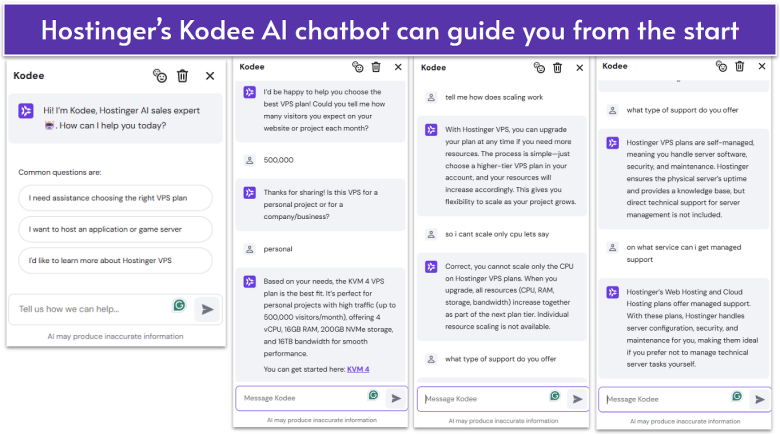
Hostinger’s AI chatbot, Kodee, can also answer common questions instantly, though it struggles with more advanced queries. Overall, Hostinger’s support is reasonably helpful, if not always hands-on.
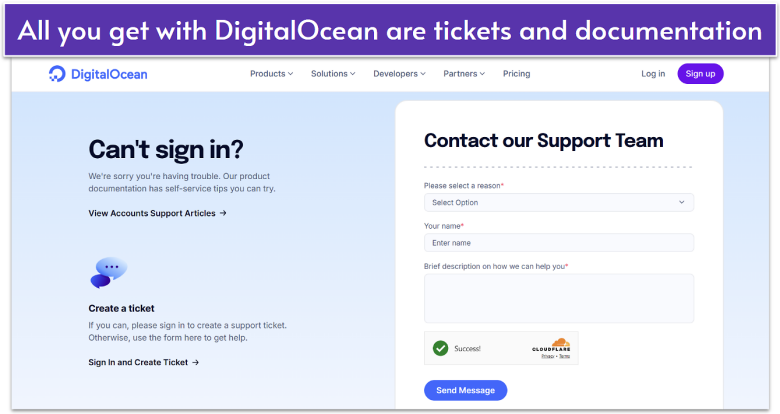
On the other hand, DigitalOcean has a reputation for weak support, and our testing confirmed it. The only option is a ticket system, but when we tried submitting one, the form itself was broken. Even long-standing users report that tickets often go unanswered for days or weeks, with some accounts locked without explanation. With no live chat or phone support, beginners may find themselves stranded when urgent problems arise.
The difference is clear: Hostinger offers multiple support channels that, while not perfect, are fairly responsive. DigitalOcean largely leaves you to figure things out on your own or dig through community forums. For small businesses or less technical users, that gap can be the deciding factor.
Hostinger Beats DigitalOcean for Most Users
When you look at the full picture of performance, security, and support, Hostinger delivers better value for money for most users. It’s beginner-friendly and includes backups, DDoS protection, and firewalls at no extra cost. Hostinger also runs on global data centers with NVMe SSD storage, even on the entry plan. DigitalOcean, by contrast, only offers this on higher tiers.
For small businesses, freelancers, or anyone who just wants reliable VPS hosting without extra complexity, Hostinger is the safer and more affordable choice.
That’s not to say there aren’t exceptions. DigitalOcean is powerful, flexible, and ideal for developers who want full control. Its vertical scaling, customizable Droplets, and advanced infrastructure options make it a strong fit for highly technical projects. But that flexibility comes at a cost: fewer built-in protections, weaker support, and add-on charges for essentials like backups.
Hostinger isn’t only my pick in this comparison – it also made our list of the best web hosting services for 2026. On top of its VPS lineup, Hostinger offers affordable shared hosting, something DigitalOcean doesn’t provide at all.
The table below offers a quick comparison of the two providers to sum up the key differences.
1-click app installs
30-day money-back guarantee
Collaboration tools
Built-in CDN
Global datacenters
99.9% uptime guarantee
Up to 10 Gbps speeds
99.99% uptime guarantee
Firewall management
DDoS filtering
Cloud firewalls
Built-in monitoring
Extensive knowledge base
AI chatbot
Extensive documentation