Most reviewers will tell you that Bluehost is better than Pressable for managed WordPress hosting, but did you know that Bluehost pays these reviewers generously if you end up buying a plan? This alone doesn’t make Bluehost a bad service, but it can lead to biased reviews that ultimately work against you.
I’ve carefully researched and tested both hosts to give you an impartial, expert opinion. Since Pressable only offers managed WordPress hosting, I’ve compared the two hosts based on their WordPress-optimized plans. Pressable came out on top across the board.
That said, I don’t think either one of these hosts is your best choice. Hostinger offers most of the same features for a much better price. Click here to see Hostinger’s latest deals, or read on to see if one of these hosts could be right for you.
1. Plans and Pricing
Bluehost Looks Cheaper than Pressable, but Its Prices Are Actually Similar
Bluehost’s affordable pricing is one thing that almost all reviewers bring up against Pressable’s expensive plans. But the truth is that while Bluehost’s shared hosting plans are fairly cheap, its managed WordPress plans are considerably pricier. Since Pressable focuses exclusively on managed WordPress hosting, it’s only fair to compare equivalent plans and prices, rather than falsely claim that Bluehost is up to ten times cheaper.
If we take a closer look at both hosts’ WordPress-optimized plans, Bluehost appears to be cheaper, but there’s a catch. To get one of Bluehost’s WP Pro plans for its advertised cost, you have to make an upfront payment for three years of hosting. You can opt for a shorter billing cycle, but expect the price to skyrocket by up to 50% if you do.
With Pressable, on the other hand, the cost stays the same – regardless of whether you choose to pay monthly or yearly (but you do get two free months of hosting if you opt for a yearly plan). In addition, once your first term is over, renewal fees stay the same as the initial price.
This is not the case with Bluehost, whose renewal fees are 50% higher on the Build and Grow plans and approximately 20% higher on the Scale offer. Following renewal, Bluehost’s entry-level Build plan is actually more expensive than Pressable’s Personal plan even if you opt for a 3-year billing cycle. So much for Bluehost being cheap.
You also get more value for your money with Pressable than you do with Bluehost. With Pressable’s Personal plan, for instance, you get Jetpack Premium, which includes an impressive kit of security, performance, design, and marketing tools that I describe in the Features section. With Bluehost’s equivalent Build plan, you get Jetpack Basic and significantly fewer features.
One downside of Pressable is that it doesn’t host emails or register domains, which means that you will have to buy these services from a separate provider. If you want a complete managed WordPress plan that is also cheaper than both Bluehost and Pressable, check out Hostinger instead:
2. Support
Pressable’s Support Is More Helpful and Professional
Both Bluehost and Pressable offer 24/7 customer support through phone, live chat, and tickets, but the type of support you get might be limited based on your subscription.
With Bluehost, you do not get access to the specialized WordPress support (referred to as Blue Sky) if you’re on the entry-level Build plan. On the Grow plan, you can only contact Blue Sky support through tickets, while the Scale plan also gives you the option of live chat.
With Pressable, all customers have access to specialized WordPress support. On the Personal plan, however, you can only reach out through tickets, while the Starter plan adds live chat, and the Pro plan includes a direct Slack line to the technical support team.
To help you better compare Bluehost and Pressable, I’ve tested both live chat options. I had a decent experience in both cases, but I was slightly disappointed that the support agent from Bluehost tried multiple times to pressure me into a sale.
For instance, when I asked the agent to suggest a plan for a simple landing page website, he recommended Bluehost’s Basic shared hosting offer, but emphasized on two separate occasions that I should also buy the SEO Tools addon.
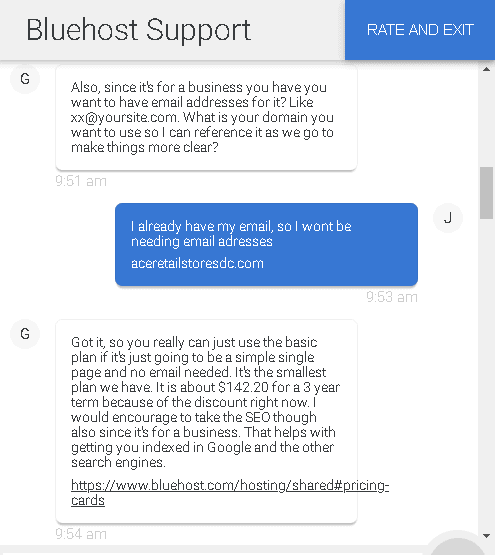
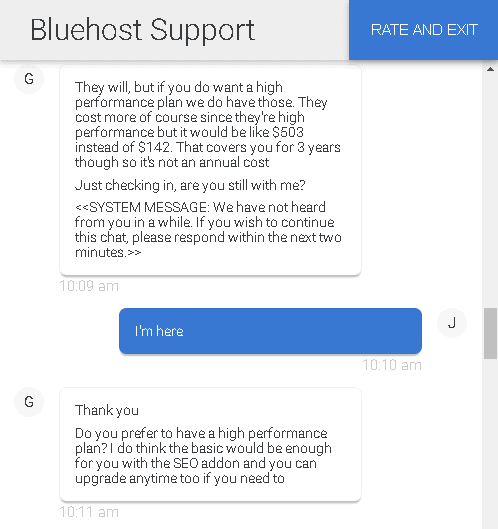
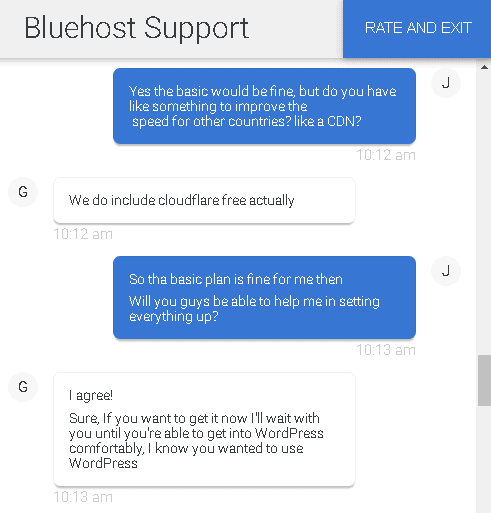
The agent gave me all the information I needed regarding my WordPress installation, as well as the website loading speeds I could expect for visitors around the world. When I asked if Bluehost would help me set up my account, he offered to do it himself, but suggested that I make a purchase then and there.
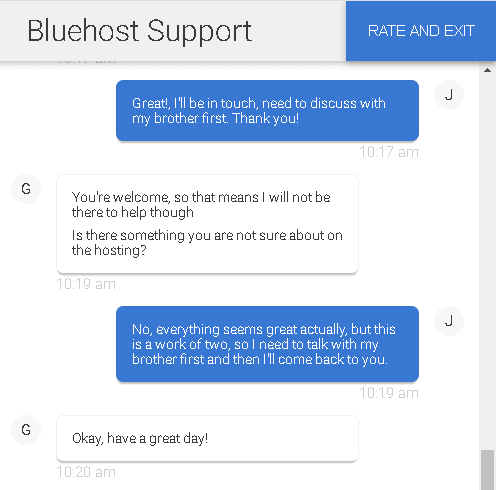
Before I ended the conversation, the support agent tried to close the deal once again, which felt rather unprofessional.
With Pressable, on the other hand, I had to go through a bot and a couple of different agents before I was transferred to someone who could address my questions. Once I did get on the right chat, though, everything went smoothly and I got the answers I was looking for.
The agent recommended the entry-level Personal plan for my simple website and made no attempts to upsell an additional feature or a more expensive plan.
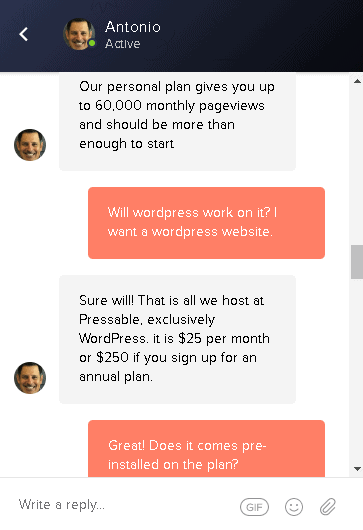
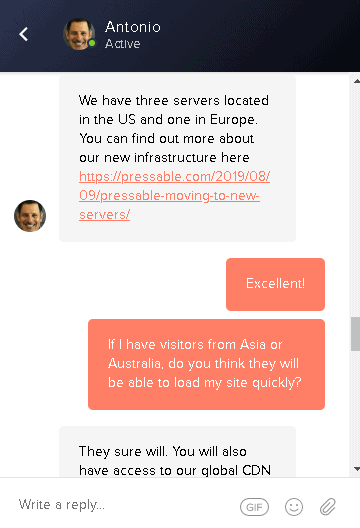
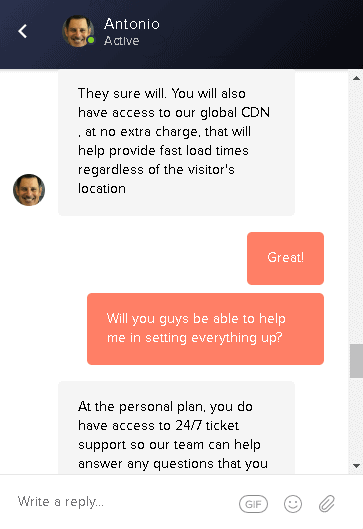
I also got the details I needed about the provider’s server locations, performance-enhancing tools, and support availability. Overall, the agent was knowledgeable and professional.
If you prefer to look for solutions yourself, both Pressable and Bluehost have extensive knowledge bases with guides and tutorials. Bluehost has an official YouTube channel with additional guides. If you host your website with Pressable, on the other hand, you and your clients will have free access to its proprietary collection of courses, WP101.
3. Features
Pressable Beats Bluehost’s Basic WordPress Features
While it’s true that Bluehost offers unlimited storage, bandwidth, and emails on all WP Pro plans, this doesn’t actually mean you have unlimited resources. After digging into the company’s User Agreement and Acceptable Use Policy, I can tell you that Bluehost reserves the right to close your account, with or without warning, if the amount of storage or bandwidth you use begins to affect your neighbors on the same server.
Pressable, on the other hand, caps storage at 200GB on all plans. However, this is more than enough for an e-commerce store with thousands of high-definition product pictures, let alone for a regular website. Pressable does restrict the number of visitors you can have per month, but your account won’t be closed if your traffic happens to spike. Instead, you’ll receive a notification and, if need be, you’ll discuss a better plan for your needs.
So far, it might seem that Bluehost is in the lead. After all, it promises unlimited resources, whereas Pressable has restrictions. What Pressable gives you in exchange, however, is an excellent set of WordPress features and tools that Bluehost doesn’t offer for the same price.
For example, Bluehost charges a premium fee for website migrations, while Pressable can transfer your site(s) for free. You can either use the provider’s automated site transfer plugin or you can ask the support team to do it for you.
With both hosts, WordPress comes preinstalled and plugin updates are automatic. In addition, Bluehost’s entry-level Build plan includes the Basic version of Jetpack, which gives you 100 free WordPress themes, protection against brute force attacks, and a few caching solutions for static files and images. For a better version of Jetpack, you have to upgrade to a more expensive plan.
Meanwhile, all Pressable plans are built on the same infrastructure and provide access to all the available features. Even with the entry-level Personal plan, you get Pressable’s WordPress-optimized setup, advanced performance tools that I discuss below, as well as Jetpack Premium, which adds video caching, SEO tools, Google Analytics integration, PayPal integration, and more.
For a quick comparison of Pressable’s and Bluehost’s most affordable plans, check out the table below:
| Pressable | Bluehost | |
|---|---|---|
| Hosting Type | Managed WordPress | Shared, Managed WordPress, VPS, Dedicated Servers, Reseller |
| Free Domain | No | Yes |
| Free SSL Certificate | Yes | Yes |
| Disk Space | 200GB | Unlimited |
| Bandwidth | Unmetered | Unmetered |
| Automatic Backups | Yes | Yes |
| Control Panel | Proprietary control panel (MyPressable) | cPanel |
| Email Accounts | No | Unlimited |
| Free CDN | Yes | Yes |
| Free Site Migration | Yes | No |
| Jetpack | Premium | Basic |
| Money-Back Guarantee | No, but you can apply for a 15-day trial | 30 days |
4. Performance
Pressable Is Better Optimized for WordPress
When it comes to performance, both Bluehost and Pressable have noteworthy features. For example, both hosts offer SSD storage and an integrated CDN (content delivery network) on all plans.
Bluehost uses Cloudflare, while Pressable relies on Jetpack’s CDN, but the results are similar. While a CDN is active on your account, your website is cached and stored on dozens of servers around the world. When a visitor clicks on your site, they connect to the server that is closest to them, which translates into faster loading speeds.
One of the advantages with Pressable is that it lets you choose between four different data centers – three in the US and one in Europe – so that your website is stored closer to your target audience. Bluehost, on the other hand, has one data center in the US, but has so far refused to disclose its exact location.
It’s also worth noting that when Pressable was acquired by Automattic – WordPress’ parent company – its infrastructure was rebuilt from the ground up in order to provide better performance for WordPress. Pressable now uses Nginx web servers, which are significantly faster and more reliable than the Apache servers Bluehost uses.
Pressable’s built-in server-side caching means that your website is quickly delivered to visitors. At the same time, its load balancers ensure that all incoming traffic is properly distributed across servers for maximum performance. If traffic spikes, you can rest assured that your website continues to work within normal parameters.
Compare this to Bluehost’s Acceptable Use Policy, which states that, in case of a traffic spike, your use of resources is likely to be restricted unless you upgrade to a superior plan.
Then there’s the issue of uptime guarantees. Pressable has an excellent 100% uptime guarantee and offers compensation for every 30 minutes of downtime you experience in a month.
Meanwhile, Bluehost makes no such promises. In its Server Uptime Agreement, Bluehost claims that it provides the industry best in terms of uptime, but doesn’t back this claim with a guarantee or with compensation.
Bluehost scored poorly in our performance tests. To find out what went wrong, read our in-depth Bluehost review.
We haven’t had the chance to run the same tests on Pressable, yet. However, you can read more about its performance-enhancing features in our expert Pressable review.
5. Security
Pressable and Bluehost Offer Similar Security Features on WordPress Plans
Whether you go with Pressable or with one of Bluehost’s WP Pro plans, your website’s security is covered. Both hosts offer malware scanning and removal, safeguard against DDoS attacks, and employ spam filtering through Akismet. When you transfer any websites to the infrastructure of Pressable, the provider conducts an initial scan for potential malware.
In addition, both hosts offer automated daily backups. These are created through Jetpack if you go with Pressable or, if you opt for Bluehost’s Build plan, through CodeGuard Basic. In both cases, your website can be easily restored to a previous version with just a few clicks.
You also get free SSL certificates from Let’s Encrypt with either host. SSL certificates ensure that your website is padlock protected, which is especially important for online stores where customers are asked to provide payment details. Even if you don’t run an e-commerce website, SSL certificates are still useful because they help your site rank higher in search engines.
With both Bluehost’s WP Pro and Pressable, SSL certificates are automatically installed, so you never have to worry about renewing them.
Pressable Is Better for Managed WordPress Hosting
From pricing to support, features, and performance, Pressable comes out on top in this comparison. Security is the only category where Bluehost manages a tie, which makes Pressable the clear winner.
Especially when it comes to entry-level plans, the matchup leans heavily in favor of Pressable. Bluehost saves its best features for its most expensive plan, while Pressable includes the same set of excellent WP tools across the board.
However, the fact that Pressable doesn’t register domains or host emails is rather disappointing. If you want a simpler and more affordable managed WordPress solution, you’re should check out Hostinger latest deals.
Neither Bluehost nor Pressable made it into our top ten best hosts. To find out which providers did, take a look at our list of the best web hosting services.
For a quick comparison of Bluehost and Pressable, I’ve put their main features side by side the table below:
FAQ
Is Pressable better than Bluehost?
It depends. If you’re looking for managed WordPress hosting, then Pressable is a better choice.Pressable’s entry-level Personal plan gives you plenty of storage space, an integrated CDN, free SSL certificates, and a Jetpack Premium license, which comes with 100 WordPress themes and a set of useful WP optimization tools that make your website faster and more secure. To get the same features with Bluehost, you have to pick one of its more expensive, WP Pro plans.However, Pressable doesn’t give you the option to register a domain, nor does it offer email hosting. If you don’t like the idea of buying these services from a separate provider, you might be better off with one of the hosts on our list of the best web hosting services.
Is Bluehost a good host for WordPress?
Bluehost’s WP Pro plans include unlimited websites, email, storage, and bandwidth. However, if you want a good set of WordPress-specific tools, you have to buy one of its top-tier plans. WordPress comes preinstalled on the entry-level Build plan and updates are automatic, but that’s about all the specialized features you get.Even if you’re working with a tight budget, you shouldn’t have to settle for a sub-par managed WordPress solution. The hosts included in our list of the best WordPress hosting services have better features for a lower price.
Who owns Pressable?
Pressable is currently part of Automattic, the parent company of WordPress and the developer of popular plugins such as Jetpack and Akismet. When the host was acquired by Automattic, its servers were rebuilt and optimized specifically for WordPress.
Is Pressable good for e-commerce?
With an infrastructure optimized for WordPress, an integrated CDN, and free SSL certificates included on all plans, Pressable can be a decent host for a WooCommerce website. You also get Jetpack Premium and access to Jilt’s email marketing platform regardless of the plan you choose.That being said, Pressable is fairly expensive and the company doesn’t offer domain registration or email hosting. For a more complete e-commerce solution, check out our list of the best e-commerce web hosting plans.