

When comparing Hostinger vs Cloudways, it’s clear why many developers choose Cloudways. Its cloud setup, staging environments, and Git integration are designed for teams and advanced projects. But here’s the problem: most reviews compare Cloudways to Hostinger’s shared hosting plans, which isn’t a fair match. Shared hosting simply can’t compete with a managed cloud platform.
That’s why in this review, I test Hostinger’s cloud hosting directly against Cloudways’ managed solutions. The two work very differently.
Cloudways doesn’t host websites but manages servers from providers like AWS and DigitalOcean. While it offers flexibility, many long-term users report a drop in support quality across forums. That caught my attention. And what I found was Cloudways can also get pricey fast, with aggressive upsells on basics like email and malware protection.
Hostinger takes the opposite approach: its cloud plans include a free domain, email, SSL certificate, and content delivery network (CDN), all managed through its simple hPanel dashboard. Pricing is clearer, and it’s much easier for beginners and small businesses to use.
Because it offers better value and ease of use overall, Hostinger is the winner in this comparison. Keep reading for the full breakdown.
Plans and Pricing
Hostinger and Cloudways Structure Their Plans Differently
Hostinger keeps it simple with three managed cloud tiers (Startup, Professional, and Enterprise), each scaling CPU, RAM, and storage. Even the entry-level plan includes 100 websites, a free domain for the first year, unlimited SSL, Hostinger’s CDN, and a dedicated IP address. To get the lowest rate, you’ll need to commit to a longer term (usually 48 months), but monthly billing is also available.
With Cloudways, you can choose between Flexible and Autonomous plans, billed monthly or hourly. Cloudways Flexible plans are popular with developers who want infrastructure control. You can pick your cloud provider (AWS, DigitalOcean, Google Cloud, Linode, or Vultr) and scale resources as needed. The entry-level Micro plan includes unlimited websites, free SSL, a staging environment, and server-level firewalls, but essentials like Cloudflare CDN cost extra.
Compared to Hostinger’s Cloud Startup plan, Cloudways Micro costs nearly double yet provides far fewer resources (1 GB RAM, 1 vCPU, 25 GB NVMe storage vs. Hostinger’s 3 GB RAM, 2 CPU cores, and 100 GB NVMe storage).
Cloudways Autonomous is a premium-tier, fully managed WordPress solution with autoscaling, unmetered traffic, Cloudflare Enterprise CDN, and load balancing. While powerful, it’s expensive, and the lowest tier is still only suitable for a single basic site. That makes Cloudways Autonomous best suited to enterprise-level projects with very high traffic and budgets to match.
Hostinger backs its plans with a 30-day money-back guarantee, while Cloudways offers a shorter 3-day free trial. Overall, Hostinger delivers better value for small-to-medium businesses and e-commerce owners, bundling all the essentials and avoiding the upsells that make Cloudways’ pricing unpredictable.
Features
Hostinger Packs More Built-in Features Than Cloudways
Every Hostinger cloud hosting plan includes its intuitive hPanel control panel, automatic daily backups, unlimited SSL certificates, a free CDN, and a dedicated IP. You also get email accounts for free in the first year, plus a free domain, which cuts down on extra subscriptions.
Hostinger is fully managed for WordPress and WooCommerce, with built-in AI tools to increase visibility and a 7-day Horizons trial for building no-code websites. Free migrations are included, and in most cases, Hostinger’s team can move your site within an hour. For SMBs upgrading from shared hosting, these bundled features mean you can focus on running your business instead of managing add-ons.
Cloudways Flexible plans use a custom control panel instead of cPanel. You get free staging environments to test changes, automated backups, free SSL, one website migration, and a server-level firewall. Developers benefit from Git integration, unlimited app deployments, and server cloning. The flexibility works well for complex workflows, but basics like email and Cloudflare CDN aren’t included by default.
With Autonomous, Cloudways adds enterprise-level tools like autoscaling, load balancing, unlimited PHP workers, and Cloudflare Enterprise. These are impressive for high-traffic WordPress and WooCommerce projects, but unnecessary for most business owners. For the majority of users comparing Hostinger vs Cloudways, Hostinger’s cloud plans cover everything needed from the start, without extra purchases or technical setup.
Here’s how Hostinger and Cloudways compare:
| Hostinger | Cloudways | |
|---|---|---|
| Cloud hosting types | Managed hosting for WordPress, WooCommerce, and Node.js apps | Customizable managed hosting (for WordPress, Magento, Laravel, and PHP apps) and fully managed WordPress hosting |
| CPU | 2–6 CPU cores | 1–96 vCPU cores (varies by provider) |
| RAM | 3–12 GB | 1–384 GB (varies by provider) |
| Storage | 100–300 GB NVMe | 25 GB–5 TB NVMe (varies by provider) |
| Bandwidth | Unmetered | 1–20 TB (varies by provider) |
| Control panel | hPanel | Cloudways control panel |
| Dedicated IPs | ✔ | ✔ |
| Free CDN | ✔ | ✔ (but only with fully managed WordPress hosting) |
| Data center locations | 5 in Europe, 4 in Asia, 3 in North America, 1 in South America | 65+ (through partner providers worldwide) |
| Money-back guarantee | 30 days | 3-day free trial (except for AWS and Google Cloud) |
It’s worth noting that Cloudways’ resources depend on the provider you select. For example, AWS plans can scale as high as 96 vCPUs and 384 GB RAM, but storage can be as low as 20 GB.
Performance
Hostinger Offers Guaranteed Performance, Cloudways Wins on Potential
Hostinger’s cloud hosting is optimized for speed without extra setup. All Hostinger managed cloud hosting plans include NVMe SSD storage, LiteSpeed servers, built-in caching, and a free CDN, giving you fast load times without extra setup. With data centers across North and South America, Europe, and Asia, most businesses can host close to their customers.
Hostinger also offers a 99.9% uptime guarantee, which is in line with what most SMBs expect for a reliable storefront or client site. Even on shared hosting, Hostinger delivered a 0.8-second load time in our tests, much faster than the industry average. This can make a real difference for WooCommerce stores where speed impacts conversions. For a deeper look at our hands-on experience, see our Hostinger review.
With Cloudways, performance depends on the cloud provider you select. Cloudways doesn’t host sites itself – it manages servers from AWS, Google Cloud, DigitalOcean, Vultr, and Linode. This lets you tap into enterprise-grade infrastructure with NVMe SSD storage, free Redis cache, and Object Cache Pro across all providers. You can also scale resources instantly across 65+ global locations, which gives Cloudways stronger performance potential.
That said, the offer varies a lot. Some AWS plans use slower HDD storage, and Cloudflare Enterprise CDN is only included in the Autonomous tier (it costs extra on Flexible plans). As for uptime, Cloudways offers 99.99% uptime by relying on the SLAs of providers. This makes Cloudways the winner for high-traffic projects, but you’ll need to budget for add-ons. For the full breakdown, check our Cloudways review.
Security
Hostinger Bundles More Essentials, While Cloudways Charges for Extras
Hostinger’s cloud hosting plans include core protections like free SSL certificates, DDoS mitigation, malware protection, and automated daily backups. You also get a dedicated IP address for improved security, which is rare at this price point. For most SMBs, Hostinger’s built-in features are more than enough to keep websites and e-commerce stores safe without the need for third-party add-ons.
Cloudways also provides SSL certificates and server-level firewalls across all plans, plus free automated backups and bot protection. However, many advanced features like Cloudflare Enterprise are only available as paid upgrades (unless you’re on an Autonomous plan). That said, Cloudways integrates these tools at the infrastructure level, which can offer stronger protection for larger or more complex deployments.
Overall, Hostinger delivers better built-in security for SMBs and e-commerce owners who want peace of mind without extra fees. Cloudways can scale to enterprise-level protection with advanced tools like auto-healing servers and infrastructure-level defenses, but you’ll need to budget for those upgrades.
Support
Hostinger Wins Thanks to Built-in Help and Its AI Assistant
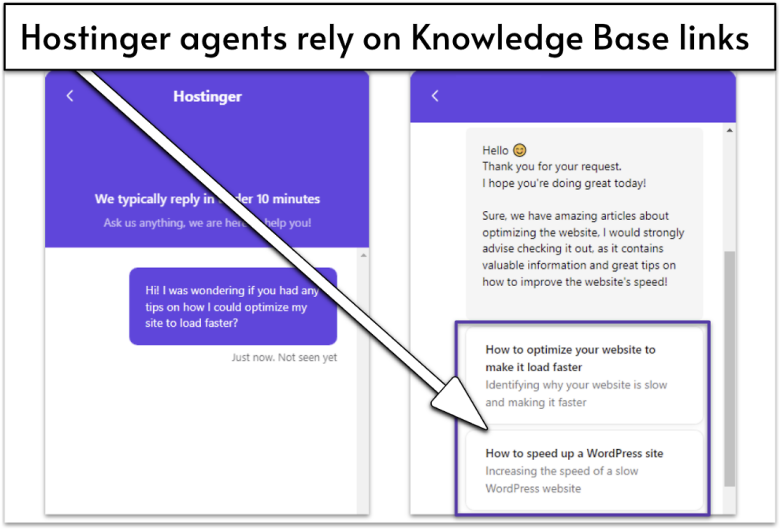
Hostinger offers 24/7 support through live chat and email. In our tests, live chat responses arrived in about 14 minutes, while email replies came back in under 22 minutes, which is faster than promised. Its agents are polite and professional, but they often rely on knowledge base links instead of giving step-by-step answers. For many users, this is actually helpful, since it points you to official resources you can reference later.
Another big advantage is Kodee, Hostinger’s AI assistant. Beyond answering questions, it can perform tasks directly, like migrating a website, creating backups, scanning for malware, or managing WooCommerce products. For SMBs and non-technical users, Kodee AI means less time digging through hPanel or waiting on an agent. It essentially acts as a 24/7 virtual admin, speeding up routine management while keeping support costs low.
Cloudways also provides 24/7 live chat and email support. During our tests, response times were 30–60 seconds, which is way quicker than Hostinger. Its agents were friendly, asked clarifying questions, and even explained basic terms like CDNs. On the downside, trial users can’t file tickets unless they upgrade, and deeper troubleshooting isn’t always included.
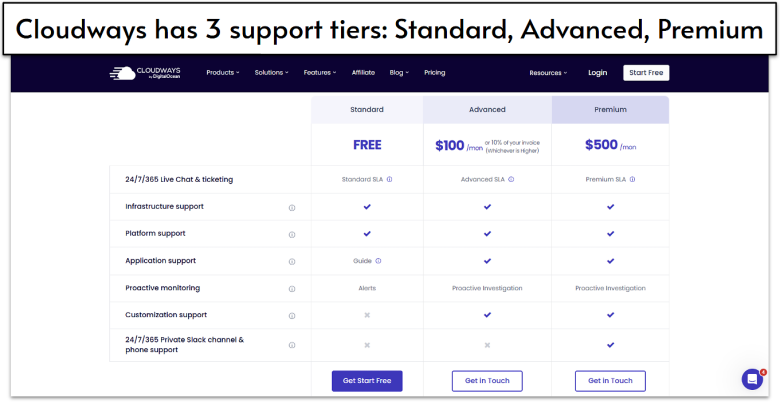
More complex tasks like proactive monitoring or in-depth troubleshooting are only available with the paid add-ons. The Advanced support add-on adds deeper investigations, while Premium includes customization support and even a private Slack channel with Cloudways engineers. This tiered setup can be useful for enterprises that need hands-on help, but it does mean SMBs will face extra costs if they want more than the basics.
Hostinger Is the Clear Winner in 2026
Hostinger is the better choice for most SMBs, WooCommerce stores, and non-technical users. Its cloud plans include a free domain, email, CDN, SSL, malware protection, and automated backups, making pricing clear and predictable. The platform is easy to manage with hPanel and Kodee AI, and you don’t need to rely on paid add-ons to get reliable performance and security.
Cloudways is better suited for developers and agencies managing multiple projects. It offers staging, Git integration, advanced caching, and the ability to choose from providers like AWS, Google Cloud, or DigitalOcean. However, many features, such as Cloudflare Enterprise or premium support, require extra fees, so the total cost is higher than Hostinger for most SMB use cases.
For an all-in-one, affordable solution, Hostinger is the clear winner. Cloudways is only worth considering if you need advanced workflows and customizable infrastructure.
Before deciding, keep in mind that Cloudways didn’t make it into our top 10, but Hostinger did. For more options, check our full list of the best web hosting services in 2026.
To make your decision easier, here’s a quick summary of the key differences:
7-day Horizons trial
Hostinger CDN
30-day money-back guarantee
Git integration
Cloudflare Enterprise CDN (included with Autonomous plan)
3-day free trial (no credit card)
LiteSpeed servers
99.9% uptime guarantee
Vertical scaling
99.99% uptime guarantee
Dedicated IP address
Unlimited SSL certificates
Server-level firewall
Free SSL certificates
Extensive knowledge base
Kodee AI assistant
Paid premium support tiers