
We tested both hosting providers for months, evaluating ease of use, features, performance, security, and customer support, while also reviewing customer reviews from across the web. In the end, we decided that Hostinger’s beginner-friendly hPanel, reliable performance for shared hosting, and one-click install options made it the best bet for beginners.
On the other hand, AWS powers giant enterprises like Netflix and Airbnb. However, it comes with very complex functionality and sometimes unpredictable bills that many small business owners have complained about. Because it delivers better value and simplicity overall, Hostinger is our recommended choice in this comparison. Read on to see why.
Plans and Pricing
Hostinger Beats AWS on Transparent Pricing
Hostinger’s offering (more focused on shared and managed beginner-friendly plans) is very different from AWS’s (cloud-based, scalable servers). The most comparable plans are Hostinger’s VPS hosting against Amazon Lightsail and Amazon EC2, since they are both VPS options with modifiable resources. Amazon Lightsail is a simplified VPS-like service with monthly plans, while EC2 is its more advanced, pay-as-you-go cloud solution.
Hostinger’s VPS pricing is clear and predictable. You choose a plan with fixed monthly costs, and that price includes essentials like SSL certificates, backups, and 24/7 support. While renewal rates increase after the first term, you’ll never face surprise charges for basic features. For small businesses or agencies managing multiple client sites, Hostinger’s level of transparency makes budgeting much simpler.
AWS Lightsail is the closest equivalent to Hostinger’s VPS, as it also comes with predictable monthly plans that bundle in compute, storage, and bandwidth. The difference is in value per dollar: at the same entry-level price point, Hostinger typically includes more resources and built-in features, while Lightsail often requires you to add extras.
Amazon EC2 offers near-unlimited customization and is billed by the hour or even the second. On paper, this flexibility looks cost-effective for projects that scale resources up and down. But for small businesses that underestimate traffic or storage usage, bills can escalate quickly. Backups, SSL, and bandwidth are not automatically included, so you’ll need to budget carefully. Despite the AWS Pricing Calculator, many users still report unexpected bills.
| Hostinger | AWS |
|---|---|
| ✅ Fixed monthly costs on VPS plans ✅ Included SSL certificates and backups ✅ 24/7 customer support |
✅ Higher plan variety for specialized uses ✅ Hourly and second-based pricing |
| ❌ Less specialized VPS options | ❌ Users report unexpected bills ❌ Higher price for similar features ❌ No included SSL certificates or backups |
Features
AWS Wins for Developers, Hostinger for Everyone Else
Hostinger’s biggest advantage is its all-in-one bundle. Every VPS package includes full root access, weekly backups and snapshots, a built-in firewall, and DDoS protection. You can choose from multiple Linux distributions, install apps like Docker or Django in minutes, and manage everything from a clean custom control panel. If you’re migrating from another host, Hostinger even provides free assisted site migration, which is a big relief for beginners.
AWS’s Lightsail is the beginner-friendly option, with preconfigured stacks for WordPress, Magento, and Joomla. However, it doesn’t come with features such as SSL certificates, backups, or a content delivery network (CDN). For larger projects, AWS’s EC2 would be the next step.
EC2 gives you full root control, server type selection, networking, and scaling, though almost nothing comes preconfigured, so you’ll need some technical skills to set EC2 up. Popular hosting options, such as WordPress or WooCommerce hosting, require users to install, configure, and secure all apps. While this might prove too complicated for most users, the high degree of control makes AWS well-suited for developers.
Both platforms can handle high-traffic websites, but they take different approaches. Hostinger gives SMBs and freelancers a beginner-friendly VPS with bundled features, while AWS delivers ultimate control and scalability for developers who want to build everything themselves. Even for testing, Hostinger includes a 30-day money-back guarantee, while AWS offers account credits and a Lightsail 3-month trial through the AWS Free Tier.
I’ve summed up the main VPS features of Hostinger and AWS Lightsail so you can see how they compare:
| Hostinger | AWS Lightsail | |
|---|---|---|
| VPS hosting types | Unmanaged KVM VPS | Unmanaged virtual servers (instances) |
| CPU | 1–8 vCPU cores | 2–64 vCPU cores |
| RAM | 4–32 GB | 0.5–256 GB |
| Storage | 50–400 GB NVMe | 20 GB–1.28 TB SSD |
| Bandwidth | 4–32 TB | 1–10 TB |
| Control panel | hPanel (custom), cPanel, CyberPanel, Plesk (VPS add-ons) | Amazon Lightsail console, plus other interfaces from the AWS Management Console |
| Dedicated IPs | ✔ | ✔ |
| Free CDN | ✘ (only on shared/cloud, manual setup for VPS) | ✔ (free first year, up to 50 GB; then paid via Amazon CloudFront) |
| Data center locations | 2 in North America, 1 in South America, 3 in Asia, 4 in Europe | 4 in North America, 6 in Asia-Pacific, 5 in Europe |
| Money-back guarantee | 30-day money-back guarantee | 3 months free on the AWS Free Tier |
Performance
AWS Takes the Lead, but Hostinger Isn’t Far Behind
Hostinger’s VPS servers use AMD EPYC processors, NVMe SSD storage, and 1 Gbps network speed on all plans. You can choose from 10 data centers in North America, Europe, Asia, and South America.
AWS offers 120 availability zones in 38 regions worldwide. Note that this wide geographical network is only available for EC2 plans. Lightsail plans offer access to 14 regions in North America, Europe, and Asia. Lightsail plans offer SSD storage from 20 GB to 1,280 GB and free CDN usage of up to 50 GB for one year. It’s overall more flexible than Hostinger, but the costs scale as well.
For uptime, Hostinger backs its VPS hosting with a 99.9% guarantee. If it fails to meet this, you can request a 5% credit for that month’s hosting fee. AWS has a more detailed SLA: spreading instances across multiple zones guarantees 99.99% uptime, while single instances have 99.5%. If AWS falls short, you get 10–100% service credits, though that rarely happens.
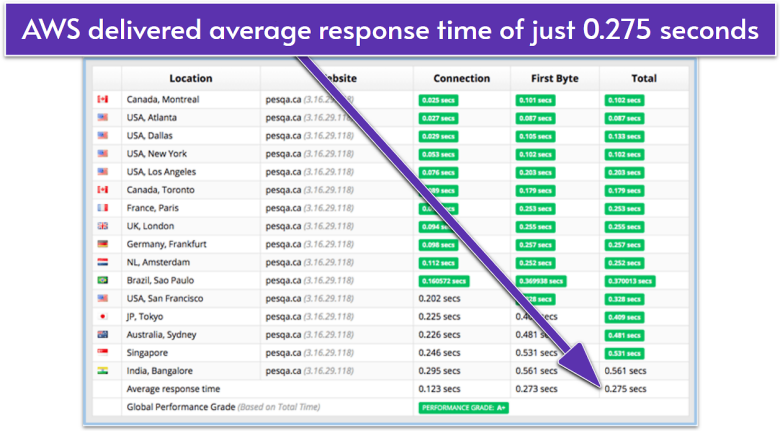
During testing, AWS EC2 delivered an impressive global average of 0.275 seconds on Sucuri. Most locations stayed under 0.300 seconds, with Montreal, Atlanta, and New York leading the pack as low as 0.102 seconds. Even farther regions like Sydney and Bangalore stayed reasonably quick, which shows the strength of AWS’s worldwide network.
If you have a large-scale platform with users spread across continents, this kind of consistency can make a noticeable difference in engagement and conversion rates. For more details, visit our expert AWS review.
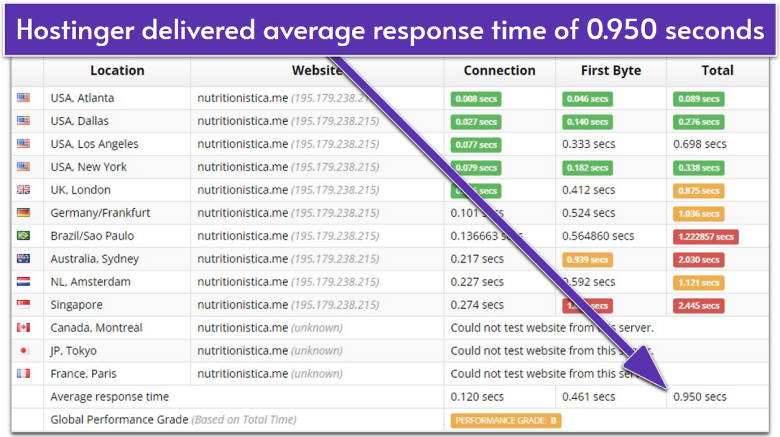
By contrast, Hostinger averaged 0.950 seconds globally on Sucuri. While US-based tests, such as Atlanta, were strong at 0.089 seconds, performance fell sharply in other regions. Sydney clocked in at 2.030 seconds, and Singapore at 2.445 seconds, slow enough to frustrate international visitors. Overall, Hostinger earned a grade of B, compared to AWS’ A+.
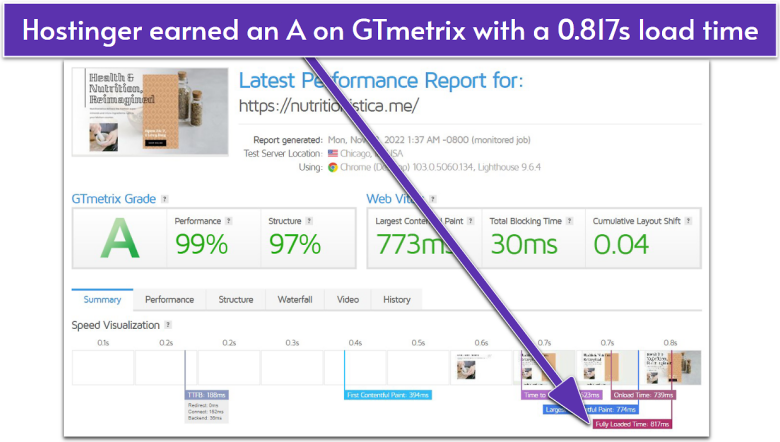
On GTmetrix, Hostinger delivered a 99% performance score with a fully loaded time of 0.817 seconds, which is excellent for a budget-friendly VPS. Compared to other hosts in its price range (which often exceed 2 seconds), Hostinger performs well enough for small to mid-sized businesses, agencies, and freelancers who want reliable speeds without enterprise complexity. Read our full Hostinger review for more details on its performance.
AWS is clearly unmatched for companies that need worldwide reliability and can’t afford a millisecond of downtime. But most small businesses don’t require that scale. While Hostinger delivers excellent speeds at a lower cost, making it a good fit for WordPress sites, e-commerce, and SMBs, AWS offers better performance overall, though at a steeper price.
| Hostinger | AWS |
|---|---|
| ✅ LiteSpeed servers ✅ NVMe SSD storage ✅ 10 available regions |
✅ 38 available regions ✅ Free CDN for a year ✅ Higher resource limits |
| ❌ Slower times to full-load farther away from the datacenter ❌ Slower times overall |
❌ Higher prices for similar resources ❌ No options in South America on Lightsail plans |
Security
Hostinger’s Security Is More Practical and Cost-Effective
Hostinger’s VPS hosting comes with built-in protections that are more than enough for most small to mid-sized businesses. Every plan includes free weekly backups, snapshots, firewall management, and DDoS protection. You also get full root access, which means you can customize security settings or install extra tools if your business needs more control.
With AWS Lightsail, you get basic protections like automated snapshots (paid add-on), integrated firewalls, and private networking, enough to secure a simple site or application. But once you step into EC2, security becomes much more customizable and complex.
Advanced options like AWS Shield for DDoS protection, IAM for user permissions, and advanced VPC security configurations can protect enterprise-grade workloads, but they often come with extra setup time and costs. For example, DDoS protection with AWS Shield Advanced for EC2 can run into thousands of dollars a month, far beyond the budget of a small business.
The trade-off is clear: Hostinger’s security is simple, affordable, and built for small businesses that need reliable protection without hiring a sysadmin. AWS, through Lightsail and EC2, offers deeper tools and scalability for teams with the technical know-how (and budget) to manage them.
Support
Hostinger’s Free Support Rocks, While AWS Keeps You Waiting
Hostinger gives you 24/7 live chat and email right inside hPanel, which is far better than most budget hosts manage. In our tests, the agent responded in under 15 minutes and was polite, friendly, and helpful. Its email support was even faster, with a detailed solution in less than half an hour from the first email.
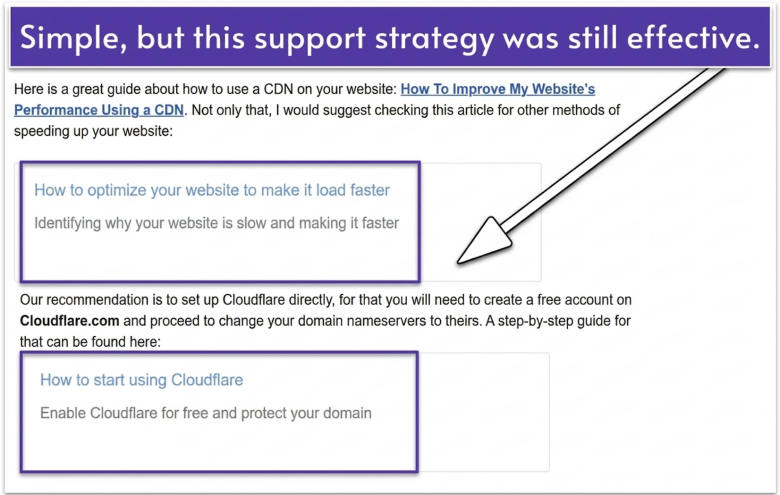
For most questions, Hostinger’s support will link to its knowledge base with step-by-step guides for all the basics (some tutorials even include video guides). Hostinger has also rolled out Kodee, its AI assistant, which is surprisingly helpful for common issues. It won’t replace a live agent for complex stuff, but if you just want quick guidance on setup or server tweaks, it’s faster than waiting for human support.
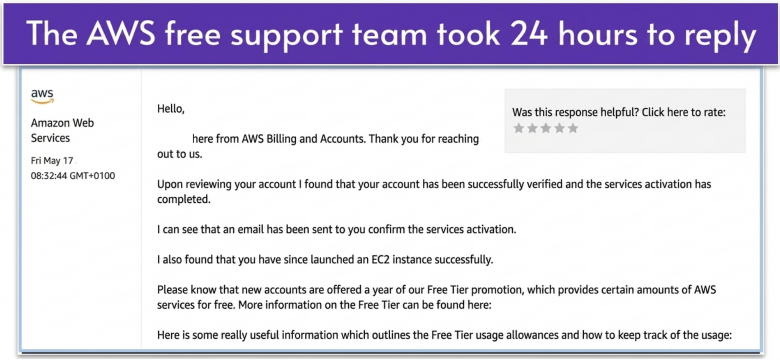
AWS takes a very different approach. The free basic support only helps with billing and account issues. If you actually want technical support, you’ll need to pay for one of its four paid tiers (Developer, Business, Enterprise On-Ramp, and Enterprise Support) that unlock 24/7 chat and phone support with faster response times from experts. The catch is that the better the support at AWS, the higher the price, making it hard to justify for smaller projects.
Bottom line: if you want fast, human help without paying enterprise prices, Hostinger is the clear winner on support.
Hostinger vs AWS: Predictability Beats Power (for Most Users)
Hostinger’s included features, ease of use, and lower, predictable pricing make it the better choice for most users. It’s especially good for beginners and businesses that can’t devote much time or resources to setting up their hosting infrastructure. Developers and larger enterprises will benefit more from AWS’s global network, highly customizable setup, and greater scalability limits.
Hostinger also secured a spot on our list of the best hosting services for 2026 proving it’s not only budget-friendly but also a reliable top performer.
AI assistant (Kodee)
1-click app installs
30-day money-back guarantee
Reserved IPs
Intuitive management console
One-click SSH and RDP access
AMD EPYC processors
1 Gbps network speed
10 global datacenters
99.9% uptime guarantee
SSD storage
Free CDN (Lightsail up to 50 GB)
CloudFront CDN (extra cost)
99.5% (single instance) to 99.99% (multi-zone) uptime SLA
Firewall management
DDoS protection
Snapshots included
Server monitoring
DNS management
Advanced options like AWS Shield, IAM, and VPC security (paid add-ons)
Extensive knowledge base
AI chatbot
Four paid support tiers unlock 24/7 technical help
Extensive documentation