We rank vendors based on rigorous testing and research, but also take into account your feedback and our commercial agreements with providers. This page contains affiliate links. Advertising Disclosure
Webador’s strong suit is easy to use, making it an excellent choice for beginners. With an intuitive and user-friendly editor and highly affordable pricing, it’s a standout option for quickly getting a site online.
However, users seeking advanced customization and more robust features may find it lacking and might need to explore other options.
Webador makes its primary appeal clear right from the start: It’s a website builder that lets you create a functional website in under 10 minutes. Hassle-free and quick website building for anyone – it doesn’t get much better than that.
Almost every builder has to strike a balance between providing every conceivable feature and keeping things easy to use, and Webador definitely leans towards simplicity. This makes Webador an outstanding builder if you’re looking to get a simple site online for cheap, but it won’t support loftier ambitions.
Still, if Webador is right for you, then it will really be right for you. The Webador editor is available in Dutch, English, French, German, Italian, Polish, Portuguese, and Spanish. Is it everything you need, or should you go for something more robust? Read on to find out.
4.5
Templates
Webador’s Templates Show How Far You Can Take It
Webador doesn’t go the same route as other website builders when it comes to templates. Instead of segmenting its templates into various categories or functionalities, Webador simply shows you what’s available.
This might seem like a bad thing at first, but there’s a very good reason for it. Every one of Webador’s 50+ mobile-friendly templates can work for several different purposes.
It isn’t the most advanced editor in the world (more on that later), but the templates are there to give you an idea of the different moods and styles you can achieve. That said, you should keep in mind that each template comes with its own non-swappable header style.
I personally could’ve used a couple more business-oriented templates that showcased Webador’s e-commerce tools. But still, the great thing about Webador’s templates is that they give you the freedom to make them your own, so any template can become a business-oriented template as soon as you add some e-commerce sections.
After you select the best template for you, Webador’s customization process is incredibly intuitive. To change the overall look of your site, all you have to do is click the “Design” tab on the top menu. There, you’ll be able to change the colors of your header, footer, background, and accent color. If you click on “text formatting” you’ll also be able to change the template’s font styles, sizes, and color.
Webador makes it easy to change the broad strokes of your site
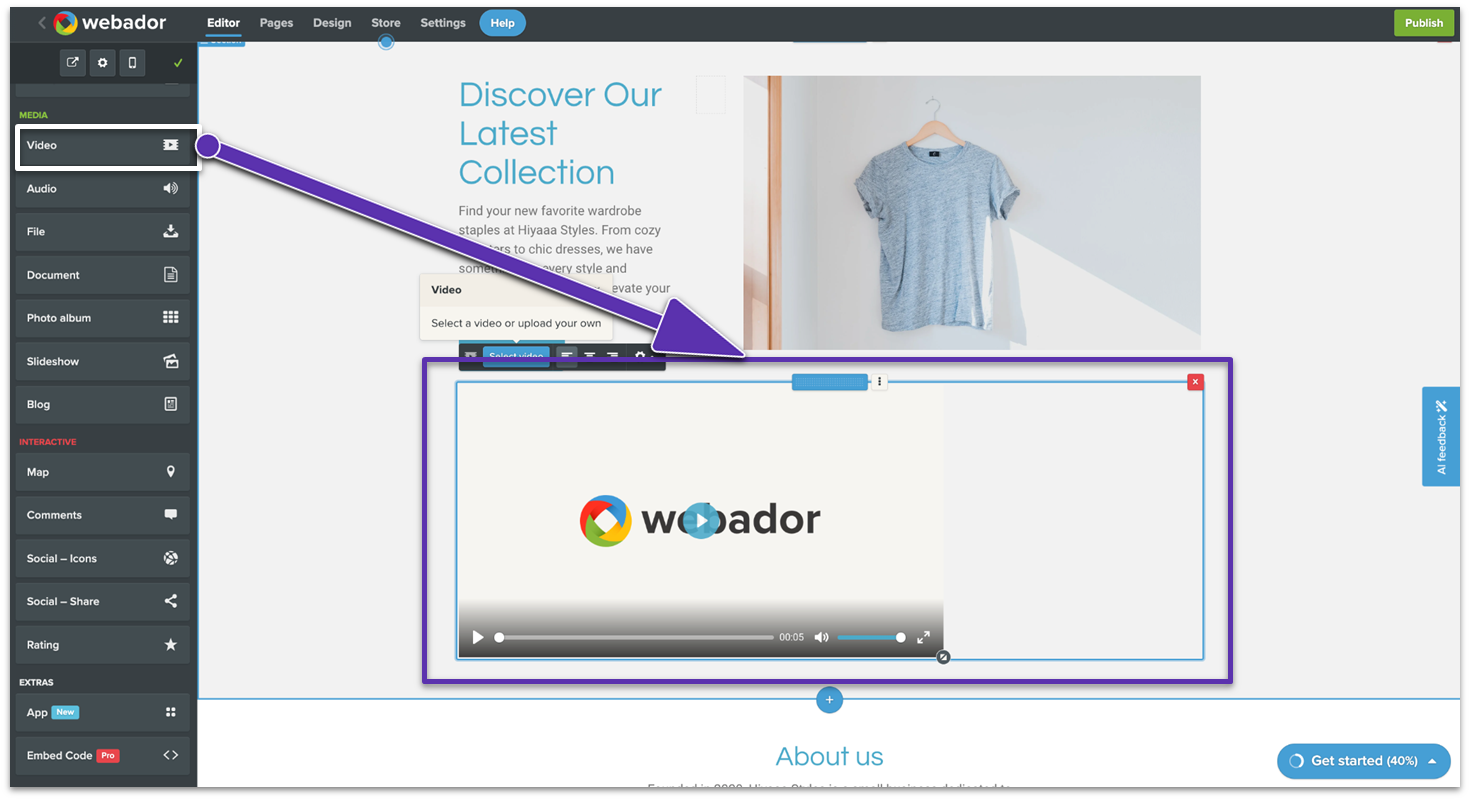
Once you’re satisfied with your overall text styles, you can head back to the “Editor” tab. There, you’ll be able to access a modest – but not lackluster – collection of elements divided into six categories: Basic, Online Store, Structure, Media, Interactive, and Extras. You can add any element to the body of your site by dragging it into place from the sidebar. Webador automatically places your elements onto a grid, which helps to ensure a decent level of visual clarity.
Adding a new element is as easy as placing it where you want
That said, the editing capabilities of Webador can feel limited. You don’t get much say over the settings for your header and footer, and the widget selection is smaller than what most other builders offer. Also, there aren’t many options to customize individual elements, like text effects or animation features. You can definitely create something unique with Webador, but probably nothing mind-blowing.
4.7
Features
Webador’s Toolset Is Reliable but Not Very Extensive
Webador provides a solid range of features for customization, e-commerce, and media sharing, making it versatile for various needs. However, the lack of more advanced features – and even some of the restrictions on the features that are there – hold back its full potential.
That’s not the worst thing in the world when taken into context. After all, Webador’s aim isn’t to be the go-to platform for professional designers – it’s to help anyone create a simple but high-quality site. Even still, Webador has a few tricks up its sleeve that pleasantly surprised me.
Webador Offers Unique Elements to Customize Your Page
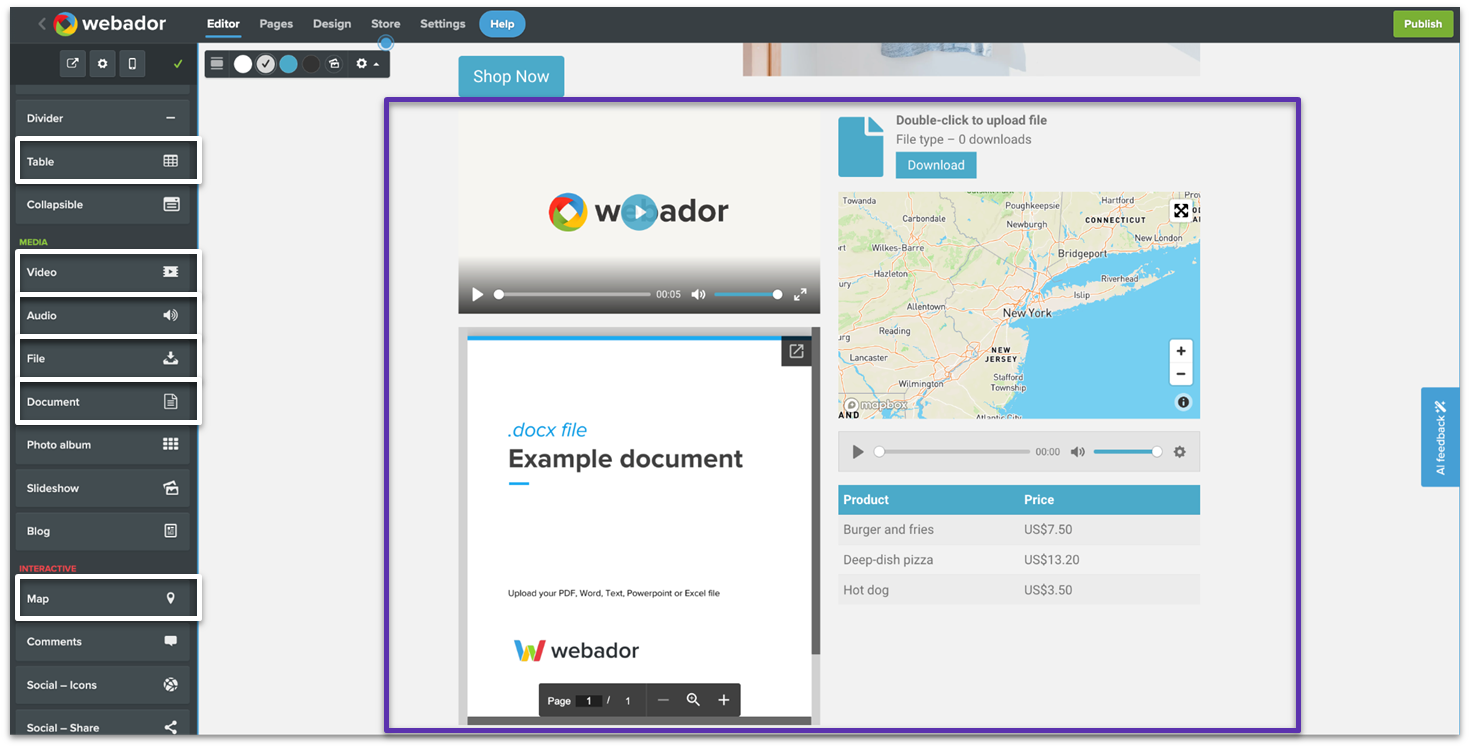
Besides the classic, indispensable elements like headings, buttons, and image options, Webador offers some interesting surprises to raise your site above the mundane.
You can add all sorts of widgets with Webador, but discretion is advised
If you want your audience to reach out, Webador’s got you covered. Whether you want to include a digital map of your physical location or even a rating system, Webador includes widgets to make direct communication with customers easier. Some of the tools for visitor interaction included in the editor are:
Ratings. You can add a five-star rating system anywhere on your page, which is a great way to engage with your audience or gauge their reaction to a particular product or service.
Comments. This might not seem like much, but Webador lets you add a comments box anywhere, not just on blog entries. That means that you can add a section for visitor discussions wherever you like.
Social buttons. Webador includes built-in icons to easily link your social media sites, as well as plenty of sharing tools to help spread the word around about your website.
Digital maps. If you have a physical location, embedding an up-to-date map is vital to make sure potential clients always know where to find you.
Custom forms. Webador includes a pretty solid form tool. You can customize your form’s questions, edit the field type (text, checkbox, multiple choice, etc.), and even tailor the confirmation message.
Webador also has a variety of widgets for turning your site into a file-sharing, media-streaming hub, which include audio and video players, a document-sharing system, and a file download system (with a 42MB upload limit per file).
A Complete Set of E-Commerce Tools
Webador’s e-commerce tools let you sell products directly from your site and cover core needs. There are no prebuilt store templates, so you’ll begin with a blank page when adding a shop. However, as soon as you create a page, Webador’s AI guides you with setup questions to quickly customize and launch your shop.
Webador’s store builder is a good alternative to templates
You can sell physical products, digital downloads, and services with Webador, but there’s no dedicated option for memberships. While you can’t group products into categories like women’s tops or men’s pants, you can still create filters and variants such as color, size, type, and material.
You can create variants for each product in your Webador store
You can also create discount codes, set fixed sale prices, include customer feedback fields for product personalization, adjust each item’s SEO metadata, and add special product labels, such as “New” or “Special offer.” Webador’s store dashboard has order and inventory tracking, VAT tax setup, shipping options, and customizable checkout fields, but there’s no multi-currency support or abandoned cart recovery.
Webador doesn’t take a commission on your online store sales – a rare benefit, even compared to many dedicated e-commerce platforms. Keep in mind, though, that standard payment processing fees still apply.
Webador’s Pro plan lets you sell up to 10 products, while the Business plan supports unlimited products and adds an advanced statistics tool for insights into visitors’ locations, traffic sources, and devices used. You can also connect Google Analytics for deeper insights on both plans.
Though Webador’s e-commerce features are impressive, I would still recommend choosing a dedicated e-commerce platform if you want to create a fully-fledged online store. However, if you want to sell a small range of products on the side, Webador’s e-commerce tools give you all the features you need to manage your sales directly from your site’s dashboard.
Webador Makes It Easy To Run and Manage a Blog
If you’re interested in blogging, Webador offers a what-you-see-is-what-you-get (WYSIWYG) editor that allows you to make visual changes and add custom elements to your blog posts as you edit. This system gives you a lot of flexibility and ensures that you can always craft unique blog posts.
Webador lets you customize your blog posts to your heart’s content
To manage your posts, just add the blog widget anywhere on your site and click on the “manage blog” option. From there, you can enable or disable comments, hide your page from search engines like Google, schedule posts, and set page titles and descriptions.
Webador Offers Multi-Language Support
Webador makes its editor available in 12 languages, including custom multi-language support for features like its webshop and custom forms. The editor is available in the following languages:
English
French
German
Spanish
Italian
Dutch
Polish
Danish
Finnish
Swedish
Portuguese
Norwegian
Unlike Wix, Webador doesn’t offer built-in automatic translation. However, you can still create a multilingual site by duplicating your main pages and translating them manually. Alternatively, you can integrate Website Translator by Elfsight using Webador’s embed code element.
5.0
Ease of use
My Experience With Webador
Webador is among the most user-friendly website builders I’ve tested – far less learning curve than complex builders like WordPress or even feature-rich ones like Wix. It earned one of the highest ease-of-use ratings in my tests.
Webador truly delivers on its ‘website in 10 minutes’ promise – I was able to go from sign-up to publishing a basic site in one short sitting. Its interface is minimal and logically organized – far less overwhelming than Wix’s. This balance of some drag-and-drop freedom with a guiding structure keeps things easy and prevents design accidents.
Getting Started With Webador
Webador’s template selection process differs from what I was accustomed to. Unlike most website builders, where you choose your template upfront, Webador required me to enter its editor first. Before diving into the editor, I was presented with two options: start from a blank website or allow Webador’s AI to prefill my site with content based on some basic information.
Once in the editor, I was finally able to browse the template library from the “Design” tab. However, the templates were not categorized, making it difficult to find a specific design style. Although previewing and switching between designs was straightforward, scrolling through an uncategorized selection felt cumbersome at first.
Webador’s AI builder helps streamline the process. It asked me about my business details, such as its type, name, and unique features. It also guided me in selecting initial pages and features (like Google integrations, custom domains, and SEO tools). This input influenced my website’s style and initial layout suggestions, which I found very helpful.
Customizing My Webador Website
Webador’s drag-and-drop interface allowed me to effortlessly move elements into place. For instance, I simply dragged an image element where I wanted it to go, adding my picture. However, I was surprised that there wasn’t an undo button, which would have been a useful addition.
While there are no pop-up tips to guide you through the process, Webador offers a comprehensive help section accessible via the editor. Clicking the “Help” button led me to detailed tutorials and guides, which were a great fallback when I needed clarification.
Webador provides helpful guides and tutorials for website creation
Basic tasks like adding new pages or customizing design elements were straightforward. To add a page, I just used the “Pages” tab at the top of the editor. Changing templates, accent colors, and text formatting was equally smooth through the Design menu.
Another highlight was setting up an online store. The Store menu allowed me to easily manage products, configure shipping, set up coupons, and add payment methods. I was really pleased to see that Webador supports major gateways like PayPal and Stripe.
Webador makes it easy to set up an online store
Interestingly, Webador doesn’t have an AI image generator. I’m seeing this more and more in most website builders, so I was a bit disappointed, as this tool can help save time and would have helped me get started faster.
Overall, Webador delivered a user-friendly and capable website-building experience. While it lacks AI features and the design flexibility offered by competitors like Wix, Webador’s intuitive interface, solid e-commerce tools, and helpful resources make it a reliable choice.
Additional Ease of Use Features
Webador Is by Far One of the Most User-friendly Builders Out There
I was really impressed by the simplicity of Webador’s user interface. Its highly responsive editor lets you edit any section of your site with just a click. On top of that, Webador goes the extra mile with a personalized “Getting Started” walkthrough, ensuring you always have clear guidance for your next steps.
The interesting thing about Webador’s ease of use is that there isn’t much to talk about. Not because it’s hard to use, but exactly the opposite. From the moment you pick a template to the moment you publish your site, every part of the site-building process is straightforward with Webador.
Webador Offers a Crash Course on Site Building Fundamentals
Out of all the website builders I’ve tested, I wouldn’t have expected Webador to offer such a rigorous set of complimentary material through its help center. It’s not like you’ll find yourself in need of a ton of support documentation often (again, this is one of the easiest website builders out there), so why is it even there?
Well, the answer is that Webador’s help center covers much more than just how to use the platform. It also helps beginners get to grips with crucial website-building fundamentals.
Webador’s help center guides anyone looking to build and grow their site
If you’re new to website building, you’ll find useful information about the basic principles of web design, such as spacing, visual weight, page distribution, and more.
The help center delves into various topics, from design best practices to SEO optimization, and its tips are applicable regardless of the builder you’re using. The articles are well-written and use plenty of resources (such as images and video tutorials) for extra clarity.
Easy SEO Settings To Improve Your Traffic Rankings
Search engine optimization is essential for boosting your organic traffic, but putting all the best practices into action can be pretty challenging.
Although Webador can’t apply the best SEO practices for you, what it can do is make it as easy as possible for you to apply them yourself. Webador makes it extremely easy to modify and update your website’s SEO settings. Just open the editor, click on “Settings,” and head to the SEO section. From there, you can easily update page titles, write meta descriptions, and choose whether or not you want a page to be indexed by Google.
You can even edit the SEO characteristics of individual elements as you edit, ensuring you always have the final say over how you want every part of your site to be listed.
AI Tools To Expedite the Website Creation Process
If you need to launch your website quickly, Webador’s AI tools can help by pre-filling it with content. All you have to do is choose the “prefilled with content” option when asked how you want to get started. Then, enter your business type, website name, and location, and you’re ready to go!
Admittedly, the AI-generated text is somewhat generic, but it can be a good starting point. Webador also pre-creates a structure for your site and fills it with relevant widgets. This gives you a solid foundation to work on instead of the completely blank canvas you’d get otherwise.
4.5
Support
Webador’s support is primarily via email (ticket system). There’s no live chat or phone support, but there’s WhatsApp support, which is almost as efficient. To test the support quality, I emailed in a couple of (really) basic questions.
I had two questions in mind: Can you directly edit your site’s HTML, and can you use the video widget to embed videos from sources other than YouTube? I submitted the ticket during regular working hours (Monday through Friday, 8:30-17:00 CET) and got a response in my inbox in less than one hour. However, if you’re outside Europe, you might experience a delay if you email during off-hours.
Webador’s email support agent answered my questions clearly
The response itself was OK. It wasn’t exceptional, but it responded to my inquiries, and it was quick. Webador could benefit from providing additional support options, but the level of support you receive is fairly satisfactory.
I tested Webador’s WhatsApp support next, and it was equally responsive. I sent a message on Sunday and got a response the next day.
Webador’s WhatsApp support is a good alternative to standard live chat support
However, for the self-learning type, I can’t recommend the help center enough. It has everything you need to build your site from start to finish. There’s also an AI chatbot that answers basic questions, so you don’t have to search through help center articles manually. If you have a more technical question, it prompts you to submit an email ticket.
5.0
Pricing
One of the Cheapest Builders Out There, but Read the Small Print
Webador is by far one of the most affordable options out there. For starters, its forever-free plan includes access to over 100,000 stock photos, AI features for website building, and unlimited data traffic and storage. That’s a really decent offering for a free plan. The only catch is that your site will have a Webador subdomain and advertisement.
If you’re ready to upgrade from the free plan, you get three premium options: Lite, Pro, and Business. For $3.00 a month, the Lite plan allows you to connect a custom domain and even comes with free domain registration for a year. Just note that it doesn’t completely remove Webador’s branding, which is disappointing, especially since most competitors like Wix, Squarespace, and SITE123 support ad-free sites at their entry level.
Still, this isn’t such a big problem considering that the next available plan, Pro, removes all Webador ads from your site for just $5.25 per month. When you update to Pro, you’ll also get access to visitor statistics, access to Webador’s app store, custom code integrations, and a ton of other extras.
You can also start selling up to 10 products directly with the Pro plan which might be plenty for small businesses. Webador doesn’t charge a commission on e-commerce sales, which is a rarity when compared to other web builders.
Finally, Webador’s most expensive plan, Business, which is still very affordable ($10.50 per month), lets you add HD videos to your site and gives you the option to add an unlimited number of products to your e-commerce store.
Just keep in mind that Webador’s pricing doubles after your first 12 months. That means that after your first year, the monthly equivalent comes to $6.00 for Lite, $10.50 for Pro, and $21 for Business.
If cost is the primary concern and your needs are basic, Webador can be a compelling value. However, if you anticipate needing scalable e-commerce, design flexibility, or advanced tools down the line, the higher price points of Wix or Squarespace may prove more justifiable.
Webador is really clear about its priorities as a builder, which means that it probably won’t be the ideal service for everyone. If your goal is to build a highly dynamic site with advanced animations, interactive features, and custom transitions, this platform isn’t designed for that.
Where Webador excels is in providing a straightforward, affordable solution for users who want to create a simple, functional website with minimal hassle. Even experienced designers may find it useful for quickly launching smaller projects without the need for ongoing maintenance.
Wix is better than Webador. It gives you far more design flexibility, template variety, advanced SEO and e-commerce tools, a large app marketplace, and AI tools. In contrast, Webador is easier to use but more limited.
Can you make money on Webador?
Yes, you can make money on Webador using multiple methods. With a Pro or Business plan, you can sell physical or digital products and services via its online store. You can also monetize with affiliate marketing or by adding Google AdSense ads.
Yes, you can use Webador’s free plan indefinitely at no cost. It includes unlimited storage and data traffic, all Webador templates, an AI website builder, free stock photos, and a Webador-hosted subdomain. You’ll have to upgrade to at least the Pro plan to get a custom domain and an online store. You can explore our best free website builders for more options.
Kamso is a former writer for Website Planet, specializing in writing about credit card processing and website builders. He has worked on comparisons, product reviews, and news stories about software products and digital tools. He has a mechanical engineering degree and a strong fondness for anything in the tech space.
Maggy Di Costanzo is a former editor at Website Planet, specializing in reviews of e-commerce platforms, website builders, and web hosting services. With experience as a freelance AI content specialist, editor, and writer, she brings a versatile skill set from industries like marketing and real estate. When she’s not editing or staying updated on SEO trends, Maggy enjoys going on hikes with her dog, planning dinner parties, and tracking the stock market.
onclick="trackClickout('event', 'clickout', 'Visit User Reviews', 'webador', this, true, ReturnPopup );"
View 1 reply
View %d replies
WEBADOR No Longer Trustworthy
I've been a customer for 2 years. Due to a card fraud experience, I had to cancel my card and get a new one. I forgot to update my recurring payment with Webador. So my website lapsed. When I went to renew it, Webador's UI could not allow me to make a payment to reinstate my service. Odd. I had to email them. Then, I was told to make the payment by PayPal. Could I make a monthly payment? No, only annual. I was confused but wanted my website back up, so I went to PayPal and made the payment. I was starting to feel scammed but figured maybe they're a smaller business. I heard nothing after making the payment. I emailed and waited. They asked for the invoice number. So I gave them their own invoice number. I waited again. I emailed again. They asked for the PayPal transaction ID. I provided that. At this point I definitely feel scammed. I waited again. Feeling foolish, I requested a full refund and filed a complaint with PayPal. They responded that all I had to do was remove my complaint from PayPal. Hmmmm, why? At this point, they responded with a barrage of Terms and Policies and how I had broken their terms and would be given no refunds. Please Buyer, BEWARE WEBADOR. I just got scammed $108.
Its been a two weeks I'm trying to contact Webador with log in issue. My email address isn't recognized by Webador system. I did receive an email from Webador customer service with a link to reset my password. Obviously i cannot reset my password because my email isnt recognized. I am not able to edit my website or eventually close my account and subscription. My website is published but not completely done and no way to log in to make changes. Very frustrating.
It took them 10 days to respond to a simple tech support question I had
It took them 10 days to respond to a simple tech support question I had. When I say respond, I mean to simply touch base with me and then asking me for more information. Now I am waiting again to hear back from them. If you call this good tech support than webador is for you!
I logged in this morning 1/28/23 to do some editing and check my emails and I can't do anything, it won't open my email page and it won't let me do any editing it acts like Webador doesn't exist I am on a monthly $20.00 plan I do not recommend. Emails are very important and are a way for customers to reach out not being able to access my emails is not good for my or any business.
Basic website builder. Will try to take as much money from you wherever possible by adding in fees and just adding subscriptions that you haven't paid for. It's a shame as this company has the potential to be great, but not everyone can afford to pay an extra £108 out of nowhere.
I disagree. To run a SMALL business requires adhering to a budget; Webador offers that and if a business owner, regarless of where you live, can't afford $10 USD a month, they shouldn't be in any LEGAL business. Have a great day wherever you live. Sincerely, a proud American Veteran.
Dave
,
USA November 10, 2023
Very Limited – Try to tie you down by making it very difficult to leave
Webador tie you down. to move the server you need to copy page-by-page text areas otherwise you end up with their code on your new website. Now 1 week ago we transferred the domain. propagation can take a max of 24 hours but normally in 2021, this is done in less than 1 hour. Webador has turned off the site near-instantly and now put a webador page where my client's website should be. It should be a straight swap. no downtime, no parking pages. The webador server and site is still valid. Why would you put a webador splash page over my client's site for 1 week?
This is not account-specific and you do not need to reply. You are not going to cheat your way out of this one. A Company that does not respect its customers. I will advise my client to contact paypal and request a refund and report the actions of Webador to them. 1 star is too many.
The only reason for the four-star review is that I don't think anything can be perfect enough for 5 no matter the product!
I found the web builder easy to use and well priced (in the end I decided to go with the ad-free option of the lesser of the two payed plans) which has worked out well for me.
A few of my pages have quite well-known or frequently visited competition, although when doing a general search for my topic base about 90% of them can be found high up on the very first page of google! Unfortunately, it took a little while to first appear on Google (although this is an issue I put down fully to them rather than Webador) but since I've had plenty of views from all over the world.
Just a few days before I planned to have my website up and running, disaster struck- I was unable to log in and then got worried that now the money had been taken, I was locked out and had wasted all the time, money and effort that I had put into it. Luckily, after contacting the helpful services team, which came back to me the next day (it is important to remember that because of their location time zones can play a factor in response speed) and the issue was sorted after a couple of failed attempts.
Ali's Menagerie
I swapped from Sq Space after 6 months of invisibility, within 3 months my webador site was on page 3 of google. I used identical SEO and design. Go figure. Square Space also continued charging me MONTHS after cancelation, and I am yet to get a refund. Webador wins by a country mile and guesses what? No one paid me to say this.
Family sharingMulti User SharingExpert SupportBackupSmart syncPersonal SolutionBusiness SolutionTeams optionsOffline foldersFile history and recoveryRead more reviews
 Website Planet