If you already own a GoDaddy domain, you’ve probably wondered whether sticking with GoDaddy’s website builder will save you time – or if moving your domain to a platform like Wix is actually worth the effort.
Wix remains a website-builder powerhouse, offering a depth of features few competitors can match. GoDaddy, best known for domain registration and hosting, has made real progress with its builder by including AI design and content tools. But while it can work well for quick, simple sites, it still can’t deliver the creative freedom or long-term flexibility that many businesses need.
After testing both builders thoroughly, I can say this: GoDaddy can be a solid choice for straightforward, no-frills projects, but Wix offers significantly better value, customization, and scalability.
Read on to see what gives Wix the edge.
Templates
Wix Offers More Templates and Design Options Than GoDaddy
Wix lets you choose from 2500+ templates, in 15 primary categories. But it’s not just about quantity – Wix’s templates are polished, modern, and come with useful features like blog pages and chat apps built-in to save you time.
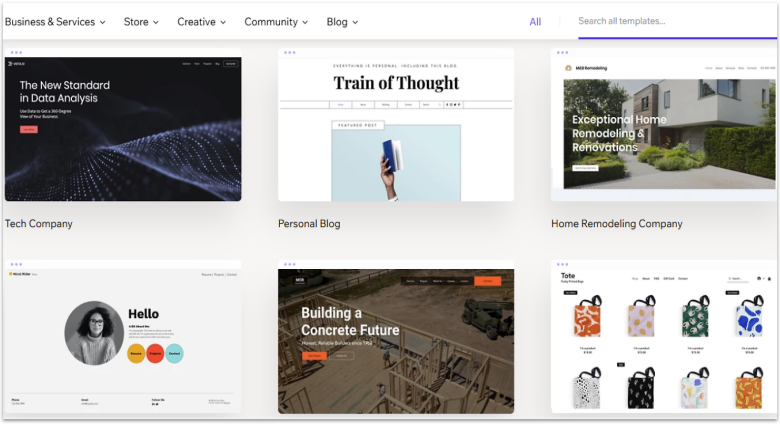
Also, you can use the drag-and-drop editor to place elements pretty much anywhere on the page. The customization flexibility allows you to create a design that feels original and doesn’t look like almost every other site out there.
Wix’s templates aren’t fully responsive, though. If you’ve made a lot of changes to your template, you’ll have to adjust it manually in the mobile view editor. Another potential drawback is that once you pick a template, you can’t switch to a new one without losing your edits, so you need to choose wisely.
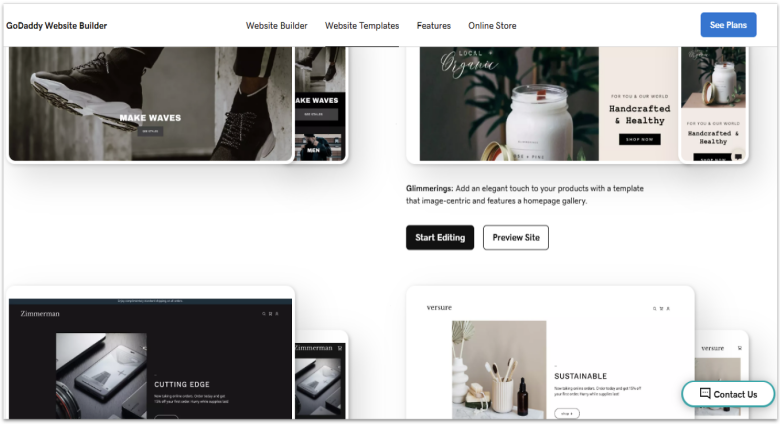
Compared to Wix, GoDaddy has a much smaller template library – only 100+ templates. They do seem to all be responsive, though, and unlike with Wix, you can switch between them on the fly without losing content. I will say that the templates are very high-quality. The designs are a little predictable, but they look gorgeous.
Unfortunately, the issue is that you can barely edit them. We’re talking about the “pick one color for the whole theme” sort of limitation. Where Wix provides design tools, GoDaddy provides design presets, and that’s a pretty big distinction.
Features and Ease of Use
GoDaddy Has a Simpler Editor, but Wix Has More Features
As I mentioned above, Wix’s drag-and-drop editor lets you move elements almost anywhere. Aside from the layout flexibility, you can change colors and background images, and there are over 100 fonts to choose from. With so many features and options, the app can take longer to learn. It’s not hard, exactly, but it definitely has a learning curve.
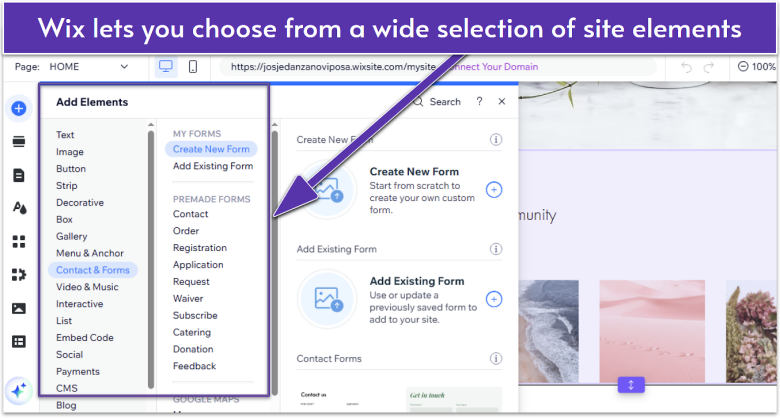
The upside to Wix’s drag-and-drop editor is freedom. The downside is that you can accidentally move things to the wrong spot, and you may need to make liberal use of the Undo button.
GoDaddy lets you create a layout from pre-made content blocks. You can’t place them wherever you like, but you can determine their order on the page. GoDaddy’s approach doesn’t allow for quite as much creativity, but it works just fine if you want to get a simple site online quickly.
If speed and simplicity is your priority, both platforms offer AI tools to save you time. Based on your preferences, Wix’s AI website builder generates a full, customizable website with content and integrations for business tools. Similarly, GoDaddy’s Airo Site Designer builds a complete website from simple language prompts.
Still, Wix offers a better balance of ease of use and built-in tools. There’s everything from custom forms, analytics, and email marketing, to member login features, social tools, and events. All you have to do is drag and drop them from the sidebar into your site.
Apps
Wix Has a Huge App Market; GoDaddy Has Limited Integrations
Unlike Wix, GoDaddy lacks a proper app store. You can only access the integrations GoDaddy supports, such as social media apps, Jotform, and PayPal. That said, if you’re a seller and use GoDaddy’s own smart terminals, there’s an app center where you can install apps to add functions like time-tracking, loyalty programs, and order management.
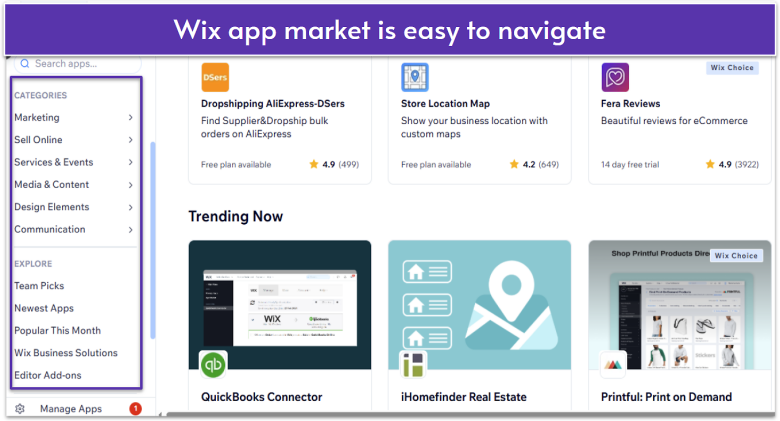
Wix has a robust App Market (800+ integrations), which includes apps developed by Wix and third-party apps. You’ll find tools for just about anything you might want to include on your site, from real estate listings and bookings to integration with third-party sites and software.

Blogging
GoDaddy Covers the Basics; Wix Offers a Wider Set of Blogging Tools
On both platforms, you use a separate editor to write blog posts. In my opinion, Wix does blogging better by offering more features.
Simply put, GoDaddy’s blogging editor lets you write posts, add categories, schedule a publishing time, and enable basic social sharing. You don’t get tags and formatting is minimal. That said, you do get AI writing tools to help you generate post ideas and draft content.
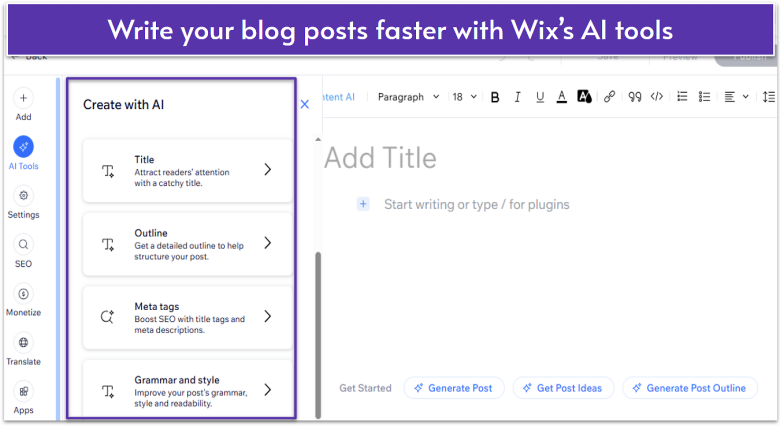
Wix’s blogging editor does everything GoDaddy’s app does, but it also offers more layout options for posts and lets you add tags. Neither of the platforms provide as many tools as WordPress, for example, but with Wix you get more flexibility in managing your posts.
E-Commerce
Both Have Solid E-commerce Features, but Wix Offers Extra Perks
Both builders let you sell physical and digital products, schedule appointments, and sell on social media. Also, both offer time-saving features like automatic tax calculation and AI product listings. GoDaddy lets you sell unlimited products, while Wix has a limit of 50,000 products on the most expensive plan.
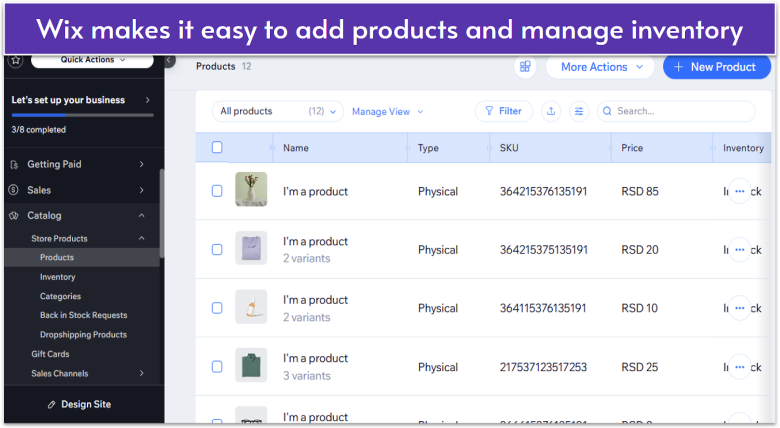
That said, Wix lets you integrate more payment gateways than GoDaddy, allowing you to attract more customers. Also, Wix offers Afterpay integration (allowing your customers to pay in installments) and many other tools you can easily connect from the App Market, such as dropshipping and print-on-demand apps.
Marketing
Wix Has Stronger Marketing Tools Than GoDaddy
GoDaddy offers a unified dashboard where you can send emails, schedule social media posts, and create graphics and videos for your posts or ads. This makes it easy to manage everything from one place. However, if you need more advanced marketing workflows, such as automations and CRM, Wix is a better choice.
Wix offers an all-in-one marketing hub that covers email marketing, social media management, ads, SEO, CRM and more. You get built-in tools like email automation (welcome emails, follow‑ups), lead capture forms, and chat apps to build and maintain customer relationships.
While both platforms offer SEO checklists and actionable tips on how to boost your online presence, Wix has a more extensive marketing suite. Plus, you can always add new tools via App Market as your business grows.
Pricing
GoDaddy Is Initially Cheaper, but Wix Provides Better Value
Aside from the free plan, Wix offers four paid plans: Light, Core, Business, and Business Elite. Each Wix plan offers a fairly wide variety of benefits for an affordable price. Most people with a few hundred dollars to start a business could make do with one of the basic plans, and go on from there.
GoDaddy’s plans are streamlined, and a bit cheaper in general. One thing to bear in mind is that GoDaddy’s advertised prices are promotional and increase significantly from year two. So, while the initial pricing is cheap, GoDaddy’s renewal prices are quite steep.
Considering the features you get in return, Wix offers better long-term value.
Here’s What You Get for Free
Wix’s free plan gives you access to all customization options, SEO, and blogging tools, but it won’t cover any real business needs. If you want to take donations, sell products, or even use a custom domain name, you’ll need one of the paid plans.
GoDaddy’s free plan also includes design options and SEO, but you’ll be stuck with the platform’s subdomain and branding. You will, however, get access to basic analytics and marketing tools, such as the graphics creation tool.
Overall, both platforms offer free plans that are more suitable for personal sites like blogs and portfolios. Business features require upgrading.
Here’s What You Get If You Pay
GoDaddy’s Basic plan is a good option if you need a simple site without an online store. You can connect a custom domain, use AI content tools, and create and send email marketing campaigns to 100 users per month.
With the Commerce plan, you can sell unlimited products and services, list your products on third-party marketplaces like Amazon and eBay, and send emails to 100,000 users per month. It’s a solid choice for smaller online stores, but with limited integrations, it may not be so easy to scale.
Wix’s Core plan will likely be enough for most small to medium-sized businesses. You get 50 GB of storage space, basic marketing and e-commerce features, and site analytics. You’ll also get some features that GoDaddy lacks at similar price points, which you can see at the table below.
| Wix | GoDaddy | |
|---|---|---|
| Starting Price | $29.00 | $16.99 |
| Free domain for one year | ✔ | ✘ |
| Customer accounts | ✔ | ✔ |
| Product reviews | ✔ | ✔ |
| Selling subscriptions | ✔ | ✘ |
| Loyalty program | ✔ | ✔ (only with GoDaddy’s POS tools) |
| Dropshipping | ✔ | ✘ |
Support
Both Are Responsive, but GoDaddy Is More Helpful
GoDaddy offers 24/7 support by phone, live chat and text, but the availability varies by region. I contacted them with a question about the Airo Site Designer and they responded within minutes.
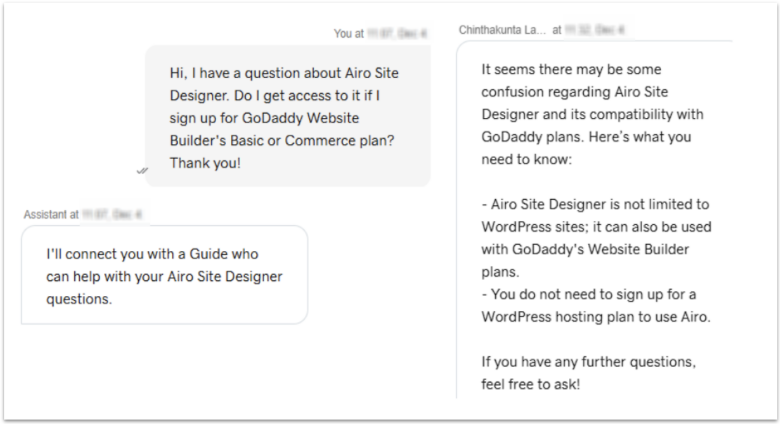
GoDaddy’s customer support agent was friendly and helpful, clarifying that Airo Site Designer can be used with GoDaddy’s Website Builder plans (not just with WordPress sites, as I initially thought.)
Wix offers 24/7 callback and email support, while live chat is available Monday – Friday, 2 AM – 6 PM EST. I reached out with a question about Wix’s AI tools and got a reply almost instantly.
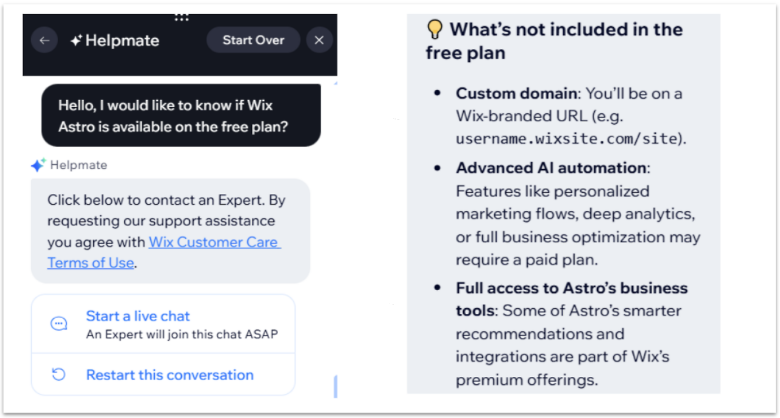
While I did get an answer to my question (sort of), it looked like the support agent asked AI for help and then simply sent me a screenshot of AI’s answer. I couldn’t get information about specific features, so it felt as if the support agent didn’t know anything more about Wix’s offerings than I did.
Overall, while both platforms have extensive knowledge bases and responsive direct support, GoDaddy wins this round for simply adding human touch to customer communication.
Wix Is a Better Choice Overall, but GoDaddy Has Its Strengths
GoDaddy is a viable option if you need to get a simple site online quickly, especially if you already have a GoDaddy domain. You get a beginner-friendly editor and essential marketing and e-commerce features to manage everything from one place.
However, Wix is a better choice if you’re focused on design-flexibility and long-term value. You get tons of built-in and third-party apps and a range of well-priced plans to support your business’s growing needs.
- Knowledge base
- Callback (24/7)
- Email (24/7)
- Live chat (Monday – Friday, 2 AM – 6 PM EST)
- Knowledge base
- Phone (24/7, varies by region)
- Live chat (24/7)
- Text (24/7)