
When comparing two popular hosting titans like Hostinger and GreenGeeks, there are many things to consider. Both services offer a wide range of affordable and feature-packed hosting plans. They also cater to budget-wise beginners and experienced website owners alike.
To make a fair comparison between Hostinger and GreenGeeks, I evaluated them across multiple categories, including pricing, features, and performance. Despite many similarities, Hostinger defeated GreenGeeks in three out of five rounds, making it the champion of this neck-and-neck race. Read on to find out how and why.
Plans and Pricing
Hostinger Is More Cost-Effective and Has Cheaper Renewal Rates Than GreenGeeks
With Hostinger, you can choose from shared, cloud, VPS, WordPress, email, CMS, e-commerce, and MineCraft server hosting. GreenGeeks provides slightly fewer hosting solutions: shared, reseller, VPS, WordPress and application hosting, and dedicated servers.
Hostinger not only offers ridiculously good discounts, but its shared hosting packages renew at a cheaper price than the GreenGeeks plans. In addition, Hostinger offers several free months with each plan purchase, saving you even more.
While both hosts provide a free domain name for the first year, this feature is only available on some Hostinger plans. Both hosts also offer free website migration and a 30-day money-back guarantee.
The winner here is Hostinger. Compared to GreenGeeks, Hostinger has more budget-friendly plans and better discounts.
Features
GreenGeeks’ Shared Hosting Plans Come With Higher Resource Allocations
With Hostinger’s three shared hosting plans, you can host 100 to 300 websites, get 100GB SSD to 200GB NVMe storage and unlimited bandwidth, and create up to 100 email accounts.
All three packages include weekly backups, Git, a free SSL certificate, a custom control panel, an application installer (100+ CMS apps), and the latest WordPress versions. Hostinger only includes SSH access and daily backups with its Premium and Business plans. Hostinger has also developed its own control panel, hPanel, which makes using the platform a breeze.
GreenGeeks also has three shared hosting plans. Unlike Hostinger, all GreenGeeks’ packages include unlimited SSD storage, unlimited bandwidth, and unlimited email accounts.
You can host unlimited websites and all plans come with a free SSL certificate, nightly backups, free CDN, SSH access, Git, WP-CLI, Drush, cPanel, and Softaculous one-click app installer. GreenGeeks still relies on cPanel for its account dashboard.
Check out the following comparison table to further compare Hostinger and GreenGeeks:
| Hostinger | GreenGeeks | |
|---|---|---|
| Hosting Types | Shared, VPS (Linux and Windows), cloud, WordPress, email, CMS, and e-commerce hosting, MineCraft server hosting | Shared, VPS, reseller, WordPress and application hosting, dedicated servers |
| Free Domain | ✔ (depending on the plan) | ✔ |
| Free SSL Certificate | ✔ | ✔ |
| Disk Space | 100GB SSD to 200GB NVMe | 50GB SSD – Unlimited |
| Bandwidth | Unlimited | 10TB – Unmetered |
| Automatic Backups | ✔ | ✔ |
| Control Panel | hPanel | cPanel |
| Email Accounts | Up to 100 | Unlimited |
| Free CDN | ✔ (depending on the plan) | ✔ |
| Free Site Migration | ✔ | ✔ |
| Money-Back Guarantee | 30 days | 30 days (except for dedicated servers) |
The winner? GreenGeeks. Even though both services provide high-quality shared hosting packages, GreenGeeks outshines Hostinger in this round by offering more features and freebies across all plans.
Performance
Hostinger Has Slightly Faster Global Loading Speeds
Hostinger has servers in the UK, Brazil, the US, Indonesia, Singapore, the Netherlands, and Lithuania. Alternatively, GreenGeeks only has servers in the US, Canada, Singapore, and the Netherlands – giving Hostinger an advantage in global presence.
Both Hostinger and GreenGeeks offer SSD storage with all plans, which boosts your website’s loading speed and overall performance compared to traditional HDD storage.
You’ll get free Cloudflare CDN on all plans from both hosts, except the entry-level Hostinger plan. A CDN, or Content Delivery Network, is a feature that boosts your website’s loading speed from different locations worldwide by placing it on a network of cloud servers.
Both hosts guarantee an uptime of 99.9%. When we tested this promise, both hosts surpassed our expectations and maintained a flawless uptime.
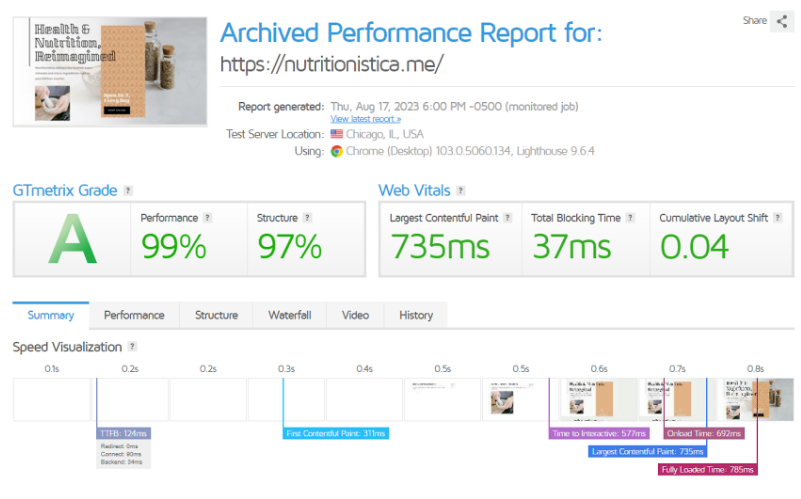
When testing the loading speed of Hostinger using the GTmetrix tool (without using CDN), we got lightning fast loading speeds, resulting in a nearly perfect performance score. Check out the numbers for yourself in Hostinger’s full review.
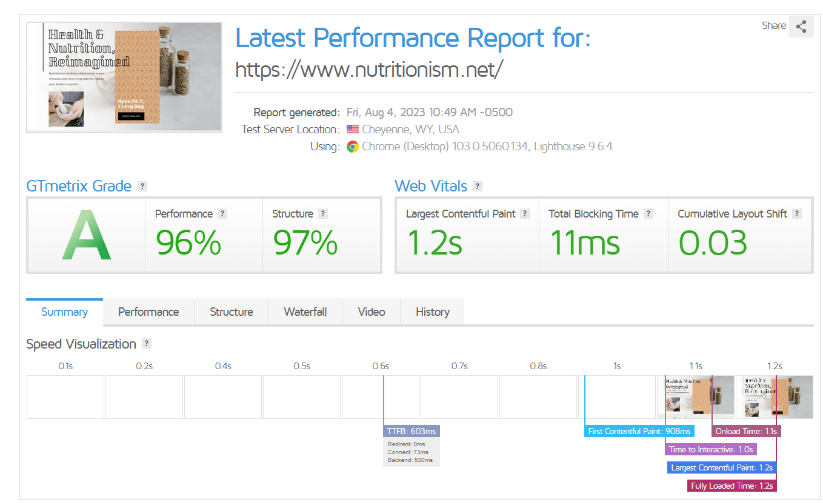
When performing the same test on GreenGeeks, we got good results. Most hosts and their users would be more than pleased to get a 1.2 second fully loaded time. When compared with Hostinger, though, “good” wasn’t quite enough. You can find the test results in this GreenGeeks detailed review.
Both hosts have flawless performance and offer a wide range of performance-boosting features. However, Hostinger wins this round due to its additional server locations and slightly better loading speeds.
Security
Hostinger has More Advanced Security Features
Hostinger’s security consists of DDoS protection on multiple levels – Wanguard anti-DDoS traffic analyzer and intelligent firewall rules on switch level, BitNinja or Immunity360 (Web Application Firewall) on each server, and custom web server rules.
GreenGeeks’ security features, on the other hand, include 24/7 server monitoring, DDoS protection, spam protection, antivirus, antimalware, strong firewalls, and hack protection with all its plans.
Hostinger uses CloudLinux OS with all its Linux-based shared hosting plans, and GreenGeeks uses a similar protocol called Hosting Account Isolation. Both of these systems securely isolate your account from other users on the same server to protect it against threats targeting others. They also ensure that all the server’s resources are allocated fairly among accounts.
Both hosts offer no-cost SSL certificates and no-cost automatic routine backups in all their plans. Yet, GreenGeeks performs backups every day, while Hostinger does daily backups only with certain plans and weekly backups for the others.
Even though both hosts offer a wide range of security features, Hostinger’s security is more advanced than GreenGeeks, making it the winner of this round.
Support
GreenGeeks’ Support Has Additional Channels and Is More Responsive
Both Hostinger and GreenGeeks have comprehensive and organized knowledgebase sections, including articles and tutorials covering essential topics.
Hostinger’s customer support is available 24/7 via live chat and support ticket. However, it can be slow to get connected to a representative. Even though I got the help I needed, it was very time-consuming.
![[Hostingers] - [support chat]](https://dt2sdf0db8zob.cloudfront.net/wp-content/uploads/2020/11/hostinger-vs-greengeeks-1.png)
![[GreenGeeks] - [support chat]](https://dt2sdf0db8zob.cloudfront.net/wp-content/uploads/2020/11/hostinger-vs-greengeeks-2.png)
Hostinger Wins by a Slim Margin
As you observed, this wasn’t a one-horse race. Hostinger and GreenGeeks stand out as two robust hosting providers that present a wide range of hosting plans at remarkably budget-friendly rates suitable for individuals as well as small to medium enterprises. They’re both featured in our expert list of the best web hosting services.
Nevertheless, Hostinger defeated GreenGeeks in the pricing, performance, and security rounds, earning it the winning title of this battle.