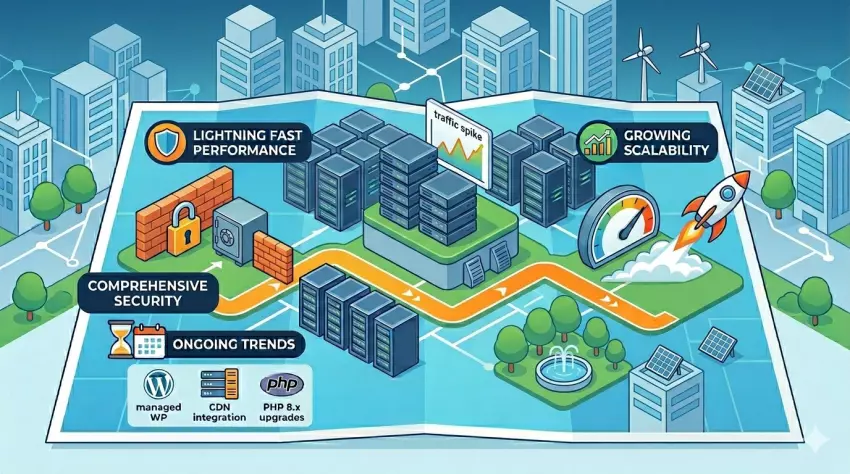

Web hosting plays a critical role in website performance, security, scalability, and overall user experience, yet many consumers choose hosting plans without fully understanding the long-term implications. From handling traffic spikes and supporting business growth to choosing between shared, managed, and specialized hosting solutions, the right hosting environment can have a significant impact on a website’s success.
To help website owners make more informed decisions, Website Planet asked hosting industry experts to share their insights on some of the most important aspects of modern web hosting. Their perspectives cover everything from scalability and WordPress hosting to traffic management, support models, and the often-overlooked factors that can limit a website’s growth over time.
What should beginners look for when choosing their first web hosting plan?
Beginners should focus on reliability, ease of use, and responsive technical support rather than choosing the cheapest hosting plan available. A good beginner-friendly hosting plan should provide stable performance, high uptime, an easy-to-use control panel, and fast customer support when issues arise.
It is also important to consider future scalability, such as the ability to upgrade CPU, RAM, or storage resources as the website grows. Essential security features like free SSL, automatic backups, and DDoS protection are also important for new websites.
How does scalability in web hosting work, and why is it important for growing websites?
Scalability in web hosting refers to the ability to increase resources such as CPU, RAM, bandwidth, or storage as a website grows over time. This allows websites to maintain stable performance without requiring a complete infrastructure migration.
Scalability is especially important for growing websites because traffic can increase rapidly during marketing campaigns, seasonal events, or viral content spikes. A scalable hosting environment helps reduce downtime, improve page loading speed, and provide a more consistent user experience.
Tam Nguyen, Founder & Operator of VietHosting
How do hosting providers handle traffic spikes, and what should website owners prepare for?
Traffic spikes are usually handled in layers: edge caching absorbs repeat page views, a CDN reduces distance and filters bad traffic, load balancing distributes demand, and the origin server handles everything that cannot be cached. The critical issue is that most traditional hosting providers survive surges by leaning heavily on front-end caching. That works when visitors are anonymously browsing static pages. It does not work nearly as well when the spike is commercial or interactive.
The real stress test starts when users log in, search, filter products, add items to a WooCommerce cart, update checkout details, or access personalized account pages. These requests are dynamic and typically bypass cache, going straight to PHP, the database, and the origin CPU. This is where many hosting environments expose their limits. Artificial PHP worker caps, slow database response, and reactive scaling can create queues long before a site appears “down.” The result is often slow checkout, failed carts, 502 or 504 errors, and lost revenue at the exact moment demand is highest.
Website owners should prepare for spikes by testing real revenue paths, not just the homepage. A cached homepage can score well while the cart, checkout, and search experience collapse under load. They should also audit heavy plugins, clean up database bloat, use object caching where appropriate, and understand their host’s commercial terms before a campaign or viral event. Many providers treat traffic spikes as an upsell moment through forced plan upgrades, bandwidth limits, worker restrictions, or overage charges.
From Servebolt’s perspective, spike readiness should be measured by how well the origin handles uncached work. Fast PHP execution, optimized MariaDB performance, no metered bandwidth, and no artificial PHP worker ceiling directly protect ROI. A successful traffic spike should mean more conversions, not a surprise bill or a broken checkout.
Elena Tileva, Head of Sales & Marketing (EMEA) at Servebolt
What hosting-related factors have the greatest impact on website resilience during outages or unexpected failures?
People often expect resilience to come from one specific technology, but in reality it is the result of how the entire hosting environment is designed. Backups, monitoring, security, resource allocation, server stability, and update practices all matter. But the most important part is that these things work together before something goes wrong. A hosting service should not rely only on support reacting after a failure. It should be built in a way that reduces the chance of failure in the first place.
Of course, support is important when something unexpected happens. No provider can honestly say that incidents will never occur. But if a customer needs to contact support at 3AM because their website is constantly down, that’s not a strong support story, that is usually a sign that the foundation is not strong enough.
For me, good hosting is the kind you do not have to think about every day. Your website loads, your email works, your customers can reach you, and the business keeps moving. Resilience is not only about how fast someone responds during an incident. It’s about how well the infrastructure, monitoring, backups, and security reduce the impact before it becomes a serious problem.
At JetHost, we see resilience as a balance between technology, prevention, and responsibility. Human support matters, but the real goal is to provide a hosting environment stable enough that customers can focus on their business instead of constantly worrying about what might break.
Metodi Drenovski, CEO and Co-Founder at JetHost – jethost.com
What’s the actual difference between a large hosting provider and a specialized full-service hoster?
Large providers offer solid infrastructure at competitive prices, and many businesses run perfectly fine on them, including larger ones. The model is self-service by design: you get the tools, the platform, and the documentation. What you do with it is up to you. That works well if you have the time and interest to manage it, or if you’re already working with an agency that handles the technical side for you.
A specialized full-service provider follows an entirely different model. The idea is simple: you focus on your core business, and someone else takes care of the technical side – hosting, mail, website, and everything that comes with it.
Here’s a real example. When PHP 8.x became the new standard, many large hosting customers suddenly found themselves paying extra every month just to keep running their old PHP version, often for years. What nobody told them: their website would have been compatible with the newer version all along. It just needed someone to check, explain, and if necessary, make a small adjustment to the code.
That’s exactly what a full-service provider does – and ideally before you even notice there’s an issue. Setup, configuration, updates, technical questions, and even application support – all of that gets handled for you. No copy-paste responses, no endless support ticket loops.
It’s not about infrastructure quality. It’s about not being one of many, but working with a real partner who knows your business, your requirements, your needs – and, admittedly not the most important thing, but also your first name.
Andreas Niemann, Cologne Hosting – cologne-hosting.de
What are the most overlooked factors businesses should consider when choosing a web hosting provider?
Many businesses focus heavily on storage space, bandwidth, or monthly pricing when selecting a hosting provider. However, the most overlooked factors are often the ones that have the greatest long-term impact on business continuity. The first factor is the quality and responsiveness of technical support. Even the best infrastructure can experience issues, and the difference between a minor incident and a major outage often depends on how quickly the hosting provider responds.
The second factor is the provider’s backup and disaster recovery strategy. Businesses should understand how frequently backups are performed, how long they are retained, and how quickly services can be restored if something goes wrong. Another commonly overlooked area is infrastructure quality. Enterprise-grade hardware, redundant power systems, reliable networking, and proactive monitoring contribute significantly to uptime and performance.
Finally, businesses should evaluate scalability. A hosting provider should be able to support future growth without requiring complex migrations or prolonged downtime. Ultimately, the best hosting provider is not necessarily the cheapest one, but the one that delivers the right balance of reliability, performance, security, support, and long-term scalability.
Ahmed Saad, Team Leader Technical Support and System Administrator at Thamara Cloud
How can website owners determine whether a hosting provider is a good fit for their industry or use case?
In our experience managing over 500 websites since 2014 and providing dedicated hosting services since 2019, we’ve found that choosing a hosting provider based solely on advertised price often leads to problems down the road. The right hosting solution depends heavily on the website’s purpose. While many business websites prioritize email reliability, speed, security, and dependable automated backups, eCommerce websites require additional attention to scalability and consistent performance during traffic spikes. A hosting provider should also offer transparent pricing and clearly communicate any limitations that may affect growth.
One of the most overlooked factors is support quality. Technical issues are inevitable, and responsive support can make the difference between a minor inconvenience and prolonged downtime. We also encourage website owners to look beyond storage and bandwidth figures and understand restrictions such as inode limits, renewal pricing, backup policies, and resource allocations. Over the years, we’ve seen that long-term satisfaction depends far more on performance, support quality, and ease of scaling than on obtaining the lowest initial price. For most businesses, a provider that offers reliable uptime, transparent policies, and responsive support represents a much better investment than one that competes primarily on low-cost plans.
Aftab Saqib, Chief Operating Officer (COO) at XeCreators IT Services (Pvt.) Ltd.
How should businesses prepare their hosting environment before launching a major website redesign or migration?
Before any major website redesign or migration, businesses should ensure their hosting environment is fully prepared to support a smooth transition. The most important steps include creating complete backups, reviewing server resources, verifying software compatibility, and testing the new website in a staging environment before deployment. Businesses should also confirm that SSL certificates, DNS configurations, email services, and third-party integrations are functioning correctly. Performance and security checks should be completed in advance to identify potential issues before launch. In addition, organizations should review database performance, storage capacity, and bandwidth limits to ensure the hosting environment can handle expected traffic levels after the redesign or migration. It is also important to establish a rollback plan so that the previous version of the website can be restored quickly if unexpected problems occur.
Website owners should coordinate with developers, hosting providers, and other stakeholders to create a clear migration timeline and minimise disruptions. Monitoring tools should be configured before launch to track up-time, page speed, server performance, and user activity. Businesses should also test website functionality across different devices, browsers, and operating systems to ensure a consistent user experience. Search engine optimisation elements, including redirects, metadata, and URL structures, should be reviewed carefully to prevent ranking losses and broken links.A well-prepared hosting environment minimises downtime, reduces risk, and helps ensure that users and search engines experience a seamless transition. Careful planning, thorough testing, proactive monitoring, and effective communication are essential for a successful website redesign or migration, helping businesses maintain performance, security, and customer satisfaction throughout the process.
Victoria Etim Effanga, Marketing Communications at TFhost (A division of Trefoil Networks) – www.tfhost.ng
How can users tell if their current hosting provider is limiting their website’s growth?
One way to spot whether your hosting provider is holding back your site’s growth is to look beyond the surface and pay attention to how your site behaves under pressure.
If your website feels sluggish even after you’ve optimized images and streamlined plugins, that’s often a sign of resource limits. Shared environments, even managed ones, can struggle when traffic spikes, and you’ll notice slower load times or “resource exceeded” warnings. Another red flag is frequent downtime. If visitors regularly encounter errors or outages, it means the server isn’t scaling with your needs.
Traffic caps are another subtle limiter. Some hosts quietly throttle bandwidth once you cross a threshold, so even if your marketing is working, growth stalls because the server won’t allow more visitors. Similarly, if your provider doesn’t offer easy upgrades, staging environments, or advanced caching, that lack of scalability can keep your site from expanding.
Security and support matter too. Weak backup policies, outdated malware protection, or slow responses from support teams can make scaling risky. A growing site needs stronger safeguards and quick help when issues arise.
If you’ve done your part to optimize but still see slow speeds, capped traffic, downtime, or limited upgrade paths, your host may be the bottleneck. A good provider should feel invisible, quietly supporting growth rather than standing in the way.
What are the benefits of managed WordPress hosting compared to general shared hosting?
When comparing managed WordPress hosting with general shared hosting, the distinction lies less in whether the host manages updates and more in how specialized the environment is.
Managed cPanel hosting provides a general platform where multiple websites share server resources, but the host still takes care of routine tasks like security patches, backups, and server monitoring. You get access to cPanel, which allows you to manage email accounts, databases, and install different applications, including WordPress. It’s versatile and cost‑effective, but because the server isn’t tailored exclusively for WordPress, performance can vary. Sites may run slower during traffic surges, and optimization is largely left to the user.
Managed WordPress hosting, by contrast, is purpose‑built for WordPress. The provider configures servers specifically for WordPress performance, often including caching layers, CDN integration, and automatic updates for the WordPress core and plugins. Security is stronger, with malware scanning and daily backups included by default. Support teams are WordPress specialists, so troubleshooting is faster and more precise. This type of hosting reduces the technical burden, letting site owners focus on content and growth rather than maintenance.
Hence, the general shared hosting is broader, flexible, and budget‑friendly, suitable for small businesses or personal sites that want a managed environment but don’t need WordPress‑specific tuning. Managed WordPress hosting is more specialized, offering speed, security, and convenience for those who rely heavily on WordPress and want a smoother, optimized experience. The choice depends on whether you value general flexibility or WordPress‑specific optimization.
Dhaval Chandrani, Founder of Hosticon.com
How do hosting providers optimize their infrastructure specifically for WordPress workloads?
WordPress is a unique workload because it combines dynamic PHP execution, database queries, plugins, themes, media assets, and user-generated content. As a result, hosting providers optimise their infrastructure in a number of different ways to ensure WordPress websites remain fast, secure, and reliable. Traditionally, optimisation focuses on the underlying technology stack. This includes using high-performance SSD or NVMe storage, modern PHP versions, server-side caching, content delivery networks (CDNs), and carefully tuned database configurations. Many providers also implement automated backups, proactive monitoring, and security controls specifically designed around common WordPress vulnerabilities.
However, in our experience at Hipposerve, one of the most overlooked aspects of WordPress optimisation is managing the sheer volume of unwanted traffic that modern websites receive. WordPress is the world’s most popular content management system, making it a constant target for bots, vulnerability scanners, brute-force attacks, and other forms of automated abuse. While many website owners attempt to address this by installing additional security plugins, these tools themselves consume resources on every page request. The website ends up spending valuable CPU time and memory defending itself rather than serving visitors.
This is why we developed Hipposerve® Guardian, our intelligent threat detection and traffic analysis platform. Guardian continuously monitors traffic patterns across our hosting infrastructure, identifying suspicious behaviour and filtering malicious requests before they reach the website. By stopping unwanted traffic at the platform level, websites can dedicate more resources to genuine visitors, improving both performance and reliability. An important advantage of this approach is that the benefits are not limited to WordPress. Because protection is applied at the hosting infrastructure level, any website hosted on our platform can benefit. Customers gain the advantages of reduced malicious traffic and improved performance without needing to install additional plugins, modify their code, or manage complex security tools.
Whilst fast hardware, caching, and modern software remain essential, we have found that reducing unnecessary workload often delivers the most significant real-world improvements. In many cases, the fastest WordPress website is not the one with the most powerful server, but the one that spends the least amount of time dealing with traffic that should never have reached it in the first place.
Jason Tedale, Head of Customer Support and User Experience at Hipposerve – hipposerve.com
When does it make sense for a website owner to move from general hosting to managed WordPress hosting?
A website owner should consider moving from general hosting to managed WordPress hosting when website performance, reliability, security, and maintenance start becoming more important than simply keeping hosting costs low. For small brochure websites or early-stage projects, standard shared hosting is usually enough. However, as traffic grows or the site becomes business-critical, managed WordPress hosting can save significant time and reduce technical headaches.
Managed WordPress hosting is especially useful when:
- The website receives consistent or growing traffic;
- Website speed directly affects conversions or SEO;
- The owner wants automatic updates, backups, and stronger security;
- Downtime or plugin conflicts could impact revenue;
- The site uses WooCommerce or other resource-heavy plugins;
- The business prefers focusing on content or sales instead of server management.
Unlike general hosting, managed WordPress providers optimize their infrastructure specifically for WordPress. This often includes server-level caching, malware protection, staging environments, CDN integration, and WordPress-focused support teams. For eCommerce stores and high-traffic WordPress websites, the difference in performance and stability can be substantial, especially during traffic spikes or marketing campaigns.
In most cases, moving to managed WordPress hosting becomes worthwhile once a website starts generating leads, sales, or meaningful business activity where uptime and speed matter.
Ali Husnain, Director at Flare Holdings – boltflare.com
What WordPress-specific hosting features have the biggest impact on site performance and reliability?
When it comes to WordPress performance and reliability, standard hosting often falls short. The biggest impact comes from a managed environment with features engineered specifically for the platform’s architectural demands, shifting the heavy lifting from the application layer to the server. First and foremost is server-level caching coupled with high-performance web servers (like LiteSpeed or Nginx). Utilizing server-side caching alongside Object Caching (via Redis, Valkey, or Memcached) is far more efficient than plugin-based solutions. It caches recurrent SQL queries and bypasses pages directly from memory, drastically reducing Time to First Byte (TTFB) and CPU load.
Second, the underlying infrastructure execution matters. Hosting providers supporting the latest stable PHP versions (8.x) with optimized OPcache deliver substantial execution speeds. When paired with enterprise-grade SSD NVMe storage, which eliminates traditional I/O bottlenecks, the foundational speed for write-heavy WordPress tasks is dramatically boosted. For global performance, integrated CDNs are also invaluable for minimizing latency worldwide.
Finally, reliability and uptime are anchored by isolated resource allocation and advanced security. Modern WordPress hosting must feature next-generation Web Application Firewalls (WAFs) equipped to mitigate aggressive AI bots and scrapers. Today, many malicious or data-harvesting AI bots masquerade their user agents to bypass standard filters, causing massive server resource exhaustion and spikes in power consumption. A robust firewall effectively blocks these hidden bots before they can drain CPU and memory. Coupled with brute-force protection and automated daily backups, these features ensure the ecosystem remains secure, stable, and highly scalable.
Ultimately, high-performing WordPress hosting is about an optimized ecosystem where specialized server tuning, fast storage, and intelligent security work in tandem to guarantee a seamless user experience.
Stathis Anastasiadis, Managing Director at HostChefs – hostchefs.eu/wordpress-hosting.php
How do hosting providers support website staging environments, and why are they useful?
Staging sites keep your experiments safely isolated from your live production site, allowing you to test out new designs, code, or features in a sandbox environment. Because they are fully-featured replicas of your live setup, they quickly become an essential part of a reliable deployment workflow.
A quality hosting provider should support seamless, two-way synchronisation. This means it should be just as easy to pull your live production site down into staging as it is to push your staging site out to the live environment. As a vital safeguard, a good host will also automatically back up your production site immediately before any changes are pushed live—providing an instant safety net just in case something breaks.
However, staging requires careful management if your live site actively handles dynamic data—such as a busy WooCommerce store, a frequently updated blog, or an active community forum—where live database changes could be overwritten. But if you want total peace of mind that a major WordPress core upgrade or a critical plugin update won’t disrupt your business, choosing a hosting provider with robust, built-in staging support is non-negotiable.
Jaron Phillips, Founder of WPhost – www.wphost.nz
What are the most common WordPress hosting mistakes that lead to performance or security issues?
It might be obvious, but its certainly the most common mistake when looking for hosting is shopping based on price only and landing on cheap, shared hosting. These plans are cheap because they sell it in large volumes, and when too many sites share one server’s CPU, memory and database resources, a busy neighbour can drag down your performance. Budget hosting plans may not include SSL, caching or CDN support either. Server-level caching is often more effective at speeding up a website than relying on a WordPress plugin alone (though we still recommend a well-configured plugin). Having CDN support reduces latency for customers located further from your server. In Australia this is a pretty important consideration given the size of our country and the location of most web servers.
Budget hosting often means budget server maintenance/updates and budget (or non-existent) support. I’ve lost count how many clients we’ve helped untangle from big (cheap) hosting companies that offered no support when something went wrong. Worse still, if that cheap hosting doesn’t have a solid backup system you know how to use, no firewall, no malware scanning and poor isolation between accounts. These few things combined with a poorly maintained WordPress site on your end (no updates to core, themes and plugins) are the single most common road to a hacked website.
The last one I’ll add is not having any means to setup a good staging environment for testing. Even cheap hosting usually has something like Softaculous to make this really easy with WordPress, but some don’t even have that.
My top 5 questions to ask before choosing a host:
- Read the reviews, specifically looking for feedback on support. If they get great scores for tech, but overall rate badly for customer support, move on. Bad support is never worth it no matter how ‘good’ or ‘fast’ the server.
- Is it shared hosting. Shared doesn’t mean its necessarily bad (if its well managed), but it is something to consider. If you have an eCommerce site or use heavy plugins (booking/event management for example) then basic shared hosting will likely throttle your site, so a higher-level plan is likely needed.
- Does it have enough space. Find out how big your site is, and times that by 4 as a bare minimum (ideally more). Just running a staging copy of the site in the same location and storing any online backups the space will fill up fast.
- Does it have CDN and caching? Where is the server located? (the closer to you/your customers the better).
- Does it include Softaculous or another WordPress-specific back end for setting up your staging copy, accessing/managing backups or similar? Unless you’re an advanced user, these will become your best friend and its worth checking.
Kirsty Dredge, Founder of Thorn Creative – thorncreative.com.au
What is the difference between cloud hosting and traditional hosting, and when should you choose one over the other?
The terms “cloud hosting” and “traditional hosting” are often used interchangeably in marketing, but they describe fundamentally different approaches to delivering website infrastructure. Understanding the distinction is useful not only from a technical standpoint, but also when deciding what level of resilience, scalability, and cost structure your website actually requires. Traditional hosting generally refers to websites running on a single server environment. This can take the form of shared hosting, a VPS, or a dedicated server, but in each case the resources ultimately originate from one physical machine. This model has been the backbone of the web for many years and continues to be widely used across millions of websites.
Cloud hosting, by contrast, is built on distributed infrastructure. Instead of relying on a single server, resources are drawn from a network of interconnected systems working together as a unified platform. This design allows workloads to be balanced dynamically, and in many cases allows services to remain online even if individual hardware components fail. The concept is closely aligned with modern cloud computing principles as described in broader technical literature Cloud computing overview. The practical difference becomes most visible in how each approach handles growth and reliability. Traditional hosting environments are typically more static, meaning capacity is tied directly to the limits of a given server. Cloud hosting environments are more flexible, allowing resources to be scaled as demand increases, which is particularly useful for websites experiencing variable traffic patterns or rapid growth.
It is important to note that neither approach is universally superior. Traditional hosting still has a strong place in the market, particularly for small websites, brochure-style business pages, or applications with predictable traffic. In these cases, simplicity and cost efficiency often matter more than elastic scalability. The underlying structure of web hosting services and their various models is well documented in general hosting theory Web hosting service overview. Cloud hosting becomes more relevant where uptime, redundancy, and scalability are more critical. E-commerce platforms, high-traffic websites, and business systems that cannot tolerate downtime generally benefit from distributed infrastructure. However, the gap between traditional and cloud hosting has narrowed in recent years, as many providers now operate hybrid systems that combine elements of both.
This evolution has led to a situation where many modern hosting services are effectively cloud-based even when presented in familiar formats such as shared hosting or VPS plans. At WhitePointerNet Hosting, for example, infrastructure is built around modern cloud-backed systems while still maintaining the simplicity and accessibility that small and medium businesses expect from traditional hosting packages. In practical terms, the decision between cloud and traditional hosting should not be framed as a binary choice of old versus new technology, but rather as a question of fit. Businesses with stable requirements and predictable workloads may find traditional-style hosting perfectly sufficient, while those requiring flexibility, resilience, or growth potential will typically lean toward cloud-based solutions.
As the hosting industry continues to mature, the distinction between these models will likely become less about marketing terminology and more about underlying architecture. For most users today, the most important factor is not what the service is called, but whether it delivers the performance, stability, and scalability their project requires.
James N. Bailey, Founder of WhitePointerNet – whitepointer.net / whitepointernet.duoservers.com