Blogging is considered a cornerstone of content marketing and is practiced by millions of individuals and businesses worldwide. If you’re thinking of starting a personal or professional blog – or are just looking to syndicate (republish) content to provide fresh posts to your readers, grow your brand, or reach a larger audience – two of the most popular options you’ll have come across are WordPress and Medium.
Both represent an easy way to start publishing content online – but each offers a very different approach.
So which should you use? Well, it depends on your situation. To make your decision easier (and taking advantage of my 5+ years of experience as a digital content creator and marketeer), I put both Medium and WordPress.com to the test, to learn more about each builder’s features, flexibility, pricing, and support.
While Medium pulls the punches on ease of use, WordPress emerges as the overall winner thanks to its greater customizability and scalability. Start building your blog for free with WordPress, or read on to discover why it wins this particular battle.
1. Templates
WordPress Gives You All the Freedom Medium Lacks
The free WordPress account lets you choose from dozens of templates (“themes”) to customize the appearance of your website; the paid plans come with a choice of more than 3,000. You can even create your own custom theme. Most are mobile responsive and it’s relatively easy to switch themes.
Medium, on the other hand, offers limited customizability. Instead of using templates, Medium requires you to publish your content via their website. The result is that every page has virtually the same design and layout. You can change the look of your posts with font colors and images, but that’s about as far as it goes. If you want full control, WordPress is the better option.
2. Ease of Use / Features
Can Medium’s Easy Editor Match Up to the Power of WordPress?
When it comes to ease of use, Medium is the clear winner. But easier does not necessarily mean better.
Creating a piece of content with Medium’s stripped-back WYSIWYG editor could not be simpler. Just sign up for an account and get typing, then simply click to add images, videos, embeds and block quotes.
However, Medium is only this easy to use because its features are so limited. You can’t install a theme. You can’t install a plugin. Your only option is blogging.
WordPress offers a lot more. While its drag-and-drop editor allows you to add different content elements, including call-to-action buttons, columns, and tables, you can also make use of a number of additional features like in-depth statistics, SEO tools, and email subscriptions.
These additional features do mean that WordPress is less user-friendly. However, it is by no means impossible. If speed is your main concern, Medium wins. However, if you want more flexibility and power, and are prepared to commit to a steeper learning curve, WordPress comes out on top.
3. Apps, Plugins, and Add-ons
Medium Can’t Compare to WordPress’s Limitless Possibilities
WordPress offers a great deal more flexibility than Medium. A number of plugins come as standard with all plans, including stats, SEO, contact forms, and social embeds.
If you take out a paid WordPress plan, you get access to thousands of plugins that can transform your site in all manner of ways. The WooCommerce plugin, for instance, comes with e-commerce features, while Yoast offers advanced SEO options.
Medium, on the other hand, doesn’t have additional plugins. While you can manually change meta descriptions, alt texts, and URLS, no advanced SEO settings are available. If you want a website with advanced functionality, Medium probably won’t be the best choice for you.

4. Pricing and Plans
Can Medium and WordPress Free Plans Measure Up?
While WordPress offers a free plan, it doesn’t give you access to a lot of functionality. Unless you upgrade, you’ll only be able to use basic customization options, a limited number of plugins and themes, and you’ll have to put up with WordPress ads.
We offer four distinct paid plans that come with varying levels of functionality: Personal, Premium, Business, and eCommerce. The Personal plan provides you with a custom domain and the ability to remove ads. The Business plan includes 24/7 chat support, unlimited themes, and SEO tools to enhance your experience.
Medium, on the other hand, is completely free for writers. To generate money, it uses a metered paywall to encourage users to upgrade to a paid subscription. However, this only applies if you’re consuming content. As of August 2020, Medium is also planning on making custom domains available again – but no official date has yet been announced.
| WordPress | Medium | |
|---|---|---|
| Plan | Free | Free (Only Plan) |
| Storage Space | 3GB | Not specified |
| Custom domain | Free subdomain (yourwebsitename.wordpress.com) | Possible again in the future (date TBD) |
| Ad-free | No | Yes |
| Website Analytics | No | Via Medium Stats |
| SEO Tools | No | Limited |
| Customer Support | Community forum support | Ticket-based system |
5. Support
WordPress Community Support Beats Medium’s Ticket-Based System
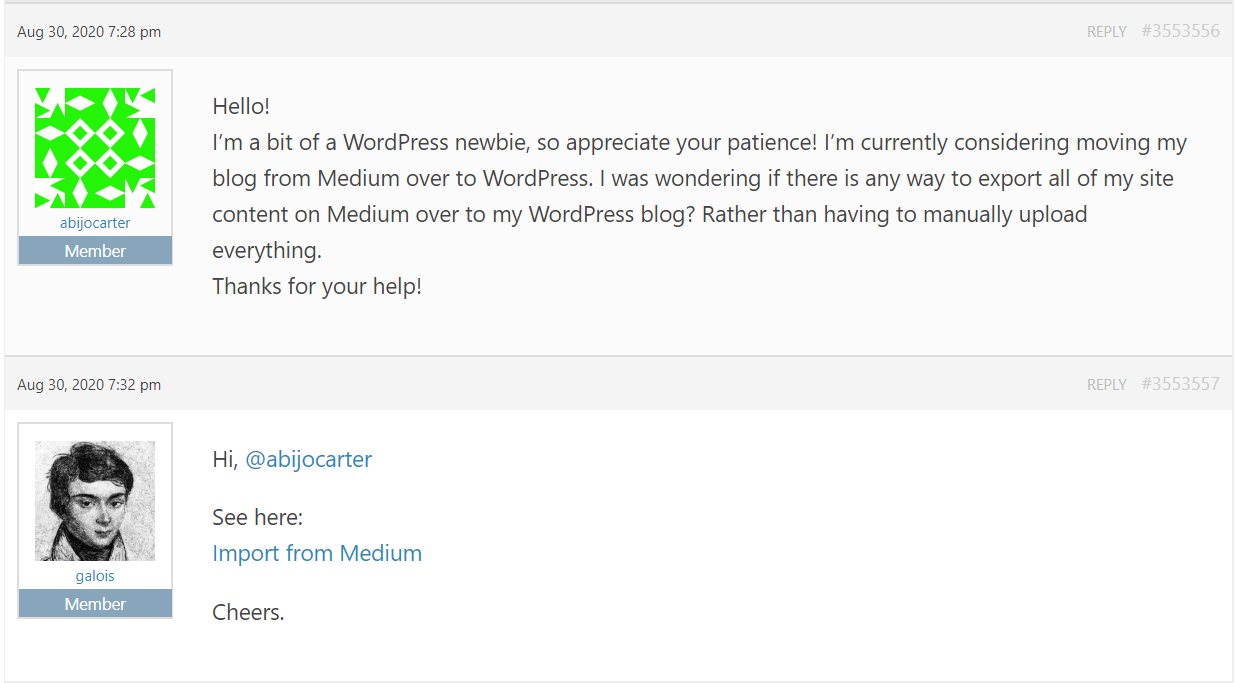
WordPress offers free community support via its forum. If you take out a paid plan, you also get 24/7 live chat support. While community support doesn’t sound great, it’s worth bearing in mind that approximately 34% of all websites are powered by WordPress. That’s a lot of fellow users to give you a helping hand – no surprise, then, that my query received a helpful reply within just a few minutes.
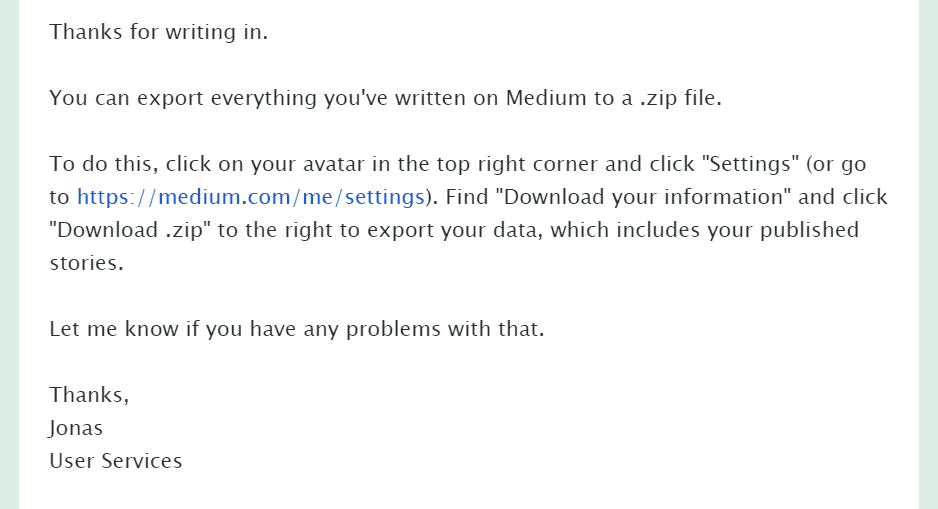
Medium, on the other hand, provides customer support via a ticket-based system. Getting a response can take between a few hours and several days, depending on how busy their support teams are. When I tested it out, I received a useful response to my query in a little over 24 hours.
A Close Competition, but Only One Winner
When you look at them side by side, WordPress outperforms Medium in every category except ease of use (and perhaps price). For someone who just wants to get writing and published with zero extra fuss, Medium has to be one of the simplest tools out there.
However, if you’re going to progress beyond blogging and incorporate additional functionality – or if you want to build a unique website, with your own design and branding – Medium simply can’t match the power and customizability of a big hitter like WordPress. For that reason, of the two, only WordPress makes it to our list of the top website builders.
Take a look at our comparison table for a side-by-side view of each feature: